In this article, you will learn how to:
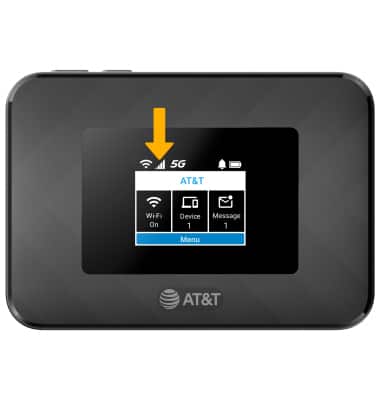
• Check network connection strength
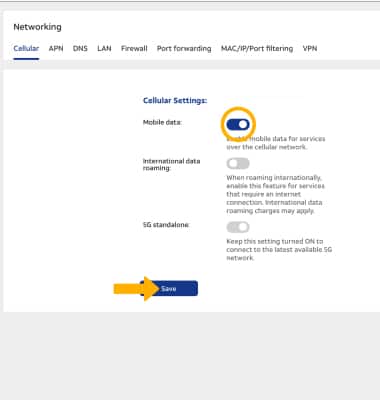
• Turn cellular data on or off
Check network connection strength
The Signal Bars display the connection strength. The more bars that are displayed, the better the connection.
Turn cellular data on or off
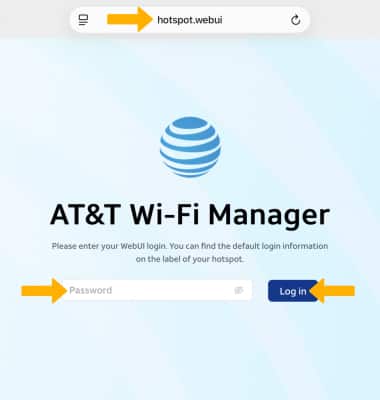
1. From your connected device's web browser, go to http://hotspot.webui. Enter your password, then select Log in.
Note: If you haven’t logged into the Web admin page before, the default password will be displayed on the Wi-Fi info screen. You will be prompted to change the admin password. Ensure that your device is connected to your GoLink™ 5G Hotspot's Wi-Fi network. For more information, please see the Connect Devices to Wi-Fi or Connect PC or Mac to Wi-Fi tutorials.
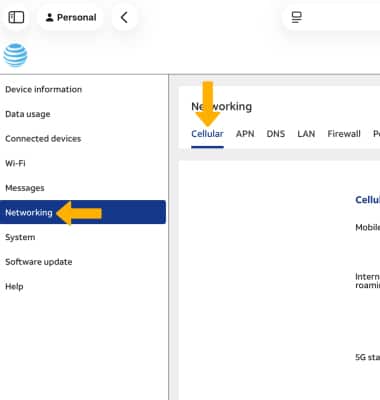
2. Select Networking on the left side of the screen, then ensure the Cellular tab is selected.
3. Select the Mobile Data switch to turn cellular data on or off, then select Save.