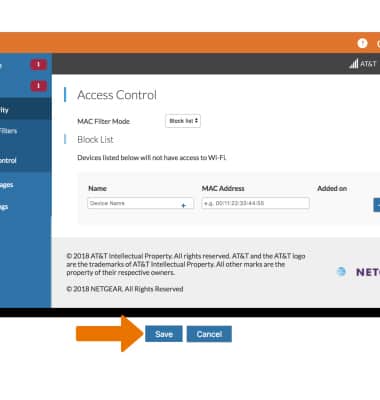
Block and unblock devices from connecting to your Router's Wi-Fi network.
-
BLOCK A DEVICE: From your device's web browser, go to http://attwifimanager. Enter your Admin Password, then click Login.
Note: Ensure that your device is connected to the AT&T Unite Express 2's Wi-Fi network. For more information, please see the Connect Devices to Wi-Fi or Connect PC or Mac to Wi-Fi tutorials.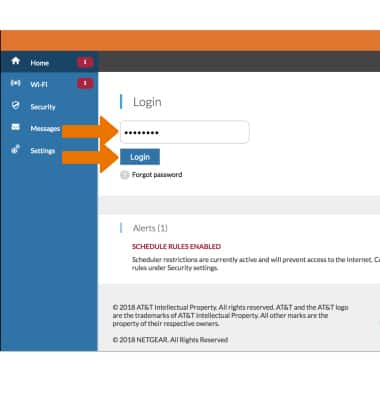
-
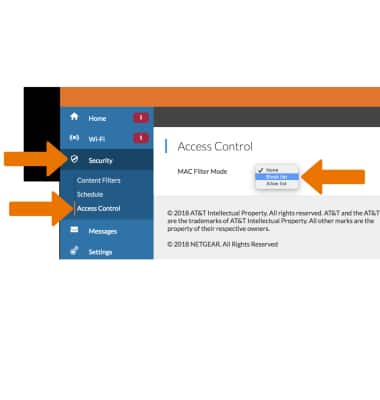
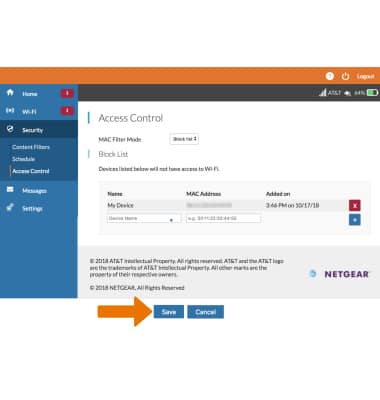
Click Security, then click Access Controls. Select the Block list from the MAC Filter Mode dropdown menu.
-
Enter the device's Name and MAC Address, then click the Add icon.
Note: To add a device that is currently connected to the network, click the Add icon then click the desired device.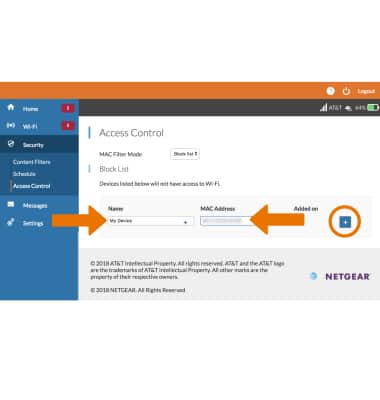
-
Click Save when finished.
-
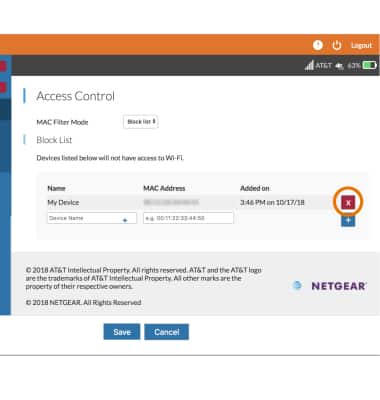
UNBLOCK A DEVICE: From the Access Controls screen, click the X icon next to the desired device.
-
Click Save when finished.