In this tutorial, you will learn how to:
• Remove 4G LTE Cover• Attach 5G Cell Booster• De-attach 5G Cell Booster• Install GPS Antenna
Remove 4G LTE Cover
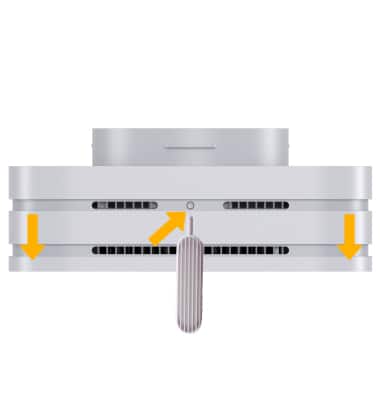
Remove the 4G LTE cover of the device by using the Cover removal tool. Insert the tool into the ejection button on top of the device. The cover will become slightly dislodged from the device.
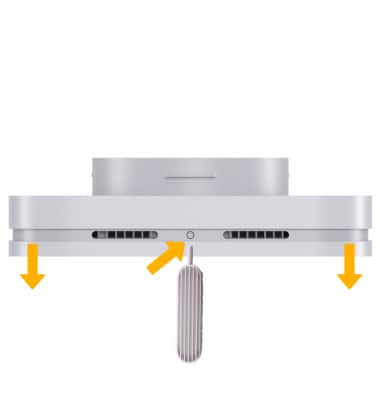
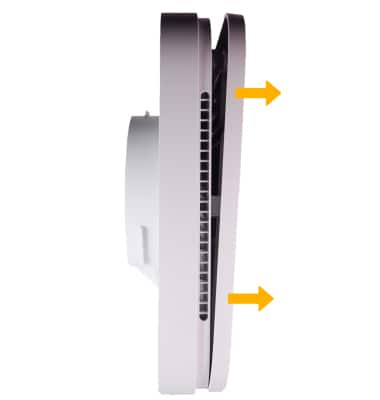
Remove the cover by pulling the cover away from the device.
Attach 5G Cell Booster
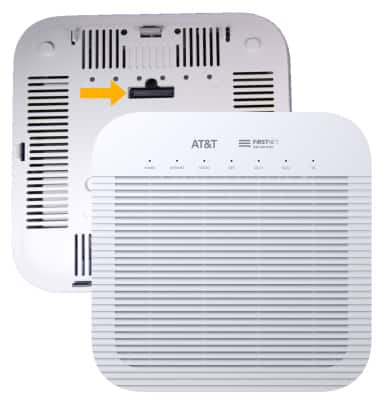
With the 4G LTE device facing down, line up the cartridge on the 5G Cell Booster Pro with cartridge on the 4G LTE device then firmly insert the 5G Cell Booster Pro into the 4G LTE device. The two devices should be seamless and you will hear an audible click when the two are correctly connected.
De-attach 5G Cell Booster Pro
Remove the 5G Cell Booster Pro by using the Cover removal tool. Insert the tool into the ejection button on top of the device. While the tool is in the device, firmly pull the 5G Cell Booster Pro from the 4G LTE device.
Install GPS Antenna
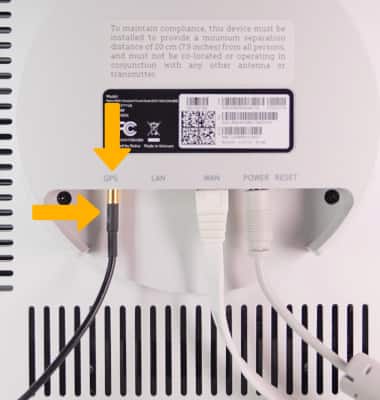
To install the GPS antenna, insert the gold-side of the GPS cable into the GPS port until it clicks into place.