Learn how to turn Airplane Mode on and off using the Notification bar or through Settings.
In this tutorial, you will learn how to:
• Turn Airplane mode on or off from the Notification bar
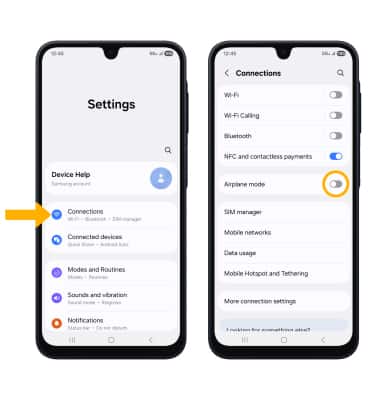
• Turn Airplane mode on or off through Settings
Airplane mode will disable all wireless services on the device. Calls, data, and text messages cannot be sent or received. Disable Airplane mode to restore regular device function.
When Airplane Mode is turned on, the

Airplane modeicon will display in the Notification bar.
Turn Airplane mode on or off from the Notification bar
Swipe down from the upper right corner of the screen, then select the
Airplane mode icon.
Turn Airplane mode on or off through Settings
- Swipe down from the upper right corner of the screen, then select the
 Settings icon.
 - Select Connections, then select the Airplane mode switch.