How to access and use the SOS button on your device.
Emergency SOS is enabled by default.
In this tutorial, you will learn how to:
• Enable and customize Emergency SOS
• Use Emergency SOS
Enable and customize Emergency SOS
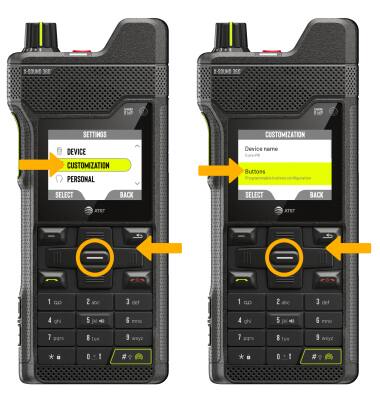
1. Use the navigation keys to highlight the  Settings app, then press the Select button to select.
2. Use the navigation keys to highlight CUSTOMIZATION, then press the Select button. Press the down navigation key to highlight Buttons, then press the Select button to select.
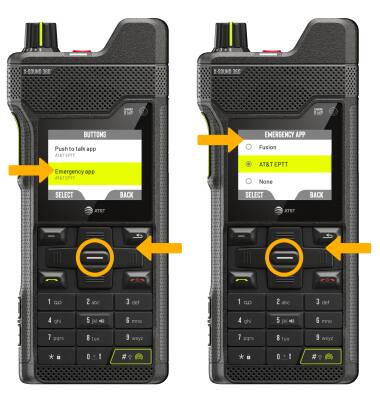
3. Use the navigation keys to highlight Emergency app, then press the Select button to select.. To set the desired emergency app, press the navigation keys to highlight the desired option then press the Select button and follow the prompts.
Use Emergency SOS
To use Emergency SOS, from any screen, press the SOS button.