Funcionalidades de llamadas
 Para obtener información sobre cómo hacer llamadas o usar tu dispositivo en otros países, visita el sitio web AT&T internacional.
En este tutorial, aprenderás a hacer lo siguiente:
• Opciones de llamada
• Configurar y usar el marcado rápido
• Crear una llamada en conferencia
Opciones de llamada
Mientras estés en una llamada activa, las siguientes opciones estarán disponibles:
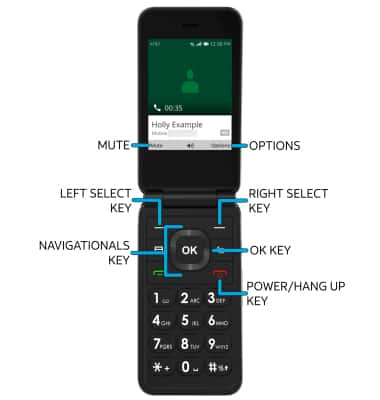
• PON EN ESPERA/REANUDA UNA LLAMADA: oprime la tecla de selección derecha para seleccionar Options, luego oprime las teclas de navegación y la tecla OK para seleccionar Hold Call.
• HABILITAR/DESHABILITAR EL ALTAVOZ: oprime la tecla OK.
• ACTIVA/DESACTIVA EL MODO SILENCIO: oprime la tecla de selección izquierda para seleccionar Mute.
• TERMINA UNA LLAMADA: oprime la tecla Power/Hang Up.
Configurar y usar el marcado rápido
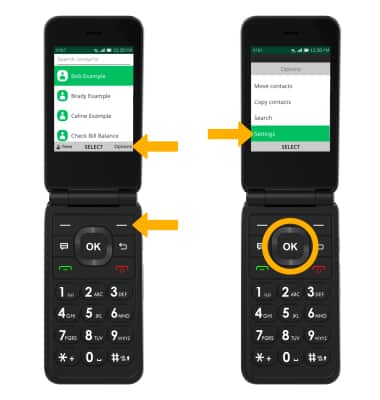
CONFIGURACIÓN: 1. Desde la pantalla principal, oprime la tecla de selección derecha para acceder a la aplicación Contacts.
Importante: También puedes obtener acceso a la aplicación Contacts desde el menú App.

2. Oprime la tecla de selección derecha para seleccionar Options. Oprime la tecla de navegación hacia abajo para resaltar Settings, luego oprime la tecla OK para seleccionar.
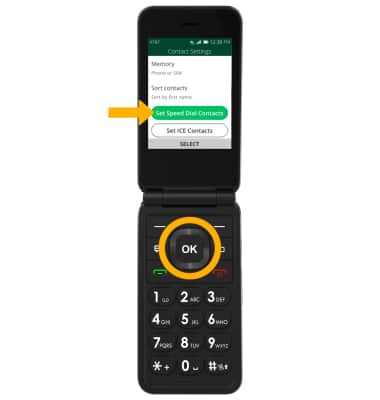
3. Oprime la tecla de navegación hacia abajo para resaltar Set Speed Dial Contacts, luego oprime la tecla OK para seleccionar.
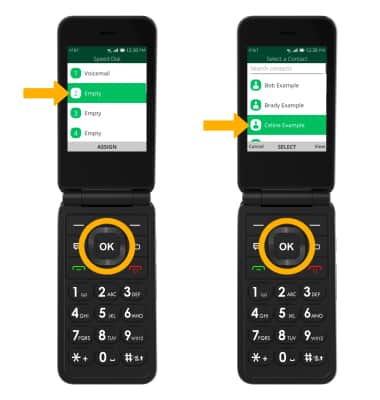
4. Oprime la tecla de navegación hacia abajo para resaltar el número de marcado rápido que desees, luego oprime la tecla OKpara seleccionar ASSIGN. Oprime la tecla de navegación hacia abajo para resaltar el contacto deseado, luego oprime la tecla OK para seleccionar.
Importante: Para eliminar o reemplazar un número de marcado rápido, en la pantalla principal Speed dial, oprime la tecla de navegación hacia abajo para resaltar el número de marcado rápidoque desees > tecla de selección derecha > opción deseada > sigue las indicaciones para completar.
USAR: mantén oprimido el número de marcado rápido que desees en el teclado.

Crear una llamada en conferencia
Desde una llamada activa, oprime la tecla de navegación derecha para seleccionar Options. Oprime la tecla OK para seleccionar Add call, luego sigue las indicaciones. Para terminar una llamada, oprime la tecla Power/Hang Up.
Importante: Al crear una llamada de conferencia, después de conectarte con una segunda llamada, deberás seleccionar Merge para combinar las llamadas independientes.
