1. OBTÉN ACCESO A LAS NOTIFICACIONES: deslízate hacia abajo desde la barra de notificaciones. Se mostrarán las notificaciones.
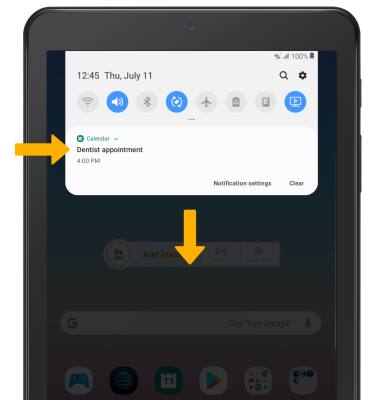
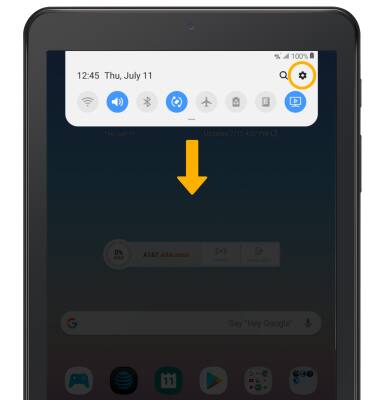
2. ACTIVAR/DESACTIVAR TODAS LAS NOTIFICACIONES EN LA PANTALLA DE BLOQUEO: para bloquear o desbloquear notificaciones para que aparezcan en el dispositivo cuando está bloqueado, deslízate hacia abajo desde la barra de notificaciones y luego selecciona el ícono Settings.
3. Selecciona Lock screen.
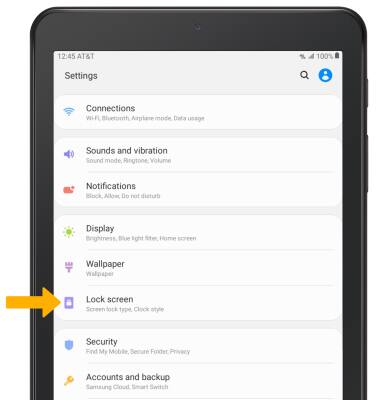
3. Selecciona Lock screen.
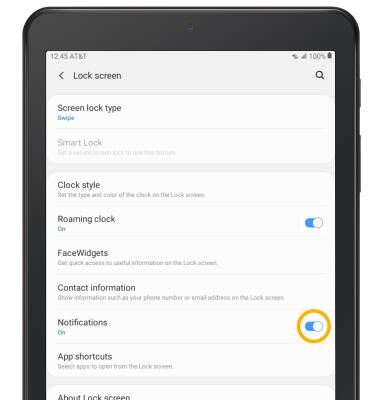
4. Selecciona el botón Notifications.
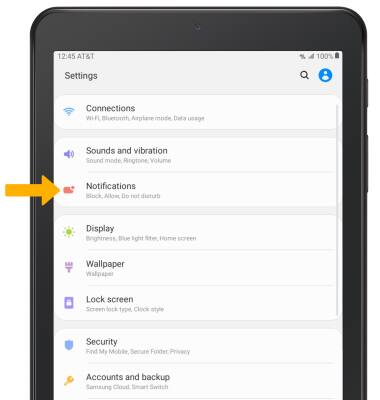
5.OBTÉN ACCESO A LAS CONFIGURACIONES DE LAS NOTIFICACIONES: desde la pantalla Settings, selecciona Notifications.
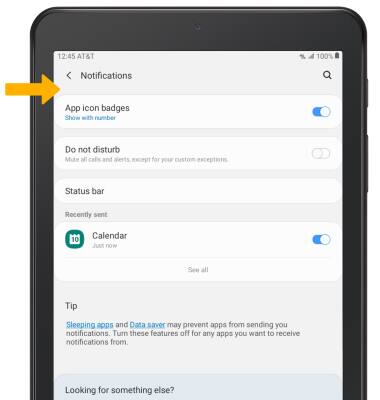
6. Edita las configuraciones de las notificaciones como desees.
7. AJUSTA SONIDOS DE NOTIFICACIONES: en la pantalla Settings, selecciona Sounds and vibration.

8. Selecciona Notification sounds.

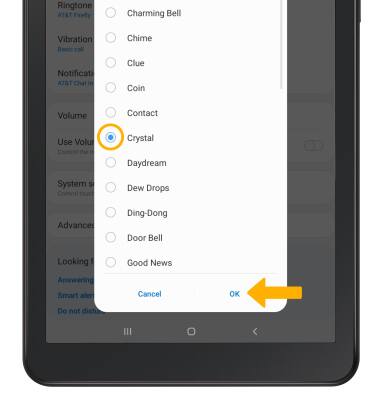
9. Selecciona el sonido de notificación, luego selecciona OK.
9. Selecciona el sonido de notificación, luego selecciona OK.