Learn how to program your U-verse TV Point Anywhere remote using our step-by-step instructions and guides to control your TV, DVD, or auxiliary devices.
You’re viewing instructions for
Remote control
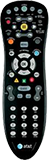
Point Anywhere Remote
KM1047397-slctrgrp_pointanywhereremote
FREQUENTLY ASKED QUESTIONS
Point Anywhere A30
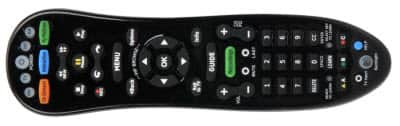
Brand programming option
You can program your remote to control the 10 most popular TV, DVD and Blu-ray player, home theater receiver, or sound bar brands. Confirm that the device you're programming is on and you can hear sound from it.
- Identify your brand device. Note which number relates to your device brand. If your device brand isn’t shown, go to the auto-code search programming option section.
Digit TV brand DVD or BLU-RAY brand Audio brand 1 LG Insignia Bose 2 Panasonic LG Denon 3 Philips, Magnavox Panasonic LG 4 RCA Philips, Magnavox Onkyo 5 Samsung Pioneer Panasonic 6 Sanyo RCA Philips 7 Sharp Samsung Pioneer 8 Sony Sharp Samsung 9 Toshiba Sony Sony 0 VIZIO Toshiba Yamaha - Press and hold the remote’s OK and MENU buttons at the same time for about 3 seconds. Wait until all 4 arrow keys flash red twice and you hear 2 short beeps to confirm you’re in programming mode.
- Press the device button you wish to set up: TV, DVD, or AUX (for audio devices). The button will then light up and stay red.
- Press and hold down the number button for your brand, and point the remote at your device.
- Release the button when the TV or DVD player turns off or the audio device is muted. The device button will blink red twice, and you’ll hear 2 short beeps to confirm that programming was successful.
- Press the POWER button to turn the TV or DVD player back on, or press MUTE to unmute the audio device.
- Check the volume with the volume buttons. If the remote doesn’t control your device's volume, try the process again, starting with step 2.
- Repeat this process for other devices (DVD or Blu-ray player, home theater receiver, or sound bar).
- Press the AT&T key for normal operation.
Auto code search
If your TV, DVD, or audio device brand doesn’t appear in the Brand programming section, you can try auto code search. Make sure the device you want to program is on and you can hear its sound.
- Press and hold the remote’s OK and MENU buttons at the same time for about 3 seconds. Wait until all 4 arrow keys flash red twice and you hear 2 short beeps to confirm you’re in programming mode.
- Press the device button you wish to set up: TV, DVD, or AUX (for audio devices). The button will then light up and stay red.
- Press and hold down the FF button while pointing the remote at your device.
- Release the button when the TV or DVD player turns off or the audio device mutes.
- Press the POWER button to turn the TV or DVD player back on, or press MUTE to unmute the audio device.
- Check the volume with the volume buttons. If the remote doesn’t control your device's volume, go back to step 1 and try again.
- Repeat this process for other devices.
- Press the AT&T button for normal operation.
Manual setup
- Identify your brand device codes.
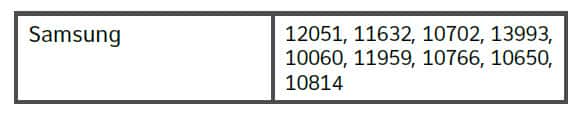
- Press and hold the remote’s OK and MENU buttons at the same time for about 3 seconds. Wait until all 4 arrow keys flash red twice and you hear 2 short beeps to confirm you’re in programming mode.
- Enter the first 5-digit code listed for your device using the remote’s number buttons. The AT&T, TV, DVD, or AUX mode button (depending on the device you’re programming) will blink red once for every digit pressed. Once you enter all 5 digits, the appropriate mode button will flash red twice and you’ll hear 2 short beeps to confirm that you entered a valid code.
- Test the remote to see if it controls your device as expected. If not, repeat this process using the next code listed for your brand.
- Press the AT&T button for normal operation.
Point Anywhere A20 remote

The auto code search method will scan through all the codes to find one that works with your TV or other equipment.
- Turn on the equipment you want to program.
- Point the remote control at the selected device.
- Press and hold the TV, DVD, or AUX (for audio devices) and the Enter button at the same time for 1 second, and then release. The 4 arrow keys on the remote control will flash twice to indicate you’re in search mode.
- Press the ScanFF button repeatedly, with a pause between each press, until the equipment turns off. The selected device button should flash once for each press of ScanFF. If the equipment doesn’t turn off and you have searched all available codes, the device button will flash 8 times. If this happens, start over at step 2.
- Press POWER on the remote to turn the device back on.
- Check the volume and mute functions to make sure they work. If there’s a problem with any of the keys, press the ScanFF button, and search until you find a code that operates all the functions properly. (Don’t test using RewScan, ScanFF, Exit, Channel + or -, Fwd, or number keys.)
- Press Enter to save the programming. The TV, DVD, or AUX key will give a long flash with a long beep, indicating successful programming.
Last updated: October 6, 2026