[Skip Navigation](https://www.att.com#mega-z2_jump_link)
[Personal](https://www.att.com/) [Business](https://www.business.att.com)
[Find a store](https://www.att.com/stores/) [Ver en español](javascript:void%280%29)
[](https://www.att.com)
- Shop
## Shop
- [Plans & services](#)
- [Devices & accessories](#)
Quick actions [Upgrade](https://www.att.com/upgrade/) [Add a line](https://www.att.com/plans/add-a-line/) [Bring your own phone](https://www.att.com/wireless/byod/) [Switch & save](https://www.att.com/wireless/switch-and-save/)
### Bundles
- [Internet + wireless](https://www.att.com/bundles/)
- [AT&T OneConnect](https://www.att.com/oneconnect/)
- [Internet + home phone](https://www.att.com/home-phone/)
- [Customers 55+](https://www.att.com/bundles/55-plus-internet-wireless/)
### Wireless
- [Explore wireless](https://www.att.com/wireless/)
- [Phone plans](https://www.att.com/plans/wireless/)
- [Build-A-Plan](https://www.att.com/plans/build-a-plan/)
- [Network coverage](https://www.att.com/maps/wireless-coverage.html)
- [Prepaid](https://www.att.com/prepaid/)
- [International add-ons](https://www.att.com/international/)
- [Connected car](https://www.att.com/plans/connected-car/)
### Home internet & phone
- [Explore home internet](https://www.att.com/internet/)
- [Check availability](https://www.att.com/internet/availability/)
- [AT&T Fiber](https://www.att.com/internet/fiber/)
- [AT&T Internet Air](https://www.att.com/internet/internet-air/)
- [All-Fi Pro](https://www.att.com/wi-fi/all-fi-pro)
- [Home phone](https://www.att.com/home-phone/services/)
New arrivals [iPhone 18 Pro](https://www.att.com/buy/phones/apple-iphone-18-pro.html) [iPhone 18 Pro Max](https://www.att.com/buy/phones/apple-iphone-18-pro-max.html) [Galaxy Z Fold8](https://www.att.com/buy/phones/samsung-galaxy-z-fold8.html) [AirPods Pro 3](https://www.att.com/buy/accessories/Headphones/apple-airpods-pro-3.html) [Pixel 11 Pro](https://www.att.com/buy/phones/google-pixel-11-pro.html)
### Devices
- [Phones](https://www.att.com/buy/phones/)
- [Prepaid phones](https://www.att.com/buy/prepaid-phones/)
- [Tablets](https://www.att.com/buy/tablets/)
- [Smartwatches](https://www.att.com/buy/wearables/)
- [AT&T Certified Pre-Owned](https://www.att.com/buy/phones/browse/att-certified-preowned)
### Accessories
- [Shop all accessories](https://www.att.com/accessories/)
- [Cases](https://www.att.com/buy/accessories/browse/cases/)
- [Chargers](https://www.att.com/buy/accessories/browse/chargers/)
- [Screen protectors](https://www.att.com/buy/accessories/browse/screen-protectors/)
- [Headphones](https://www.att.com/buy/accessories/browse/headphones/)
### Brands
- [Apple](https://www.att.com/buy/phones/browse/apple/)
- [Samsung](https://www.att.com/buy/phones/browse/samsung/)
- [Motorola](https://www.att.com/buy/phones/browse/motorola/)
- [Google](https://www.att.com/buy/phones/browse/google/)
- [Meta](https://www.att.com/buy/accessories/browse/all/meta/)
[__Get the new iPhone 18 Pro for $0 with eligible iPhone trade-in__
\
Shop now](https://www.att.com/buy/phones/apple-iphone-18-pro.html)
- Deals
## Deals
- [New & featured](#)
- [Customer discounts](#)
Featured [Shop all deals](https://www.att.com/deals/) [Wireless deals](https://www.att.com/deals/cell-phone-deals/) [Internet deals](https://www.att.com/deals/internet/) [Trade-in offers](https://www.att.com/buy/phones/browse/tradeinoffer/) [No trade-in offers](https://www.att.com/buy/phones/browse/nontradeinoffer/)
### Trending deals
- [Samsung Galaxy](https://www.att.com/buy/phones/browse/samsung_hasdeals/)
- [Apple iPhone](https://www.att.com/deals/iphone-deals/)
- [Under $50](https://www.att.com/buy/accessories/browse/all/price-range-25-50_price-range-5-25_5-and-under/)
- [Early holiday deals](https://www.att.com/deals/holiday-gift-guide/)
### Device & accessory deals
- [Phones](https://www.att.com/buy/phones/browse/hasdeals/)
- [Prepaid phones](https://www.att.com/buy/prepaid-phones/browse/hasdeals/)
- [Tablets](https://www.att.com/buy/tablets/browse/hasdeals/)
- [Smartwatches](https://www.att.com/buy/wearables/browse/hasdeals/)
- [Accessory deals](https://www.att.com/buy/accessories/browse/all/deals/)
### Subscriptions
- [AT&T OneConnect](https://www.att.com/oneconnect/)
[__Switch to AT&T and learn how to get up to $800/line to break your contract__
\
Shop now](https://www.att.com/buy/phones/)
### Discounts by occupation
- [Business employees](https://www.att.com/verification/signaturehub/#employment)
- [Military & veterans](https://www.att.com/offers/discount-program/military-discount/)
- [Teachers](https://www.att.com/offers/discount-program/teacher/)
- [Nurses & physicians](https://www.att.com/verification/signaturehub/#medical)
- [Active responders](https://www.att.com/firstnetandfamily/)
### Discounts by affiliation
- [Customers 55+](https://www.att.com/verification/signaturehub/#age)
- [Retired responders](https://www.att.com/offers/discount-program/retired-responders/)
- [Union workers](https://www.att.com/offers/discount-program/union-discount/)
- [Students](https://www.att.com/verification/signaturehub/#student)
### Partner savings
- [Credit card discount](https://www.att.com/deals/att-points-plus-citi/)
- [&More Benefits](https://andmorebenefits.att.com/root-discovery)
- AT&T Difference
## AT&T Difference
- [Our competitive edge](#)
- [Our sponsorships](#)
- [Our blog](#)
### Why choose us
- [AT&T Guarantee](https://www.att.com/why-att/guarantee/)
- [Why AT&T](https://www.att.com/why-att/)
- [AT&T vs. T-Mobile & Verizon](https://www.att.com/wireless/switch-and-save/#compare-us)
- [AT&T Fiber vs. Spectrum & Xfinity](https://www.att.com/internet/fiber/#compare-us)
- [Try AT&T for free](https://www.att.com/wireless/free-trial/)
- [Switch & save](https://www.att.com/wireless/switch-and-save/)
### Exceptional coverage
- [5G coverage map](https://www.att.com/maps/wireless-coverage.html)
- [Fiber coverage map](https://www.att.com/internet/fiber/coverage-map/)
[__Backed by the AT&T Guarantee®__
\
Learn more](https://www.att.com/why-att/guarantee/)
### Sports
- [Soccer](https://www.att.com/sponsorship/soccer)
- [Basketball](https://www.att.com/sponsorship/basketball)
- [Golf](https://www.att.com/sponsorship/golf)
- [Football](https://www.att.com/sponsorship/football/)
### Music, Arts & Culture
- [Music](https://www.att.com/sponsorship/music)
[__Backed by the AT&T Guarantee®__
\
Learn more](https://www.att.com/why-att/guarantee/)
### Internet
- [10 benefits of fiber internet](https://www.att.com/blog/10-benefits-of-fiber-internet/)
- [What internet connection do I need for streaming?](https://www.att.com/blog/internet-connection-for-streaming/)
- [Can you get internet without cable?](https://www.att.com/blog/internet-without-cable/)
### Wireless/Phones
- [What is mobile security?](https://www.att.com/blog/what-is-mobile-security/)
- [Foldable phones: Fold vs. flip and how to choose](https://www.att.com/blog/foldable-phones/)
- [Do I really need unlimited data on my phone plan?](https://www.att.com/blog/do-i-really-need-unlimited-data/)
- [What age should a kid get a phone? A parent’s guide](https://www.att.com/blog/what-age-should-a-kid-get-a-phone/)
### Technology
- [10 benefits of AI](https://www.att.com/blog/10-benefits-of-ai/)
- [Internet vs. Wi-Fi: Are they different?](https://www.att.com/blog/internet-vs-wi-fi-are-they-different/)
- [What is cloud storage?](https://www.att.com/blog/what-is-cloud-storage/)
- [Download vs upload speed](https://www.att.com/blog/download-speed-vs-upload-speed/)
[__Backed by the AT&T Guarantee®__
\
Learn more](https://www.att.com/why-att/guarantee/)
- Support
## Support
- [Bill & account](#)
- [Wireless](#)
- [Internet](#)
- [Home phone](#)
Quick actions [View all support](https://www.att.com/support/) [Go to my account](https://www.att.com/acctmgmt/overview) [Payment center](https://www.att.com/acctmgmt/mypaymentcenter) [Billing center](https://www.att.com/acctmgmt/billing/mybillingcenter)
### Bill & payments
- [Understand your bill](https://www.att.com/support/my-account/understand-your-bill/)
- [Find out why your bill changed](https://www.att.com/support/article/my-account/KM1051879/)
- [Set up and manage AutoPay](https://www.att.com/acctmgmt/mypaymentcenter?intent=MANAGEAUTOPAY)
- [View device installments](https://www.att.com/acctmgmt/payment/installmentplandetails)
- [Pay without signing in](https://www.att.com/acctmgmt/fastpmt/fastpay)
### Account
- [Change or reset password](https://www.att.com/support/article/my-account/KM1008941/)
- [Add or remove accounts](https://www.att.com/support/article/my-account/KM1008925/)
- [Move internet service](https://www.att.com/help/moving/)
- [View my orders and claims](https://www.att.com/orders/history)
- [More account help](https://www.att.com/support/my-account/)
[__America’s best guarantee__
\
Learn more](https://www.att.com/why-att/guarantee/)
Quick actions [Manage my wireless service](https://www.att.com/acctmgmt/mywireless) [Track my order](https://www.att.com/orders/history) [Add AT&T International Day Pass](https://www.att.com/acctmgmt/signin?intent=DEEPLINK&soc=IRRLHDF&level=CAT&source=ILC242589969&wtExtndSource=Megamenu)
### My device
- [Check my usage](https://www.att.com/acctmgmt/usage/mysummary)
- [Manage add-ons](https://www.att.com/acctmgmt/wireless/manage-addon)
- [Change my plan](https://www.att.com/acctmgmt/mywireless/manageplan/)
- [Add a line](https://www.att.com/buy/postpaid/?wlsfi=AL)
- [Check upgrade eligibility](https://www.att.com/buy/postpaid/?wlsfi=up)
- [Activate a wireless device](https://www.att.com/support/how-to/wireless/get-started/)
### Device options
- [Manage eSIM](https://www.att.com/acctmgmt/wireless/manage-esim)
- [Suspend wireless service](https://www.att.com/acctmgmt/wireless/suspend)
- [Transfer a number to AT&T](https://www.att.com/acctmgmt/wireless/transfer-number)
- [Change phone number](https://www.att.com/acctmgmt/wireless/change-number)
- [Unlock a device](https://www.att.com/acctmgmt/wireless/device-unlock)
### Wireless help
- [Check for outages](https://www.att.com/outages/)
- [Use device hotspot](https://www.att.com/support/article/wireless/KM1009376/)
- [Device protection & warranty](https://www.att.com/support/device-protection-warranty/)
- [More wireless help](https://www.att.com/support/wireless/)
[__America’s best guarantee__
\
Learn more](https://www.att.com/why-att/guarantee/)
Quick actions [Manage my internet service](https://www.att.com/acctmgmt/myinternet) [Track my order](https://www.att.com/orders/history) [Get help moving](https://www.att.com/help/moving/)
### Equipment
- [Restart a gateway](https://www.att.com/support/article/internet/KM1010361/)
- [Find Wi-Fi info](https://www.att.com/support/article/internet/KM1203150/)
- [Run internet speed test](https://www.att.com/support/speedtest/)
- [Set up Internet Air](https://www.att.com/support/article/internet/KM1489093/)
### Troubleshooting
- [Check for outages](https://www.att.com/outages/)
- [Manage appointments](https://www.att.com/orders/history)
- [Optimize connection](https://www.att.com/support/how-to/optimize-your-connection/)
- [More internet help](https://www.att.com/support/internet/)
[__America’s best guarantee__
\
Learn more](https://www.att.com/why-att/guarantee/)
### Home phone
- [AT&T Phone](https://www.att.com/home-phone/)
- [AT&T Phone – Advanced](https://www.att.com/home-phone/phone-advanced/)
[__America’s best guarantee__
\
Learn more](https://www.att.com/why-att/guarantee/)
Search site
Search or chat
Your cart is empty
Let's get shopping!
[Explore bundles](https://www.att.com/bundles) [Shop phones](https://www.att.com/buy/phones)
[Sign in](https://www.att.com/acctmgmt/signin?final_url=https%3A%2F%2Fwww.att.com%2Fsupport%2Farticle%2Finternet%2F000092830%2F) [Create an account](https://www.att.com/acctmgmt/registration/selectServices) [Forgot user ID?](https://identity.att.com/identity-ui/fid/lander?trid=9806a0fd32a18ad2ce22ba62b72f0d6f8631e5e1&Return_URL=https%3A%2F%2Foidc.idp.clogin.att.com%2Fmga%2Fsps%2Foauth%2Foauth20%2Fauthorize%3Fresponse_type%3Did_token%26client_id%3Dm14186%26redirect_uri%3Dhttps%253A%252F%252Fwww.att.com%252Fmsapi%252Flogin%252Funauth%252Fservice%252Fv1%252Fhaloc%252Foidc%252Fredirect%26state%3Dfrom%253Dnx%26scope%3Dopenid%26response_mode%3Dform_post%26nonce%3DH0ihL2qQ&Cancel_URL=https%3A%2F%2Foidc.idp.clogin.att.com%2Fmga%2Fsps%2Foauth%2Foauth20%2Fauthorize%3Fresponse_type%3Did_token%26client_id%3Dm14186%26redirect_uri%3Dhttps%253A%252F%252Fwww.att.com%252Fmsapi%252Flogin%252Funauth%252Fservice%252Fv1%252Fhaloc%252Foidc%252Fredirect%26state%3Dfrom%253Dnx%26scope%3Dopenid%26response_mode%3Dform_post%26nonce%3DH0ihL2qQ&lang=en-us)
* * *
[Make a payment](https://www.att.com/acctmgmt/payment/makepayment) [Pay without signing in](https://www.att.com/acctmgmt/fastpmt/fastpay) [Go to my prepaid account](https://www.paygonline.com/websc/loginPage.html)
## Welcome back!
[Switch user](https://www.att.com/acctmgmt/logout?kmsi=y&target_url=https%3A%2F%2Fwww.att.com%2Facctmgmt%2Flogin)
[Sign out](https://www.att.com/acctmgmt/logout?kmsi=n)
Quick actions [&More Benefits](https://andmorebenefits.att.com/) [My favorites](https://www.att.com/myfavorites/) [Privacy choices](https://www.att.com/acctmgmt/myprofile/overview?flow=privacy-choices)
### Account overview
- [Check my notifications](#)
- [Go to my account](https://www.att.com/acctmgmt/overview)
- [Update my profile](https://www.att.com/acctmgmt/myprofile/overview)
- [View my orders & claims](https://www.att.com/orders/history)
- [Go to my prepaid account](https://www.paygonline.com/websc/loginPage.html)
### Bill & payments
- [Make a payment](https://www.att.com/acctmgmt/payment/makepayment)
- [See my bill](https://www.att.com/acctmgmt/billing/mybillingcenter)
## Welcome back!
[Sign out](https://www.att.com/acctmgmt/logout?kmsi=n)
[Switch user](https://www.att.com/acctmgmt/logout?kmsi=y&target_url=https%3A%2F%2Fwww.att.com%2Facctmgmt%2Flogin)
### Account overview
- [Check my notifications](#)
- [Go to my account](https://www.att.com/acctmgmt/overview)
- [Update my profile](https://www.att.com/acctmgmt/myprofile/overview)
- [View my orders & claims](https://www.att.com/orders/history)
- [Go to my prepaid account](https://www.paygonline.com/websc/loginPage.html)
### Bill & payments
- [Make a payment](https://www.att.com/acctmgmt/payment/makepayment)
- [See my bill](https://www.att.com/acctmgmt/billing/mybillingcenter)
### Quick actions
- [&More Benefits](https://andmorebenefits.att.com/)
- [My favorites](https://www.att.com/myfavorites/)
- [Privacy choices](https://www.att.com/acctmgmt/myprofile/overview?flow=privacy-choices)
Search or chat
[](https://www.att.com)
## Shop
- [Plans & services](#)
- [Devices & accessories](#)
## Deals
- [New & featured](#)
- [Customer discounts](#)
- [View all deals](https://www.att.com/deals/)
## AT&T Difference
- [Our competitive edge](#)
- [Our sponsorships](#)
- [Our blog](#)
## Support
- [Bill & account](#)
- [Wireless](#)
- [Internet](#)
- [Home phone](#)
- [View all support](https://www.att.com/support/)
- [AT&T Business](https://www.business.att.com/)
- [Find a store](https://www.att.com/stores/)
- [Ver en español](javascript:void%280%29)
Back
Shop
## Plans & services
### Bundles
- [Internet + wireless](https://www.att.com/bundles/)
- [AT&T OneConnect](https://www.att.com/oneconnect/)
- [Internet + home phone](https://www.att.com/home-phone/)
- [Customers 55+](https://www.att.com/bundles/55-plus-internet-wireless/)
### Wireless
- [Explore wireless](https://www.att.com/wireless/)
- [Phone plans](https://www.att.com/plans/wireless/)
- [Build-A-Plan](https://www.att.com/plans/build-a-plan/)
- [Network coverage](https://www.att.com/maps/wireless-coverage.html)
- [Prepaid](https://www.att.com/prepaid/)
- [International add-ons](https://www.att.com/international/)
- [Connected car](https://www.att.com/plans/connected-car/)
### Home internet & phone
- [Explore home internet](https://www.att.com/internet/)
- [Check availability](https://www.att.com/internet/availability/)
- [AT&T Fiber](https://www.att.com/internet/fiber/)
- [AT&T Internet Air](https://www.att.com/internet/internet-air/)
- [All-Fi Pro](https://www.att.com/wi-fi/all-fi-pro)
- [Home phone](https://www.att.com/home-phone/services/)
### Quick actions
- [Upgrade](https://www.att.com/upgrade/)
- [Add a line](https://www.att.com/plans/add-a-line/)
- [Bring your own phone](https://www.att.com/wireless/byod/)
- [Switch & save](https://www.att.com/wireless/switch-and-save/)
Start of main content
1. [Home](https://www.att.com/)
2. [Support](https://www.att.com/support/)
3. [AT&T Internet](https://www.att.com/support/internet/)
# Learn about your All-Fi Hub (CGW450)
Get all the details on using your CGW450 to connect to the internet and troubleshoot common issues.
* * *
You’re viewing instructions for
Internet equipment
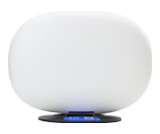
All-Fi-Hub
CGW450
000092830-slctrgrp\_allfihubcgw450
* * *
Status lightsStatus lightsWi-Fi detailsWi-Fi detailsAdvanced settingsAdvanced settings
### Detailed display and light info
Review the PDF to get all info related to the lights and display animations on your All-FiTM Hub.
[View PDF (347KB)](https://www.att.com/scmsassets/support/internet/what-do-my-all-fi-hub-lights-mean-cgw450.pdf)
### Notification light
The color and state of your notification light defines what it’s doing in conjunction with the display matrix or WPS light. If your notification light is:
- __Green or yellow:__ You’ll see these when you’re setting up, pairing devices, or running a speed test. Your hub display will provide additional details.
- __Solid red:__ The light turns red if your hub has an error. Check the display and find the error code. Use the [All-Fi Hub status lights (PDF, 313KB)](https://www.att.com/scmsassets/support/internet/what-do-my-all-fi-hub-lights-mean-cgw450.pdf "PDF opens in new window") or [Error codes FAQ](https://www.att.com/support/article/wireless/000092832/ "Link opens in same window") to find a fix.
- __Off with clock during set up:__ Make sure you have completed your registration and set up with Smart Home Manager.
- __Off with clock:__ This means your hub is working correctly.
### WPS LED (back of hub)
This light helps you identify the pairing process with other devices on your Wi-Fi network. If the light is:
- __Green (blinking):__ The hub is pairing with a device or restarting after a factory reset.
- __Red (blinking):__ The hub is restarting or it has too many devices trying to pair.
- __Red (solid):__ WPS pairing failed. You can try again or connect with your Wi-Fi® name and password.
### Find Wi-Fi info
Get your Wi-Fi name and password in three simple ways:
- __All-Fi Hub:__ Look for a sticker with your Wi-Fi name and password.
- __QR code:__ Use your mobile device to automatically connect devices to your hub.
- __Smart Home Manager:__ Open [Smart Home Manager](http://www.att.com/shm "Link opens in new window") and look for the My Wi-Fi card. Don’t have the Smart Home Manager app yet? Download the app from the [Apple App store](https://itunes.apple.com/us/app/smart-home-manager/id1258654743?mt=8 "Link opens in new window") or [Google Play store](https://play.google.com/store/apps/details?id=com.att.shm "Link opens in new window").
### Change Wi-Fi name
1. Sign in to [Smart Home Manager](http://www.att.com/support/internet/home "Link opens in new window").
2. Scroll to the __My Wi-Fi card__ and choose __Change__ next to the name or password.
3. Select __X__ to clear existing info, then enter a new name or password.
4. Select __Save__.
Once you finish making changes, reconnect your devices with the updated network info.
__FYI:__ You can also update your Wi-Fi from your [All-Fi Hub settings](http://192.168.1.254/ "Link opens in new window").
### Manage Wi-Fi security
Your CGW450 comes with the security __On__. If you or someone else turned the security __Off__, learn how to turn it back on.
1. Go to your [All-Fi Hub settings](http://192.168.1.254/ "Link opens in new window").
2. Select __Home Network__, then __Wi-Fi__.
3. Enter the __Device Access Code__ on your hub.
4. Select __Advanced Options__.
5. Do the following for both the 2.4GHz and 5GHz Wi-Fi Configuration sections:
- To use the default password, select __WPA – Default Password__ from the __Security__ options.
- To use a custom password or a password you changed, choose __WPA__ from the __Security__ options.
- In the __WPA Version__ section, select __WPA-2__ for maximum compatibility.
- Enter a new 10-character password. Use a longer or more complex password for better security.
6. Select __Save__.
7. Update your Wi-Fi devices with your new password info.
__FYI:__ Your 2.4 and 5.0GHz radios may have different network names and passwords. For the best Wi-Fi experience, we recommend you use the same Wi-Fi network name and password for both radios.
### Hide Wi-Fi info
__Important:__ Before proceeding with this process, be sure to store your Wi-Fi network name and password in a safe location. You’ll have to manually enter them after your network name is hidden. Then, choose your equipment type to get detailed instructions.
01. Go to your [All-Fi Hub settings](http://192.168.1.254/ "Link opens in new window").
02. Select __Home Network__, then __Wi-Fi__.
03. Enter the __Device Access Code__ on your hub.
04. Select __Home Network__, then __Wi-Fi__.
05. Select __Continue__.
06. Select __Home Network__, then __Wi-Fi__.
07. Choose __Advanced Options__ in the __Wi-Fi__ section.
08. Scroll to the __2.4Hz Radio__ or __5.0Hz Radio__ section.
09. Next to __Hide Network Name__, choose __On__ from the dropdown.
10. Select __Save__.
### Set up port forwarding
Every device connected to the internet has an IP address. Each address is divided into ports that send and receive data. With port forwarding, you set up rules to tell your All-FiTM Hub to route a port’s data. The hub sends the data to a specific IP address on your home network.
__Important:__ Use port forwarding with caution. It may allow others to access devices in your home without your knowledge.
To open a port for specific applications to use:
1. Go to your [hub settings](http://192.168.1.254/ "Link opens in new window").
2. Select __Firewall__ and then __NAT/Gaming__. If you get a warning message, restart your hub. Then, continue with these steps.
3. Enter the __Device Access Code__ found on your hub, if asked.
4. Select the application for port forwarding from the __Service__ dropdown. If you don’t see your application, or you’re setting up port forwarding for a device:
- Select __Custom Services__.
- Enter the device or application name in __Service Name__.
- Enter the port(s) you wish to open for __Global Port Range__. It's recommended to create a separate service entry for each port as opposed to using a port range. In this case the port number should be the same in the Global Port Range fields.
- In __Base Host Port__, enter the port number used for the first Global Port Range section.
- Choose the appropriate __Protocol__ from the dropdown for the application or device you are adding.
- Select __Add__. Repeat as needed for additional applications and devices.
5. When all applications or devices have been added, select __Return to NAT/Gaming__. You’ll see your new applications or devices in the Applications list.
6. Select the device name or IP address of the device from the __Needed by Device__ dropdown to open the port.
7. Choose __Add__ and then __Save__ when your selections display in Hosted Applications.
Last updated: September 23, 2026
* * *
## Browse topics
Connections, browsing & security
Installation & order status
Troubleshooting & repair
Learn about DSL internet and Wi-Fi connections, tools, and security.
Advanced information
Apps & tools
Home network & Wi-Fi information
Security & safety
Web browsing & internet speeds
### Was this info helpful?
[](https://x.com/att)[](https://www.facebook.com/ATT)[](https://www.instagram.com/att/)[](https://www.linkedin.com/company/att/)
### Shop
- [Cell phones](https://www.att.com/buy/phones/)
- [Fiber internet](https://www.att.com/internet/fiber/)
- [Home internet](https://www.att.com/internet/)
- [Tablets](https://www.att.com/buy/tablets/)
- [Smartwatches](https://www.att.com/buy/wearables/)
- [Wireless accessories](https://www.att.com/accessories/)
- [Prepaid phones](https://www.att.com/prepaid/)
### Trending
- [iPhone 18 Pro Max](https://www.att.com/buy/phones/apple-iphone-18-pro-max.html)
- [iPhone 18 Pro](https://www.att.com/buy/phones/apple-iphone-18-pro.html)
- [Foldable iPhone Duo](https://www.att.com/buy/phones/apple-iphone-duo.html)
- [iPhone 17 Pro Max](https://www.att.com/buy/phones/apple-iphone-17-pro-max.html)
- [Samsung Galaxy S26 Ultra](https://www.att.com/buy/phones/samsung-galaxy-s26-ultra.html)
- [Samsung Galaxy Z Fold8 Ultra](https://www.att.com/buy/phones/samsung-galaxy-z-fold8-ultra.html)
- [Samsung Galaxy Z Fold8](https://www.att.com/buy/phones/samsung-galaxy-z-fold8.html)
- [Samsung Galaxy Z Flip8](https://www.att.com/buy/phones/samsung-galaxy-z-flip8.html)
### Top phone & data plans
- [Unlimited phone plans](https://www.att.com/plans/wireless/)
- [International plans](https://www.att.com/international/)
- [Add a line](https://www.att.com/plans/add-a-line/)
- [Upgrade](https://www.att.com/plans/phone-upgrade/)
- [Tablet data plans](https://www.att.com/plans/tablet-ipad-data-plans/)
- [Mobile hotspot plans](https://www.att.com/plans/tethering/)
- [Next Up Anytime](https://www.att.com/plans/next-up-anytime/)
### Switch to AT&T
- [Switch to AT&T](https://www.att.com/wireless/switch-and-save/)
- [How to switch phone carriers](https://www.att.com/wireless/how-to-switch-phone-carrier/)
- [Internet speed test](https://www.att.com/support/speedtest/)
- [Bring your own device](https://www.att.com/wireless/byod/)
- [Cell phone trade-in](https://tradein.att.com/)
- [Transfer your internet service](https://www.att.com/moving/)
- [Device IMEI finder](https://www.att.com/wireless/imei-finder/)
### Featured deals
- [Holiday Gift Guide](https://www.att.com/deals/holiday-gift-guide/)
- [Black Friday Deals](https://www.att.com/deals/black-friday/)
- [Cyber Monday Deals](https://www.att.com/deals/cyber-monday/)
- [AT&T Deals & Promotions](https://www.att.com/deals/)
- [Cell phone deals](https://www.att.com/deals/cell-phone-deals/)
- [iPhone deals](https://www.att.com/deals/iphone-deals/)
- [Samsung deals](https://www.att.com/buy/phones/browse/samsung_hasdeals/)
- [Phone and internet bundle deals](https://www.att.com/bundles/internet-wireless/)
- [Credit card discount](https://www.att.com/deals/att-points-plus-citi/)
- [Free phone deals for new customers](https://www.att.com/buy/phones/browse/free/)
- [No trade-in deals](https://www.att.com/buy/phones/browse/nontradeinoffer/)
- [](https://www.att.com)
### Shop cell phones by brand
- [New Apple iPhones](https://www.att.com/buy/phones/browse/apple/)
- [New Samsung Galaxy phones](https://www.att.com/buy/phones/browse/samsung/)
- [New Google Pixel phones](https://www.att.com/buy/phones/browse/google/)
- [New Motorola Moto phones](https://www.att.com/buy/phones/browse/motorola/)
- [New Sonim phones](https://www.att.com/buy/phones/browse/sonim/)
### Tablets & Watches
- [New Apple iPad](https://www.att.com/buy/tablets/browse/apple/)
- [New Samsung Galaxy Tab](https://www.att.com/buy/tablets/browse/samsung/)
- [New Apple Watch](https://www.att.com/buy/wearables/browse/apple/)
- [New Samsung Galaxy Watch](https://www.att.com/buy/wearables/browse/samsung/)
- [New Google Pixel Watch](https://www.att.com/buy/wearables/browse/google/)
- [New Kids Smart Watch](https://www.att.com/buy/wearables/att-amigo-jr-watch.html)
### Accessories by Brand
- [Apple accessories](https://www.att.com/buy/accessories/browse/all/apple/)
- [AT&T accessories](https://www.att.com/buy/accessories/browse/all/att/)
- [Samsung accessories](https://www.att.com/buy/accessories/browse/all/samsung/)
- [Otterbox phone cases](https://www.att.com/buy/accessories/browse/cases/otterbox/)
- [Beats headphones](https://www.att.com/buy/accessories/browse/headphones/beats/)
### Resources
- [Bundle internet and wireless](https://www.att.com/bundles/)
- [What is Internet Air?](https://www.att.com/internet/what-is-internet-air/)
- [How to use your phone internationally](https://www.att.com/wireless/how-to-use-your-cell-phone-internationally/)
- [What is fiber internet?](https://www.att.com/blog/what-is-fiber-internet/)
- [What is eSIM?](https://www.att.com/wireless/what-is-esim/)
- [Return or exchange your wireless device](https://www.att.com/wireless/return-policy/)
- [What is wifi?](https://www.att.com/blog/what-is-wifi/)
### AT&T
- [Find a store](https://www.att.com/stores/)
- [Newsroom](https://about.att.com/?source=EB00CO0000000000L&wtExtndSource=footer)
- [Investor Relations](https://investors.att.com)
- [Corporate Responsibility](https://sustainability.att.com/)
- [Careers](https://www.att.jobs/)
- [Help & info](https://www.att.com/support/)
- [AT&T Guarantee](https://www.att.com/why-att/guarantee/)
- [Broadband Facts Machine Readable Files](https://www.att.com/broadbandlabels/broadband-facts-machine-readable-plans/)
- [Screen share code](#)
* * *
- [Techbuzz blog](https://www.att.com/blog/)
- [Feedback](#)
- [LLMs](https://www.att.com/llms.txt)
* * *
- [Site map](https://www.att.com/sitemap/)
- [Coverage maps](https://www.att.com/maps/wireless-coverage.html)
- [Terms of use](https://www.att.com/legal/terms.attWebsiteTermsOfUse.html)
- [Accessibility](https://about.att.com/sites/accessibility)
- [Broadband details](https://about.att.com/sites/broadband)
- [Legal policy center](https://www.att.com/legal/legal-policy-center.html)
- [Advertising choices](https://about.att.com/privacy/privacy-notice.html#choice)
- [Privacy center](https://about.att.com/privacy.html)
- [Your Privacy Choices](https://about.att.com/privacy/choices-and-controls.html)
- [Health Privacy Notice](https://about.att.com/privacy/StateLawApproach/washington-health-privacy-notice.html)
- [Cyber Security](https://about.att.com/pages/cyberaware)
- [FCC public files](https://publicfiles.fcc.gov/cable-profile/999999-at&t-u-verse)
©
2026 AT&T Intellectual Property. All rights reserved.
We use [cookies](https://about.att.com/privacy/full_privacy_policy/cookies.html) to help enhance your experience on our site and for analytics. We also may use cookies for marketing purposes. You can manage your preferences and opt out of the sharing for targeted advertising and sales of cookie data.
Learn more about our approach to privacy at [att.com/privacy](https://att.com/privacy).
Manage your preferences Opt out Continue without changes