[Skip Navigation](https://www.att.com#mega-z2_jump_link)
[Personal](https://www.att.com/) [Business](https://www.business.att.com)
[Find a store](https://www.att.com/stores/) [Ver en español](javascript:void%280%29)
[](https://www.att.com)
- Shop
## Shop
- [Plans & services](#)
- [Devices & accessories](#)
Quick actions [Upgrade](https://www.att.com/upgrade/) [Add a line](https://www.att.com/plans/add-a-line/) [Bring your own phone](https://www.att.com/wireless/byod/) [Switch & save](https://www.att.com/wireless/switch-and-save/)
### Bundles
- [Internet + wireless](https://www.att.com/bundles/)
- [AT&T OneConnect](https://www.att.com/oneconnect/)
- [Internet + home phone](https://www.att.com/home-phone/)
- [Customers 55+](https://www.att.com/bundles/55-plus-internet-wireless/)
### Wireless
- [Explore wireless](https://www.att.com/wireless/)
- [Phone plans](https://www.att.com/plans/wireless/)
- [Build-A-Plan](https://www.att.com/plans/build-a-plan/)
- [Network coverage](https://www.att.com/maps/wireless-coverage.html)
- [Prepaid](https://www.att.com/prepaid/)
- [International add-ons](https://www.att.com/international/)
- [Connected car](https://www.att.com/plans/connected-car/)
### Home internet & phone
- [Explore home internet](https://www.att.com/internet/)
- [Check availability](https://www.att.com/internet/availability/)
- [AT&T Fiber](https://www.att.com/internet/fiber/)
- [AT&T Internet Air](https://www.att.com/internet/internet-air/)
- [All-Fi Pro](https://www.att.com/wi-fi/all-fi-pro)
- [Home phone](https://www.att.com/home-phone/services/)
New arrivals [iPhone Duo](https://www.att.com/buy/phones/apple-iphone-duo.html) [iPhone 18 Pro Max](https://www.att.com/buy/phones/apple-iphone-18-pro-max.html) [Galaxy Z Fold8](https://www.att.com/buy/phones/samsung-galaxy-z-fold8.html) [AirPods Pro 3](https://www.att.com/buy/accessories/Headphones/apple-airpods-pro-3.html) [Pixel 11 Pro](https://www.att.com/buy/phones/google-pixel-11-pro.html)
### Devices
- [Phones](https://www.att.com/buy/phones/)
- [Prepaid phones](https://www.att.com/buy/prepaid-phones/)
- [Tablets](https://www.att.com/buy/tablets/)
- [Smartwatches](https://www.att.com/buy/wearables/)
- [AT&T Certified Pre-Owned](https://www.att.com/buy/phones/browse/att-certified-preowned)
### Accessories
- [Shop all accessories](https://www.att.com/accessories/)
- [Cases](https://www.att.com/buy/accessories/browse/cases/)
- [Chargers](https://www.att.com/buy/accessories/browse/chargers/)
- [Screen protectors](https://www.att.com/buy/accessories/browse/screen-protectors/)
- [Headphones](https://www.att.com/buy/accessories/browse/headphones/)
### Brands
- [Apple](https://www.att.com/buy/phones/browse/apple/)
- [Samsung](https://www.att.com/buy/phones/browse/samsung/)
- [Motorola](https://www.att.com/buy/phones/browse/motorola/)
- [Google](https://www.att.com/buy/phones/browse/google/)
- [Meta](https://www.att.com/buy/accessories/browse/all/meta/)
[__Get the new iPhone 18 Pro for $0 with eligible iPhone trade-in__
\
Shop now](https://www.att.com/buy/phones/apple-iphone-18-pro.html)
- Deals
## Deals
- [New & featured](#)
- [Customer discounts](#)
Featured [Shop all deals](https://www.att.com/deals/) [Wireless deals](https://www.att.com/deals/cell-phone-deals/) [Internet deals](https://www.att.com/deals/internet/) [Trade-in offers](https://www.att.com/buy/phones/browse/tradeinoffer/) [No trade-in offers](https://www.att.com/buy/phones/browse/nontradeinoffer/)
### Trending deals
- [Samsung Galaxy](https://www.att.com/buy/phones/browse/samsung_hasdeals/)
- [Apple iPhone](https://www.att.com/deals/iphone-deals/)
- [Under $50](https://www.att.com/buy/accessories/browse/all/price-range-25-50_price-range-5-25_5-and-under/)
- [Early holiday deals](https://www.att.com/deals/holiday-gift-guide/)
### Device & accessory deals
- [Phones](https://www.att.com/buy/phones/browse/hasdeals/)
- [Prepaid phones](https://www.att.com/buy/prepaid-phones/browse/hasdeals/)
- [Tablets](https://www.att.com/buy/tablets/browse/hasdeals/)
- [Smartwatches](https://www.att.com/buy/wearables/browse/hasdeals/)
- [Accessory deals](https://www.att.com/buy/accessories/browse/all/deals/)
### Subscriptions
- [AT&T OneConnect](https://www.att.com/oneconnect/)
[__Switch to AT&T and learn how to get up to $800/line to break your contract__
\
Shop now](https://www.att.com/buy/phones/)
### Discounts by occupation
- [Business employees](https://www.att.com/verification/signaturehub/#employment)
- [Military & veterans](https://www.att.com/offers/discount-program/military-discount/)
- [Teachers](https://www.att.com/offers/discount-program/teacher/)
- [Nurses & physicians](https://www.att.com/verification/signaturehub/#medical)
- [Active responders](https://www.att.com/firstnetandfamily/)
### Discounts by affiliation
- [Customers 55+](https://www.att.com/verification/signaturehub/#age)
- [Retired responders](https://www.att.com/offers/discount-program/retired-responders/)
- [Union workers](https://www.att.com/offers/discount-program/union-discount/)
- [Students](https://www.att.com/verification/signaturehub/#student)
### Partner savings
- [Credit card discount](https://www.att.com/deals/att-points-plus-citi/)
- [&More Benefits](https://andmorebenefits.att.com/root-discovery)
- AT&T Difference
## AT&T Difference
- [Our competitive edge](#)
- [Our sponsorships](#)
- [Our blog](#)
### Why choose us
- [AT&T Guarantee](https://www.att.com/why-att/guarantee/)
- [Why AT&T](https://www.att.com/why-att/)
- [AT&T vs. T-Mobile & Verizon](https://www.att.com/wireless/switch-and-save/#compare-us)
- [AT&T Fiber vs. Spectrum & Xfinity](https://www.att.com/internet/fiber/#compare-us)
- [Try AT&T for free](https://www.att.com/wireless/free-trial/)
- [Switch & save](https://www.att.com/wireless/switch-and-save/)
### Exceptional coverage
- [5G coverage map](https://www.att.com/maps/wireless-coverage.html)
- [Fiber coverage map](https://www.att.com/internet/fiber/coverage-map/)
[__Backed by the AT&T Guarantee®__
\
Learn more](https://www.att.com/why-att/guarantee/)
### Sports
- [Soccer](https://www.att.com/sponsorship/soccer)
- [Basketball](https://www.att.com/sponsorship/basketball)
- [Golf](https://www.att.com/sponsorship/golf)
- [Football](https://www.att.com/sponsorship/football/)
### Music, Arts & Culture
- [Music](https://www.att.com/sponsorship/music)
[__Backed by the AT&T Guarantee®__
\
Learn more](https://www.att.com/why-att/guarantee/)
### Internet
- [10 benefits of fiber internet](https://www.att.com/blog/10-benefits-of-fiber-internet/)
- [What internet connection do I need for streaming?](https://www.att.com/blog/internet-connection-for-streaming/)
- [Can you get internet without cable?](https://www.att.com/blog/internet-without-cable/)
### Wireless/Phones
- [What is mobile security?](https://www.att.com/blog/what-is-mobile-security/)
- [Foldable phones: Fold vs. flip and how to choose](https://www.att.com/blog/foldable-phones/)
- [Do I really need unlimited data on my phone plan?](https://www.att.com/blog/do-i-really-need-unlimited-data/)
- [What age should a kid get a phone? A parent’s guide](https://www.att.com/blog/what-age-should-a-kid-get-a-phone/)
### Technology
- [10 benefits of AI](https://www.att.com/blog/10-benefits-of-ai/)
- [Internet vs. Wi-Fi: Are they different?](https://www.att.com/blog/internet-vs-wi-fi-are-they-different/)
- [What is cloud storage?](https://www.att.com/blog/what-is-cloud-storage/)
- [Download vs upload speed](https://www.att.com/blog/download-speed-vs-upload-speed/)
[__Backed by the AT&T Guarantee®__
\
Learn more](https://www.att.com/why-att/guarantee/)
- Support
## Support
- [Bill & account](#)
- [Wireless](#)
- [Internet](#)
- [Home phone](#)
Quick actions [View all support](https://www.att.com/support/) [Go to my account](https://www.att.com/acctmgmt/overview) [Payment center](https://www.att.com/acctmgmt/mypaymentcenter) [Billing center](https://www.att.com/acctmgmt/billing/mybillingcenter)
### Bill & payments
- [Understand your bill](https://www.att.com/support/my-account/understand-your-bill/)
- [Find out why your bill changed](https://www.att.com/support/article/my-account/KM1051879/)
- [Set up and manage AutoPay](https://www.att.com/acctmgmt/mypaymentcenter?intent=MANAGEAUTOPAY)
- [View device installments](https://www.att.com/acctmgmt/payment/installmentplandetails)
- [Pay without signing in](https://www.att.com/acctmgmt/fastpmt/fastpay)
### Account
- [Change or reset password](https://www.att.com/support/article/my-account/KM1008941/)
- [Add or remove accounts](https://www.att.com/support/article/my-account/KM1008925/)
- [Move internet service](https://www.att.com/help/moving/)
- [View my orders and claims](https://www.att.com/orders/history)
- [More account help](https://www.att.com/support/my-account/)
[__America’s best guarantee__
\
Learn more](https://www.att.com/why-att/guarantee/)
Quick actions [Manage my wireless service](https://www.att.com/acctmgmt/mywireless) [Track my order](https://www.att.com/orders/history) [Add AT&T International Day Pass](https://www.att.com/acctmgmt/signin?intent=DEEPLINK&soc=IRRLHDF&level=CAT&source=ILC242589969&wtExtndSource=Megamenu)
### My device
- [Check my usage](https://www.att.com/acctmgmt/usage/mysummary)
- [Manage add-ons](https://www.att.com/acctmgmt/wireless/manage-addon)
- [Change my plan](https://www.att.com/acctmgmt/mywireless/manageplan/)
- [Add a line](https://www.att.com/buy/postpaid/?wlsfi=AL)
- [Check upgrade eligibility](https://www.att.com/buy/postpaid/?wlsfi=up)
- [Activate a wireless device](https://www.att.com/support/how-to/wireless/get-started/)
### Device options
- [Manage eSIM](https://www.att.com/acctmgmt/wireless/manage-esim)
- [Suspend wireless service](https://www.att.com/acctmgmt/wireless/suspend)
- [Transfer a number to AT&T](https://www.att.com/acctmgmt/wireless/transfer-number)
- [Change phone number](https://www.att.com/acctmgmt/wireless/change-number)
- [Unlock a device](https://www.att.com/acctmgmt/wireless/device-unlock)
### Wireless help
- [Check for outages](https://www.att.com/outages/)
- [Use device hotspot](https://www.att.com/support/article/wireless/KM1009376/)
- [Device protection & warranty](https://www.att.com/support/device-protection-warranty/)
- [More wireless help](https://www.att.com/support/wireless/)
[__America’s best guarantee__
\
Learn more](https://www.att.com/why-att/guarantee/)
Quick actions [Manage my internet service](https://www.att.com/acctmgmt/myinternet) [Track my order](https://www.att.com/orders/history) [Get help moving](https://www.att.com/help/moving/)
### Equipment
- [Restart a gateway](https://www.att.com/support/article/internet/KM1010361/)
- [Find Wi-Fi info](https://www.att.com/support/article/internet/KM1203150/)
- [Run internet speed test](https://www.att.com/support/speedtest/)
- [Set up Internet Air](https://www.att.com/support/article/internet/KM1489093/)
### Troubleshooting
- [Check for outages](https://www.att.com/outages/)
- [Manage appointments](https://www.att.com/orders/history)
- [Optimize connection](https://www.att.com/support/how-to/optimize-your-connection/)
- [More internet help](https://www.att.com/support/internet/)
[__America’s best guarantee__
\
Learn more](https://www.att.com/why-att/guarantee/)
### Home phone
- [AT&T Phone](https://www.att.com/home-phone/)
- [AT&T Phone – Advanced](https://www.att.com/home-phone/phone-advanced/)
[__America’s best guarantee__
\
Learn more](https://www.att.com/why-att/guarantee/)
Search site
Search or chat
Your cart is empty
Let's get shopping!
[Explore bundles](https://www.att.com/bundles) [Shop phones](https://www.att.com/buy/phones)
[Sign in](https://www.att.com/acctmgmt/signin?final_url=https%3A%2F%2Fwww.att.com%2Fsupport%2Farticle%2Finternet%2FKM1010361%2F%3FtabIndex%3D2) [Create an account](https://www.att.com/acctmgmt/registration/selectServices) [Forgot user ID?](https://identity.att.com/identity-ui/fid/lander?trid=9806a0fd32a18ad2ce22ba62b72f0d6f8631e5e1&Return_URL=https%3A%2F%2Foidc.idp.clogin.att.com%2Fmga%2Fsps%2Foauth%2Foauth20%2Fauthorize%3Fresponse_type%3Did_token%26client_id%3Dm14186%26redirect_uri%3Dhttps%253A%252F%252Fwww.att.com%252Fmsapi%252Flogin%252Funauth%252Fservice%252Fv1%252Fhaloc%252Foidc%252Fredirect%26state%3Dfrom%253Dnx%26scope%3Dopenid%26response_mode%3Dform_post%26nonce%3DH0ihL2qQ&Cancel_URL=https%3A%2F%2Foidc.idp.clogin.att.com%2Fmga%2Fsps%2Foauth%2Foauth20%2Fauthorize%3Fresponse_type%3Did_token%26client_id%3Dm14186%26redirect_uri%3Dhttps%253A%252F%252Fwww.att.com%252Fmsapi%252Flogin%252Funauth%252Fservice%252Fv1%252Fhaloc%252Foidc%252Fredirect%26state%3Dfrom%253Dnx%26scope%3Dopenid%26response_mode%3Dform_post%26nonce%3DH0ihL2qQ&lang=en-us)
* * *
[Make a payment](https://www.att.com/acctmgmt/payment/makepayment) [Pay without signing in](https://www.att.com/acctmgmt/fastpmt/fastpay) [Go to my prepaid account](https://www.paygonline.com/websc/loginPage.html)
## Welcome back!
[Switch user](https://www.att.com/acctmgmt/logout?kmsi=y&target_url=https%3A%2F%2Fwww.att.com%2Facctmgmt%2Flogin)
[Sign out](https://www.att.com/acctmgmt/logout?kmsi=n)
Quick actions [&More Benefits](https://andmorebenefits.att.com/) [My favorites](https://www.att.com/myfavorites/) [Privacy choices](https://www.att.com/acctmgmt/myprofile/overview?flow=privacy-choices)
### Account overview
- [Check my notifications](#)
- [Go to my account](https://www.att.com/acctmgmt/overview)
- [Update my profile](https://www.att.com/acctmgmt/myprofile/overview)
- [View my orders & claims](https://www.att.com/orders/history)
- [Go to my prepaid account](https://www.paygonline.com/websc/loginPage.html)
### Bill & payments
- [Make a payment](https://www.att.com/acctmgmt/payment/makepayment)
- [See my bill](https://www.att.com/acctmgmt/billing/mybillingcenter)
## Welcome back!
[Sign out](https://www.att.com/acctmgmt/logout?kmsi=n)
[Switch user](https://www.att.com/acctmgmt/logout?kmsi=y&target_url=https%3A%2F%2Fwww.att.com%2Facctmgmt%2Flogin)
### Account overview
- [Check my notifications](#)
- [Go to my account](https://www.att.com/acctmgmt/overview)
- [Update my profile](https://www.att.com/acctmgmt/myprofile/overview)
- [View my orders & claims](https://www.att.com/orders/history)
- [Go to my prepaid account](https://www.paygonline.com/websc/loginPage.html)
### Bill & payments
- [Make a payment](https://www.att.com/acctmgmt/payment/makepayment)
- [See my bill](https://www.att.com/acctmgmt/billing/mybillingcenter)
### Quick actions
- [&More Benefits](https://andmorebenefits.att.com/)
- [My favorites](https://www.att.com/myfavorites/)
- [Privacy choices](https://www.att.com/acctmgmt/myprofile/overview?flow=privacy-choices)
Search or chat
[](https://www.att.com)
## Shop
- [Plans & services](#)
- [Devices & accessories](#)
## Deals
- [New & featured](#)
- [Customer discounts](#)
- [View all deals](https://www.att.com/deals/)
## AT&T Difference
- [Our competitive edge](#)
- [Our sponsorships](#)
- [Our blog](#)
## Support
- [Bill & account](#)
- [Wireless](#)
- [Internet](#)
- [Home phone](#)
- [View all support](https://www.att.com/support/)
- [AT&T Business](https://www.business.att.com/)
- [Find a store](https://www.att.com/stores/)
- [Ver en español](javascript:void%280%29)
Back
Shop
## Plans & services
### Bundles
- [Internet + wireless](https://www.att.com/bundles/)
- [AT&T OneConnect](https://www.att.com/oneconnect/)
- [Internet + home phone](https://www.att.com/home-phone/)
- [Customers 55+](https://www.att.com/bundles/55-plus-internet-wireless/)
### Wireless
- [Explore wireless](https://www.att.com/wireless/)
- [Phone plans](https://www.att.com/plans/wireless/)
- [Build-A-Plan](https://www.att.com/plans/build-a-plan/)
- [Network coverage](https://www.att.com/maps/wireless-coverage.html)
- [Prepaid](https://www.att.com/prepaid/)
- [International add-ons](https://www.att.com/international/)
- [Connected car](https://www.att.com/plans/connected-car/)
### Home internet & phone
- [Explore home internet](https://www.att.com/internet/)
- [Check availability](https://www.att.com/internet/availability/)
- [AT&T Fiber](https://www.att.com/internet/fiber/)
- [AT&T Internet Air](https://www.att.com/internet/internet-air/)
- [All-Fi Pro](https://www.att.com/wi-fi/all-fi-pro)
- [Home phone](https://www.att.com/home-phone/services/)
### Quick actions
- [Upgrade](https://www.att.com/upgrade/)
- [Add a line](https://www.att.com/plans/add-a-line/)
- [Bring your own phone](https://www.att.com/wireless/byod/)
- [Switch & save](https://www.att.com/wireless/switch-and-save/)
Start of main content
1. [Home](https://www.att.com/)
2. [Support](https://www.att.com/support/)
3. [AT&T Internet](https://www.att.com/support/internet/)
# Restart or reset your All-Fi Hub or Wi-Fi gateway
Learn how to restart or reset your All-Fi Hub or Wi-Fi gateway to help get your internet working.
* * *
## My gateway
Sign in to see your gateway type and check for any internet connection issues.
Sign in
Restart hub or gatewayRestart hub or gatewayReset hub or gatewayReset hub or gateway
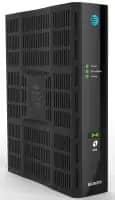
Restarting your All-Fi Hub® or Wi-Fi gateway may help fix common issues with your internet. You can do it on your own or with the Smart Home Manager app.
__Important:__ When you restart your hub or gateway, it will disconnect all devices from the internet or Wi-Fi®. It may take up to five minutes for it to come back online and your devices to reconnect.
### Manual restart
1. Unplug the power cord from the back of your hub or gateway and the wall. (If you have an internal battery backup, remove it.)
2. Wait 20 seconds. Put the internal battery back in, if you have one.
3. Plug the power cord back in and wait for it to restart.
### Smart Home Manager restart
Don’t have the AT&T Smart Home Manager app yet? Download it from the [Apple App Store](https://itunes.apple.com/us/app/smart-home-manager/id1258654743?mt=8 "Link opens in new window") or [Google Play store](https://play.google.com/store/apps/details?id=com.att.shm "Link opens in new window").
1. Open the Smart Home Manager app.
2. Select __Network__ (Wi-Fi icon).
3. Scroll to and select __Restart Wi-Fi__.
4. Select __Restart__ again.
__FYI:__ These gateways and hubs are compatible with Smart Home Manager:
- BGW720, BGW620, BGW320, BGW210
- BGW830, BGW530, CGW450
- NVG599, NVG589
- Pace 5268AC, Pace 5168, Pace 5031NV
- 2Wire 3600HGV, 2Wire 3801HGV, 2Wire 3800HGV-B
Completing a reset on your All-Fi Hub® or Wi-Fi gateway will return it to original factory settings. It will delete any custom settings such as custom Wi-Fi network names and passwords. If you want to use the same Wi-Fi® info after the reset, make sure you write them down so you can set them up again. If you have any other custom settings, such as a static IP address, make sure you note them also.
1. Locate the red __Reset button__ on your hub or gateway. It’s usually found on the back of the device.
2. Press and hold the __Reset__ button for at least 15 seconds. If you let go before 15 seconds, it will restart, but it won’t reset.
3. Wait for it to come back online. This may take up to 10 minutes.
4. Select __Restart__ again.
__FYI:__ If you had a custom Wi-Fi name and password, make sure you [change your Wi-Fi info](https://www.att.com/support/article/internet/KM1212976/ "Link opens in same window"). This way, your devices will be able to reconnect.
Last updated: October 5, 2026
* * *
### Was this info helpful?
[](https://x.com/att)[](https://www.facebook.com/ATT)[](https://www.instagram.com/att/)[](https://www.linkedin.com/company/att/)
### Shop
- [Cell phones](https://www.att.com/buy/phones/)
- [Fiber internet](https://www.att.com/internet/fiber/)
- [Home internet](https://www.att.com/internet/)
- [Tablets](https://www.att.com/buy/tablets/)
- [Smartwatches](https://www.att.com/buy/wearables/)
- [Wireless accessories](https://www.att.com/accessories/)
- [Prepaid phones](https://www.att.com/prepaid/)
### Trending
- [iPhone 18 Pro Max](https://www.att.com/buy/phones/apple-iphone-18-pro-max.html)
- [iPhone 18 Pro](https://www.att.com/buy/phones/apple-iphone-18-pro.html)
- [Foldable iPhone Duo](https://www.att.com/buy/phones/apple-iphone-duo.html)
- [iPhone 17 Pro Max](https://www.att.com/buy/phones/apple-iphone-17-pro-max.html)
- [Samsung Galaxy S26 Ultra](https://www.att.com/buy/phones/samsung-galaxy-s26-ultra.html)
- [Samsung Galaxy Z Fold8 Ultra](https://www.att.com/buy/phones/samsung-galaxy-z-fold8-ultra.html)
- [Samsung Galaxy Z Fold8](https://www.att.com/buy/phones/samsung-galaxy-z-fold8.html)
- [Samsung Galaxy Z Flip8](https://www.att.com/buy/phones/samsung-galaxy-z-flip8.html)
### Top phone & data plans
- [Unlimited phone plans](https://www.att.com/plans/wireless/)
- [International plans](https://www.att.com/international/)
- [Add a line](https://www.att.com/plans/add-a-line/)
- [Upgrade](https://www.att.com/plans/phone-upgrade/)
- [Tablet data plans](https://www.att.com/plans/tablet-ipad-data-plans/)
- [Mobile hotspot plans](https://www.att.com/plans/tethering/)
- [Next Up Anytime](https://www.att.com/plans/next-up-anytime/)
### Switch to AT&T
- [Switch to AT&T](https://www.att.com/wireless/switch-and-save/)
- [How to switch phone carriers](https://www.att.com/wireless/how-to-switch-phone-carrier/)
- [Internet speed test](https://www.att.com/support/speedtest/)
- [Bring your own device](https://www.att.com/wireless/byod/)
- [Cell phone trade-in](https://tradein.att.com/)
- [Transfer your internet service](https://www.att.com/moving/)
- [Device IMEI finder](https://www.att.com/wireless/imei-finder/)
### Featured deals
- [Holiday Gift Guide](https://www.att.com/deals/holiday-gift-guide/)
- [Black Friday Deals](https://www.att.com/deals/black-friday/)
- [Cyber Monday Deals](https://www.att.com/deals/cyber-monday/)
- [AT&T Deals & Promotions](https://www.att.com/deals/)
- [Cell phone deals](https://www.att.com/deals/cell-phone-deals/)
- [iPhone deals](https://www.att.com/deals/iphone-deals/)
- [Samsung deals](https://www.att.com/buy/phones/browse/samsung_hasdeals/)
- [Phone and internet bundle deals](https://www.att.com/bundles/internet-wireless/)
- [Credit card discount](https://www.att.com/deals/att-points-plus-citi/)
- [Free phone deals for new customers](https://www.att.com/buy/phones/browse/free/)
- [No trade-in deals](https://www.att.com/buy/phones/browse/nontradeinoffer/)
- [](https://www.att.com)
### Shop cell phones by brand
- [New Apple iPhones](https://www.att.com/buy/phones/browse/apple/)
- [New Samsung Galaxy phones](https://www.att.com/buy/phones/browse/samsung/)
- [New Google Pixel phones](https://www.att.com/buy/phones/browse/google/)
- [New Motorola Moto phones](https://www.att.com/buy/phones/browse/motorola/)
- [New Sonim phones](https://www.att.com/buy/phones/browse/sonim/)
### Tablets & Watches
- [New Apple iPad](https://www.att.com/buy/tablets/browse/apple/)
- [New Samsung Galaxy Tab](https://www.att.com/buy/tablets/browse/samsung/)
- [New Apple Watch](https://www.att.com/buy/wearables/browse/apple/)
- [New Samsung Galaxy Watch](https://www.att.com/buy/wearables/browse/samsung/)
- [New Google Pixel Watch](https://www.att.com/buy/wearables/browse/google/)
- [New Kids Smart Watch](https://www.att.com/buy/wearables/att-amigo-jr-watch.html)
### Accessories by Brand
- [Apple accessories](https://www.att.com/buy/accessories/browse/all/apple/)
- [AT&T accessories](https://www.att.com/buy/accessories/browse/all/att/)
- [Samsung accessories](https://www.att.com/buy/accessories/browse/all/samsung/)
- [Otterbox phone cases](https://www.att.com/buy/accessories/browse/cases/otterbox/)
- [Beats headphones](https://www.att.com/buy/accessories/browse/headphones/beats/)
### Resources
- [Bundle internet and wireless](https://www.att.com/bundles/)
- [What is Internet Air?](https://www.att.com/internet/what-is-internet-air/)
- [How to use your phone internationally](https://www.att.com/wireless/how-to-use-your-cell-phone-internationally/)
- [What is fiber internet?](https://www.att.com/blog/what-is-fiber-internet/)
- [What is eSIM?](https://www.att.com/wireless/what-is-esim/)
- [Return or exchange your wireless device](https://www.att.com/wireless/return-policy/)
- [What is wifi?](https://www.att.com/blog/what-is-wifi/)
### AT&T
- [Find a store](https://www.att.com/stores/)
- [Newsroom](https://about.att.com/?source=EB00CO0000000000L&wtExtndSource=footer)
- [Investor Relations](https://investors.att.com)
- [Corporate Responsibility](https://sustainability.att.com/)
- [Careers](https://www.att.jobs/)
- [Help & info](https://www.att.com/support/)
- [AT&T Guarantee](https://www.att.com/why-att/guarantee/)
- [Broadband Facts Machine Readable Files](https://www.att.com/broadbandlabels/broadband-facts-machine-readable-plans/)
- [Screen share code](#)
* * *
- [Techbuzz blog](https://www.att.com/blog/)
- [Feedback](#)
- [LLMs](https://www.att.com/llms.txt)
* * *
- [Site map](https://www.att.com/sitemap/)
- [Coverage maps](https://www.att.com/maps/wireless-coverage.html)
- [Terms of use](https://www.att.com/legal/terms.attWebsiteTermsOfUse.html)
- [Accessibility](https://about.att.com/sites/accessibility)
- [Broadband details](https://about.att.com/sites/broadband)
- [Legal policy center](https://www.att.com/legal/legal-policy-center.html)
- [Advertising choices](https://about.att.com/privacy/privacy-notice.html#choice)
- [Privacy center](https://about.att.com/privacy.html)
- [Your Privacy Choices](https://about.att.com/privacy/choices-and-controls.html)
- [Health Privacy Notice](https://about.att.com/privacy/StateLawApproach/washington-health-privacy-notice.html)
- [Cyber Security](https://about.att.com/pages/cyberaware)
- [FCC public files](https://publicfiles.fcc.gov/cable-profile/999999-at&t-u-verse)
©
2026 AT&T Intellectual Property. All rights reserved.
We use [cookies](https://about.att.com/privacy/full_privacy_policy/cookies.html) to help enhance your experience on our site and for analytics. We also may use cookies for marketing purposes. You can manage your preferences and opt out of the sharing for targeted advertising and sales of cookie data.
Learn more about our approach to privacy at [att.com/privacy](https://att.com/privacy).
Manage your preferences Opt out Continue without changes