[Skip Navigation](https://www.att.com#mega-z2_jump_link)
[Personal](https://www.att.com/) [Business](https://www.business.att.com)
[Find a store](https://www.att.com/stores/) [Ver en español](#)
[](https://www.att.com)
- Shop
## Shop
- [Plans & services](#)
- [Devices & accessories](#)
Quick actions [Upgrade](https://www.att.com/upgrade/) [Add a line](https://www.att.com/plans/add-a-line/) [Bring your own device](https://www.att.com/wireless/byod/) [Switch & save](https://www.att.com/wireless/switch-and-save/)
### Bundles
- [Internet + wireless](https://www.att.com/bundles/)
- [AT&T OneConnect](https://www.att.com/oneconnect/)
- [Internet + home phone](https://www.att.com/home-phone/)
- [Customers 55+](https://www.att.com/bundles/55-plus-internet-wireless/)
### Wireless
- [Explore wireless](https://www.att.com/wireless/)
- [Phone plans](https://www.att.com/plans/wireless/)
- [Build-A-Plan](https://www.att.com/plans/build-a-plan/)
- [Network coverage](https://www.att.com/maps/wireless-coverage.html)
- [Prepaid](https://www.att.com/prepaid/)
- [International add-ons](https://www.att.com/international/)
- [Connected car](https://www.att.com/plans/connected-car/)
### Home internet & phone
- [Explore home internet](https://www.att.com/internet/)
- [Check availability](https://www.att.com/internet/availability/)
- [Fiber internet](https://www.att.com/internet/fiber/)
- [AT&T Internet Air](https://www.att.com/internet/internet-air/)
- [All-Fi Pro](https://www.att.com/wi-fi/all-fi-pro)
- [Home phone](https://www.att.com/home-phone/services/)
[__Black Friday deals are here__
\
Shop now](https://www.att.com/deals/black-friday/)
New arrivals [iPhone Duo](https://www.att.com/buy/phones/apple-iphone-duo.html) [iPhone 18 Pro Max](https://www.att.com/buy/phones/apple-iphone-18-pro-max.html) [Galaxy Z Fold8](https://www.att.com/buy/phones/samsung-galaxy-z-fold8.html) [AirPods Pro 3](https://www.att.com/buy/accessories/Headphones/apple-airpods-pro-3.html) [Pixel 11 Pro](https://www.att.com/buy/phones/google-pixel-11-pro.html)
### Devices
- [Phones](https://www.att.com/buy/phones/)
- [Prepaid phones](https://www.att.com/buy/prepaid-phones/)
- [Tablets](https://www.att.com/buy/tablets/)
- [Smartwatches](https://www.att.com/buy/wearables/)
- [AT&T Certified Pre-Owned](https://www.att.com/buy/phones/browse/att-certified-preowned)
### Accessories
- [Shop all accessories](https://www.att.com/accessories/)
- [Cases](https://www.att.com/buy/accessories/browse/cases/)
- [Chargers](https://www.att.com/buy/accessories/browse/chargers/)
- [Screen protectors](https://www.att.com/buy/accessories/browse/screen-protectors/)
- [Headphones](https://www.att.com/buy/accessories/browse/headphones/)
### Brands
- [Apple](https://www.att.com/buy/phones/browse/apple/)
- [Samsung](https://www.att.com/buy/phones/browse/samsung/)
- [Motorola](https://www.att.com/buy/phones/browse/motorola/)
- [Google](https://www.att.com/buy/phones/browse/google/)
- [Meta](https://www.att.com/buy/accessories/browse/all/meta/)
[__Get the new iPhone 18 Pro for $0 with eligible iPhone trade-in__
\
Shop now](https://www.att.com/buy/phones/apple-iphone-18-pro.html)
- Deals
## Deals
- [New & featured](#)
- [Customer discounts](#)
Featured [Shop all deals](https://www.att.com/deals/) [Wireless deals](https://www.att.com/deals/cell-phone-deals/) [Internet deals](https://www.att.com/deals/internet/) [Trade-in offers](https://www.att.com/buy/phones/browse/tradeinoffer/) [No trade-in offers](https://www.att.com/buy/phones/browse/nontradeinoffer/)
### Trending deals
- [Samsung Galaxy](https://www.att.com/buy/phones/browse/samsung_hasdeals/)
- [Apple iPhone](https://www.att.com/deals/iphone-deals/)
- [Under $50](https://www.att.com/buy/accessories/browse/all/price-range-25-50_price-range-5-25_5-and-under/)
- [Black Friday deals](https://www.att.com/deals/black-friday/)
### Device & accessory deals
- [Phones](https://www.att.com/buy/phones/browse/hasdeals/)
- [Prepaid phones](https://www.att.com/buy/prepaid-phones/browse/hasdeals/)
- [Tablets](https://www.att.com/buy/tablets/browse/hasdeals/)
- [Smartwatches](https://www.att.com/buy/wearables/browse/hasdeals/)
- [Accessory deals](https://www.att.com/buy/accessories/browse/all/deals/)
### Subscriptions
- [Build-A-Plan](https://www.att.com/plans/build-a-plan/)
- [AT&T OneConnect](https://www.att.com/oneconnect/)
[__Switch to AT&T and learn how to get up to $800/line to break your contract__
\
Shop now](https://www.att.com/buy/phones/)
### Discounts by occupation
- [Business employees](https://www.att.com/verification/signaturehub/#employment)
- [Military & veterans](https://www.att.com/offers/discount-program/military-discount/)
- [Teachers](https://www.att.com/offers/discount-program/teacher/)
- [Nurses & physicians](https://www.att.com/verification/signaturehub/#medical)
- [Active responders](https://www.att.com/firstnetandfamily/)
### Discounts by affiliation
- [Customers 55+](https://www.att.com/verification/signaturehub/#age)
- [Retired responders](https://www.att.com/offers/discount-program/retired-responders/)
- [Union workers](https://www.att.com/offers/discount-program/union-discount/)
- [Students](https://www.att.com/verification/signaturehub/#student)
### Partner savings
- [Credit card discount](https://www.att.com/deals/att-points-plus-citi/)
- [&More Benefits](https://andmorebenefits.att.com/root-discovery)
- AT&T Difference
## AT&T Difference
- [Our competitive edge](#)
- [Our sponsorships](#)
- [Our blog](#)
### Why choose us
- [AT&T Guarantee](https://www.att.com/why-att/guarantee/)
- [Why AT&T](https://www.att.com/why-att/)
- [AT&T vs. T-Mobile & Verizon](https://www.att.com/wireless/switch-and-save/#compare-us)
- [AT&T Fiber vs. Spectrum & Xfinity](https://www.att.com/internet/fiber/#compare-us)
- [Try AT&T for free](https://www.att.com/wireless/free-trial/)
- [Switch & save](https://www.att.com/wireless/switch-and-save/)
### Exceptional coverage
- [5G coverage map](https://www.att.com/maps/wireless-coverage.html)
- [Fiber coverage map](https://www.att.com/internet/fiber/coverage-map/)
[__Backed by the AT&T Guarantee®__
\
Learn more](https://www.att.com/why-att/guarantee/)
### Sports
- [Soccer](https://www.att.com/sponsorship/soccer)
- [Basketball](https://www.att.com/sponsorship/basketball)
- [Golf](https://www.att.com/sponsorship/golf)
- [Football](https://www.att.com/sponsorship/football/)
### Music, Arts & Culture
- [Music](https://www.att.com/sponsorship/music)
[__Backed by the AT&T Guarantee®__
\
Learn more](https://www.att.com/why-att/guarantee/)
### Internet
- [10 benefits of fiber internet](https://www.att.com/blog/10-benefits-of-fiber-internet/)
- [What internet connection do I need for streaming?](https://www.att.com/blog/internet-connection-for-streaming/)
- [Can you get internet without cable?](https://www.att.com/blog/internet-without-cable/)
### Wireless/Phones
- [What is mobile security?](https://www.att.com/blog/what-is-mobile-security/)
- [Foldable phones: Fold vs. flip and how to choose](https://www.att.com/blog/foldable-phones/)
- [Do I really need unlimited data on my phone plan?](https://www.att.com/blog/do-i-really-need-unlimited-data/)
- [What age should a kid get a phone? A parent’s guide](https://www.att.com/blog/what-age-should-a-kid-get-a-phone/)
### Technology
- [10 benefits of AI](https://www.att.com/blog/10-benefits-of-ai/)
- [Internet vs. Wi-Fi: Are they different?](https://www.att.com/blog/internet-vs-wi-fi-are-they-different/)
- [What is cloud storage?](https://www.att.com/blog/what-is-cloud-storage/)
- [Download vs upload speed](https://www.att.com/blog/download-speed-vs-upload-speed/)
[__Backed by the AT&T Guarantee®__
\
Learn more](https://www.att.com/why-att/guarantee/)
- Support
## Support
- [Bill & account](#)
- [Wireless](#)
- [Internet](#)
- [Home phone](#)
Quick actions [View all support](https://www.att.com/support/) [Go to my account](https://www.att.com/acctmgmt/overview) [Payment center](https://www.att.com/acctmgmt/mypaymentcenter) [Billing center](https://www.att.com/acctmgmt/billing/mybillingcenter)
### Bill & payments
- [Understand your bill](https://www.att.com/support/my-account/understand-your-bill/)
- [Find out why your bill changed](https://www.att.com/support/article/my-account/KM1051879/)
- [Set up and manage AutoPay](https://www.att.com/acctmgmt/mypaymentcenter?intent=MANAGEAUTOPAY)
- [View device installments](https://www.att.com/acctmgmt/payment/installmentplandetails)
- [Pay without signing in](https://www.att.com/acctmgmt/fastpmt/fastpay)
### Account
- [Change or reset password](https://www.att.com/support/article/my-account/KM1008941/)
- [Add or remove accounts](https://www.att.com/support/article/my-account/KM1008925/)
- [Move internet service](https://www.att.com/help/moving/)
- [View my orders and claims](https://www.att.com/orders/history)
- [More account help](https://www.att.com/support/my-account/)
[__America’s best guarantee__
\
Learn more](https://www.att.com/why-att/guarantee/)
Quick actions [Manage my wireless service](https://www.att.com/acctmgmt/mywireless) [Track my order](https://www.att.com/orders/history) [Add AT&T International Day Pass](https://www.att.com/acctmgmt/signin?intent=DEEPLINK&soc=IRRLHDF&level=CAT&source=ILC242589969&wtExtndSource=Megamenu)
### My device
- [Check my usage](https://www.att.com/acctmgmt/usage/mysummary)
- [Manage add-ons](https://www.att.com/acctmgmt/wireless/manage-addon)
- [Change my plan](https://www.att.com/acctmgmt/mywireless/manageplan/)
- [Add a line](https://www.att.com/buy/postpaid/?wlsfi=AL)
- [Check upgrade eligibility](https://www.att.com/buy/postpaid/?wlsfi=up)
- [Activate a wireless device](https://www.att.com/support/how-to/wireless/get-started/)
### Device options
- [Manage eSIM](https://www.att.com/acctmgmt/wireless/manage-esim)
- [Suspend wireless service](https://www.att.com/acctmgmt/wireless/suspend)
- [Transfer a number to AT&T](https://www.att.com/acctmgmt/wireless/transfer-number)
- [Change phone number](https://www.att.com/acctmgmt/wireless/change-number)
- [Unlock a device](https://www.att.com/acctmgmt/wireless/device-unlock)
### Wireless help
- [Check for outages](https://www.att.com/outages/)
- [Use device hotspot](https://www.att.com/support/article/wireless/KM1009376/)
- [Device protection & warranty](https://www.att.com/support/device-protection-warranty/)
- [More wireless help](https://www.att.com/support/wireless/)
[__America’s best guarantee__
\
Learn more](https://www.att.com/why-att/guarantee/)
Quick actions [Manage my internet service](https://www.att.com/acctmgmt/myinternet) [Track my order](https://www.att.com/orders/history) [Get help moving](https://www.att.com/help/moving/)
### Equipment
- [Restart a gateway](https://www.att.com/support/article/internet/KM1010361/)
- [Find Wi-Fi info](https://www.att.com/support/article/internet/KM1203150/)
- [Run internet speed test](https://www.att.com/support/speedtest/)
- [Set up Internet Air](https://www.att.com/support/article/internet/KM1489093/)
### Troubleshooting
- [Check for outages](https://www.att.com/outages/)
- [Manage appointments](https://www.att.com/orders/history)
- [Optimize connection](https://www.att.com/support/how-to/optimize-your-connection/)
- [More internet help](https://www.att.com/support/internet/)
[__America’s best guarantee__
\
Learn more](https://www.att.com/why-att/guarantee/)
### Home phone
- [AT&T Phone](https://www.att.com/home-phone/)
- [AT&T Phone – Advanced](https://www.att.com/home-phone/phone-advanced/)
[__America’s best guarantee__
\
Learn more](https://www.att.com/why-att/guarantee/)
Search site
Search or chat
Your cart is empty
Let's get shopping!
[Explore bundles](https://www.att.com/bundles) [Shop phones](https://www.att.com/buy/phones)
[Sign in](https://www.att.com/acctmgmt/signin?final_url=https%3A%2F%2Fwww.att.com%2Fsupport%2Farticle%2Finternet%2FKM1050507%2F) [Create an account](https://www.att.com/acctmgmt/wam/registration/manual/landing) [Forgot user ID?](https://identity.att.com/identity-ui/fid/lander?trid=9806a0fd32a18ad2ce22ba62b72f0d6f8631e5e1&Return_URL=https%3A%2F%2Foidc.idp.clogin.att.com%2Fmga%2Fsps%2Foauth%2Foauth20%2Fauthorize%3Fresponse_type%3Did_token%26client_id%3Dm14186%26redirect_uri%3Dhttps%253A%252F%252Fwww.att.com%252Fmsapi%252Flogin%252Funauth%252Fservice%252Fv1%252Fhaloc%252Foidc%252Fredirect%26state%3Dfrom%253Dnx%26scope%3Dopenid%26response_mode%3Dform_post%26nonce%3DH0ihL2qQ&Cancel_URL=https%3A%2F%2Foidc.idp.clogin.att.com%2Fmga%2Fsps%2Foauth%2Foauth20%2Fauthorize%3Fresponse_type%3Did_token%26client_id%3Dm14186%26redirect_uri%3Dhttps%253A%252F%252Fwww.att.com%252Fmsapi%252Flogin%252Funauth%252Fservice%252Fv1%252Fhaloc%252Foidc%252Fredirect%26state%3Dfrom%253Dnx%26scope%3Dopenid%26response_mode%3Dform_post%26nonce%3DH0ihL2qQ&lang=en-us)
* * *
[Make a payment](https://www.att.com/acctmgmt/payment/makepayment) [Pay without signing in](https://www.att.com/acctmgmt/fastpmt/fastpay) [Go to my prepaid account](https://www.paygonline.com/websc/loginPage.html)
## Welcome back!
[Switch user](https://www.att.com/acctmgmt/logout?kmsi=y&target_url=https%3A%2F%2Fwww.att.com%2Facctmgmt%2Flogin)
[Sign out](https://www.att.com/acctmgmt/logout?kmsi=n)
Quick actions [&More Benefits](https://andmorebenefits.att.com/) [My favorites](https://www.att.com/myfavorites/) [Privacy choices](https://www.att.com/acctmgmt/myprofile/overview?flow=privacy-choices)
### Account overview
- [Check my notifications](#)
- [Go to my account](https://www.att.com/acctmgmt/overview)
- [Update my profile](https://www.att.com/acctmgmt/myprofile/overview)
- [View my orders & claims](https://www.att.com/orders/history)
- [Go to my prepaid account](https://www.paygonline.com/websc/loginPage.html)
### Bill & payments
- [Make a payment](https://www.att.com/acctmgmt/payment/makepayment)
- [See my bill](https://www.att.com/acctmgmt/billing/mybillingcenter)
## Welcome back!
[Sign out](https://www.att.com/acctmgmt/logout?kmsi=n)
[Switch user](https://www.att.com/acctmgmt/logout?kmsi=y&target_url=https%3A%2F%2Fwww.att.com%2Facctmgmt%2Flogin)
### Account overview
- [Check my notifications](#)
- [Go to my account](https://www.att.com/acctmgmt/overview)
- [Update my profile](https://www.att.com/acctmgmt/myprofile/overview)
- [View my orders & claims](https://www.att.com/orders/history)
- [Go to my prepaid account](https://www.paygonline.com/websc/loginPage.html)
### Bill & payments
- [Make a payment](https://www.att.com/acctmgmt/payment/makepayment)
- [See my bill](https://www.att.com/acctmgmt/billing/mybillingcenter)
### Quick actions
- [&More Benefits](https://andmorebenefits.att.com/)
- [My favorites](https://www.att.com/myfavorites/)
- [Privacy choices](https://www.att.com/acctmgmt/myprofile/overview?flow=privacy-choices)
Search or chat
[](https://www.att.com)
## Shop
- [Plans & services](#)
- [Devices & accessories](#)
## Deals
- [New & featured](#)
- [Customer discounts](#)
- [View all deals](https://www.att.com/deals/)
## AT&T Difference
- [Our competitive edge](#)
- [Our sponsorships](#)
- [Our blog](#)
## Support
- [Bill & account](#)
- [Wireless](#)
- [Internet](#)
- [Home phone](#)
- [View all support](https://www.att.com/support/)
- [AT&T Business](https://www.business.att.com/)
- [Find a store](https://www.att.com/stores/)
- [Ver en español](javascript:void%280%29;)
Back
Shop
## Plans & services
### Bundles
- [Internet + wireless](https://www.att.com/bundles/)
- [AT&T OneConnect](https://www.att.com/oneconnect/)
- [Internet + home phone](https://www.att.com/home-phone/)
- [Customers 55+](https://www.att.com/bundles/55-plus-internet-wireless/)
### Wireless
- [Explore wireless](https://www.att.com/wireless/)
- [Phone plans](https://www.att.com/plans/wireless/)
- [Build-A-Plan](https://www.att.com/plans/build-a-plan/)
- [Network coverage](https://www.att.com/maps/wireless-coverage.html)
- [Prepaid](https://www.att.com/prepaid/)
- [International add-ons](https://www.att.com/international/)
- [Connected car](https://www.att.com/plans/connected-car/)
### Home internet & phone
- [Explore home internet](https://www.att.com/internet/)
- [Check availability](https://www.att.com/internet/availability/)
- [Fiber internet](https://www.att.com/internet/fiber/)
- [AT&T Internet Air](https://www.att.com/internet/internet-air/)
- [All-Fi Pro](https://www.att.com/wi-fi/all-fi-pro)
- [Home phone](https://www.att.com/home-phone/services/)
### Quick actions
- [Upgrade](https://www.att.com/upgrade/)
- [Add a line](https://www.att.com/plans/add-a-line/)
- [Bring your own device](https://www.att.com/wireless/byod/)
- [Switch & save](https://www.att.com/wireless/switch-and-save/)
Start of main content
1. [Home](https://www.att.com/)
2. [Support](https://www.att.com/support/)
3. [AT&T Internet](https://www.att.com/support/internet/)
# Learn about your NVG599
Get details on using your NVG599 to connect to the internet and find help for common issues.
* * *
You’re viewing instructions for
Internet equipment
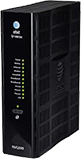
Arris
NVG599
KM1050507-slctrgrp\_arrnvg599
* * *
Status lightsStatus lightsWi-Fi infoWi-Fi infoAdvanced settingsAdvanced settings
### Power light
- __Green (solid):__ Power is on
- __Green (flashing):__ Power-On Self-Test (POST) is in progress.
- __Red (flashing):__ A POST failure (not bootable) or device malfunction occurred.
- __Orange/Amber:__ Firmware upgrade is in progress.
- __Off:__ The unit has no AC power.
### Battery light
- __Green (solid):__ Battery is in place but isn’t being used.
- __Green (flashing):__ The battery is charging.
- __Red (solid):__ The battery backup is faulty.
- __Red (flashing):__ The battery should be replaced.
- __Amber (solid):__ The battery is in use.
- __Amber (flashing):__ The battery is low.
- __Off:__ There isn’t a battery, or the battery isn’t charged.
### Ethernet light
- __Green (solid):__ A computer or device is connected to an Ethernet port.
- __Green (flickering):__ There’s activity from a device connected to an Ethernet port. The flicker is synchronized to data traffic.
### Wi-Fi light
- __Green (solid):__ A computer or device is connected by Wi-Fi® to the gateway.
- __Green (flickering):__ There’s activity from a device connected through Wi-Fi. The flicker is synchronized to data traffic.
### HomePNA light
- __Green (solid):__ A powered device is connected to the associated port.
- __Green (flickering):__ There’s activity from devices connected to the port. The flicker is synchronized to data traffic.
### Broadband 1, 2 light
- __Green (solid):__ The gateway is connected to our network.
- __Green (flashing):__ The gateway is trying to connect to our network.
- __Green & red (flashing):__ The gateway has been trying to connect to our network for more than three minutes.
- __Red (flashing):__ The gateway can't connect to our network or isn’t detecting a DSL signal.
### Service
- __Green (solid):__ The gateway has obtained an IP address from our network. The connection is active.
- __Green (flashing):__ The gateway is trying to obtain an IP address.
- __Red (solid):__ Internet service authentication has failed.
### Phone 1, 2 light
- __Green (solid):__ A phone is connected and registered.
- __Green (flashing):__ A phone is off the hook on the associated line.
### USB light
- __Green (solid):__ A device is connected to the USB port.
- __Green (flashing):__ There’s activity from a device connected to the USB port. The flicker is synchronized to data traffic.
### WPS light
This appears after using the WPS button.
- Green (solid): Wi-Fi Protected setup completed successfully.
- Green (flashing): WPS is broadcasting to connect devices.
- Red (flashing): Session overlap was detected.
- Red (solid): WPS is disabled, or a WPS connection failed.
### Status lights during firmware upgrades
Firmware updates keep your Wi-Fi gateway running smoothly. During the software installation, you’ll lose internet and phone service. The lights will function as follows:
- As firmware is being loaded into flash, the lights will operate normally as described.
- During firmware upgrade installation, the Power light will flash Orange/Amber and all other lights will be off.
### Find Wi-Fi info
Get your Wi-Fi® name and password to connect devices to your network:
- __Wi-Fi gateway:__ Look for a sticker with your Wi-Fi name and password.
- __QR code:__ Use your mobile device to automatically connect devices to your hub.
- __Smart Home Manager:__ Open [Smart Home Manager](http://www.att.com/shm "Link opens in a new window") and look for __My Wi-Fi__.
### Change Wi-Fi name
1. Sign in to [Smart Home Manager](https://att-my.sharepoint.com/personal/mm469j_att_com/Documents/att.com/shm "Link opens in a new window")
2. Scroll to the __My Wi-Fi card__ and choose __Change__ next to the name or password.
3. Select __X__ to clear existing info, then enter a new name or password.
4. Select __Save__.
Once you finish making changes, reconnect your devices with the updated network info.
__FYI:__ You can also update your Wi-Fi from your [Wi-Fi gateway settings](http://192.168.1.254/ "Link opens in a new window").
### Manage Wi-Fi security
Your gateway comes with the security __On__. If the security was turned __Off__, this is how to turn it back on.
1. Go to your [gateway settings](http://192.168.1.254/ "Link opens in a new window.").
2. Select __Home Network__, then __Wireless__.
3. Enter the __Device Access Code__ (found on the gateway) in __Password__.
4. Make sure __AT&T ID__ is __On__.
5. Scroll to Security and select __WPA-PSK__ from the dropdown.
6. Enter the new __Wi-Fi password__ (__Wireless Key__) in __Key entry__.
- For 64-bit encryption, enter a 10-digit password made up of numbers and letters a-f or A-F.
- For 128-bit encryption, enter a 26-digit hexadecimal number made up of numbers and letters a-f or A-F.
7. Select __Save__.
### Hide Wi-Fi info
__Important:__ Before following these steps, be sure to store your Wi-Fi network name and password in a safe location. You’ll have to manually enter them after your network name is hidden. Then, choose your equipment type to get detailed instructions.
1. Go to your [gateway settings](http://192.168.1.254/ "Link opens in a new window.").
2. Select __Home Network__ and then __Wi-Fi.__
3. Enter the __Device Access Code__ found on your gateway and select __Continue.__
4. Go to the __Wi-Fi section__ and choose __Advanced Options.__
5. Under __2.4Hz Radio__ or __5.0Hz Radio__ scroll to __Home SSID.__
6. Look for __Hide Network Name__ and select __On__ from the dropdown.
7. Select __Save.__
### Port forwarding
__Important:__ Use port forwarding with caution. It may allow others to access devices in your home without your knowledge.
To open a port for user-defined applications:
1. Go to your [gateway settings](http://192.168.1.254/ "Link opens in a new window.").
2. Select __Firewall__.
3. Enter the __Device Access Code__ found on your gateway.
4. Select __NAT/Gaming__. If you get a warning message, restart your Wi-Fi gateway. Then, continue with these steps.
5. Select __Continue__.
6. Select the application for port forwarding from the __Service__ drop-down. If you don’t see your application, or you're setting up port forwarding for a device:
- Select __Custom Services__.
- Enter the name for the application or device in __Service Name__.
- Enter the port(s) you wish to open for __Global Port Range__. It's recommended to create a separate service entry for each port as opposed to using a port range. In this case the port number should be the same in the Global Port Range fields.
- In __Base Host Port__, enter the port number used in the first field of the __Global Port Range__ section.
- Select the appropriate __Protocol__ from the drop-down for the application or device you want to add.
- Select __Add__. Repeat as needed for other applications and devices.
- Select __Return to NAT/Gaming__ when you’ve added all applications or devices. Your new applications or devices will display in the Applications list.
7. Select the __device name__ or __IP address__ of the device you wish to open the port from __Needed by Device__, then select __Add__.
8. Select __Save__ when your selection displays in __Hosted Applications__.
Last updated: April 8, 2026
* * *
## Browse topics
Connections, browsing & security
Installation & order status
Troubleshooting & repair
Wi-Fi gateways & equipment
Learn about internet and Wi-Fi connections, tools, and security.
Advanced information
Apps & tools
Home network & Wi-Fi gateway connections
Security & safety
Web browsing & internet speeds
### Was this info helpful?
[](https://x.com/att)[](https://www.facebook.com/ATT)[](https://www.instagram.com/att/)[](https://www.linkedin.com/company/att/)
### Shop
- [Cell phones](https://www.att.com/buy/phones/)
- [Fiber internet](https://www.att.com/internet/fiber/)
- [Home internet](https://www.att.com/internet/)
- [Tablets](https://www.att.com/buy/tablets/)
- [Smartwatches](https://www.att.com/buy/wearables/)
- [Wireless accessories](https://www.att.com/accessories/)
- [Prepaid phones](https://www.att.com/prepaid/)
### Trending
- [iPhone 18 Pro Max](https://www.att.com/buy/phones/apple-iphone-18-pro-max.html)
- [iPhone 18 Pro](https://www.att.com/buy/phones/apple-iphone-18-pro.html)
- [Foldable iPhone Duo](https://www.att.com/buy/phones/apple-iphone-duo.html)
- [iPhone 17 Pro Max](https://www.att.com/buy/phones/apple-iphone-17-pro-max.html)
- [Samsung Galaxy S26 Ultra](https://www.att.com/buy/phones/samsung-galaxy-s26-ultra.html)
- [Samsung Galaxy Z Fold8 Ultra](https://www.att.com/buy/phones/samsung-galaxy-z-fold8-ultra.html)
- [Samsung Galaxy Z Fold8](https://www.att.com/buy/phones/samsung-galaxy-z-fold8.html)
- [Samsung Galaxy Z Flip8](https://www.att.com/buy/phones/samsung-galaxy-z-flip8.html)
### Top phone & data plans
- [Unlimited phone plans](https://www.att.com/plans/wireless/)
- [International plans](https://www.att.com/international/)
- [Add a line](https://www.att.com/plans/add-a-line/)
- [Upgrade](https://www.att.com/plans/phone-upgrade/)
- [Tablet data plans](https://www.att.com/plans/tablet-ipad-data-plans/)
- [Mobile hotspot plans](https://www.att.com/plans/tethering/)
- [Next Up Anytime](https://www.att.com/plans/next-up-anytime/)
- [Country calling codes](https://www.att.com/international/country-calling-codes/)
### Switch to AT&T
- [Switch to AT&T](https://www.att.com/wireless/switch-and-save/)
- [How to switch phone carriers](https://www.att.com/wireless/how-to-switch-phone-carrier/)
- [Internet speed test](https://www.att.com/support/speedtest/)
- [Bring your own device](https://www.att.com/wireless/byod/)
- [Cell phone trade-in](https://tradein.att.com/)
- [Transfer your internet service](https://www.att.com/moving/)
- [Device IMEI finder](https://www.att.com/wireless/imei-finder/)
### Featured deals
- [Holiday Gift Guide](https://www.att.com/deals/holiday-gift-guide/)
- [Black Friday Deals](https://www.att.com/deals/black-friday/)
- [Cyber Monday Deals](https://www.att.com/deals/cyber-monday/)
- [AT&T Deals & Promotions](https://www.att.com/deals/)
- [Cell phone deals](https://www.att.com/deals/cell-phone-deals/)
- [iPhone deals](https://www.att.com/deals/iphone-deals/)
- [Samsung deals](https://www.att.com/buy/phones/browse/samsung_hasdeals/)
- [Phone and internet bundle deals](https://www.att.com/bundles/internet-wireless/)
- [Credit card discount](https://www.att.com/deals/att-points-plus-citi/)
- [Free phone deals for new customers](https://www.att.com/buy/phones/browse/free/)
- [No trade-in deals](https://www.att.com/buy/phones/browse/nontradeinoffer/)
### Shop cell phones by brand
- [New Apple iPhones](https://www.att.com/buy/phones/browse/apple/)
- [New Samsung Galaxy phones](https://www.att.com/buy/phones/browse/samsung/)
- [New Google Pixel phones](https://www.att.com/buy/phones/browse/google/)
- [New Motorola Moto phones](https://www.att.com/buy/phones/browse/motorola/)
- [New Sonim phones](https://www.att.com/buy/phones/browse/sonim/)
### Tablets & Watches
- [New Apple iPad](https://www.att.com/buy/tablets/browse/apple/)
- [New Samsung Galaxy Tab](https://www.att.com/buy/tablets/browse/samsung/)
- [New Apple Watch](https://www.att.com/buy/wearables/browse/apple/)
- [New Samsung Galaxy Watch](https://www.att.com/buy/wearables/browse/samsung/)
- [New Google Pixel Watch](https://www.att.com/buy/wearables/browse/google/)
- [New Moto Watches](https://www.att.com/buy/wearables/browse/motorola/)
- [New Kids Smart Watch](https://www.att.com/buy/wearables/att-amigo-jr-watch.html)
### Accessories by Brand
- [Apple accessories](https://www.att.com/buy/accessories/browse/all/apple/)
- [AT&T accessories](https://www.att.com/buy/accessories/browse/all/att/)
- [Samsung accessories](https://www.att.com/buy/accessories/browse/all/samsung/)
- [Otterbox phone cases](https://www.att.com/buy/accessories/browse/cases/otterbox/)
- [Beats headphones](https://www.att.com/buy/accessories/browse/headphones/beats/)
### Resources
- [Bundle internet and wireless](https://www.att.com/bundles/)
- [What is Internet Air?](https://www.att.com/internet/what-is-internet-air/)
- [How to use your phone internationally](https://www.att.com/wireless/how-to-use-your-cell-phone-internationally/)
- [What is fiber internet?](https://www.att.com/blog/what-is-fiber-internet/)
- [What is eSIM?](https://www.att.com/wireless/what-is-esim/)
- [Return or exchange your wireless device](https://www.att.com/wireless/return-policy/)
- [What is wifi?](https://www.att.com/blog/what-is-wifi/)
### AT&T
- [Find a store](https://www.att.com/stores/)
- [Newsroom](https://about.att.com/?source=EB00CO0000000000L&wtExtndSource=footer)
- [Investor Relations](https://investors.att.com)
- [Corporate Responsibility](https://sustainability.att.com/)
- [Careers](https://www.att.jobs/)
- [Help & info](https://www.att.com/support/)
- [AT&T Guarantee](https://www.att.com/why-att/guarantee/)
- [Broadband Facts Machine Readable Files](https://www.att.com/broadbandlabels/broadband-facts-machine-readable-plans/)
- [Screen share code](#)
* * *
- [Techbuzz blog](https://www.att.com/blog/)
- [Feedback](#)
- [LLMs](https://www.att.com/llms.txt)
* * *
- [Site map](https://www.att.com/sitemap/)
- [Coverage maps](https://www.att.com/maps/wireless-coverage.html)
- [Terms of use](https://www.att.com/legal/terms.attWebsiteTermsOfUse.html)
- [Accessibility](https://about.att.com/sites/accessibility)
- [Broadband details](https://about.att.com/sites/broadband)
- [Legal policy center](https://www.att.com/legal/legal-policy-center.html)
- [Advertising choices](https://about.att.com/privacy/privacy-notice.html#choice)
- [Privacy center](https://about.att.com/privacy.html)
- [Your Privacy Choices](https://about.att.com/privacy/choices-and-controls.html)
- [Health Privacy Notice](https://about.att.com/privacy/StateLawApproach/washington-health-privacy-notice.html)
- [Cyber Security](https://about.att.com/pages/cyberaware)
- [FCC public files](https://publicfiles.fcc.gov/cable-profile/999999-at&t-u-verse)
©
2026 AT&T Intellectual Property. All rights reserved.