Forgot AT&T Wi-Fi Manager Log On
The default password for the WebUI is ‘admin’.
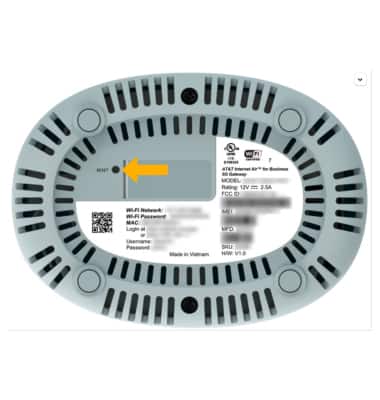
If you forget your 5G Gateway Password to Admin Web Page, a factory reset will erase all configuration settings and put the device back to its factory state. With the 5G Gateway on its side, use a SIM Tool to press and hold the Reset button on the bottom of the 5G Gateway. The 5G Gateway will take a moment to reset. After resetting the password to the Admin Web Page will be the password on the bottom of the 5G Gateway.
Note: Ensure that your device is connected to your 5G Gateway's Wi-Fi network. For more information, please see the Connect Devices to Wi-Fi or Connect PC or Mac to Wi-Fi tutorials. After a factory reset**, the default password will be ‘admin’. You will be prompted to change the admin password upon initial access.