Block or Unblock Calls
Block or unblock calls from your device.
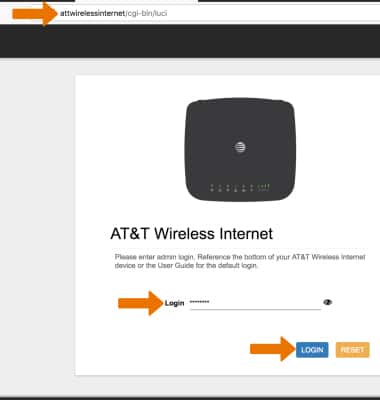
1. From a device that is connected to the AT&T Wireless Internet network, open the web browser and go to http://attwirelessinternet. Enter your Login and then click LOGIN.
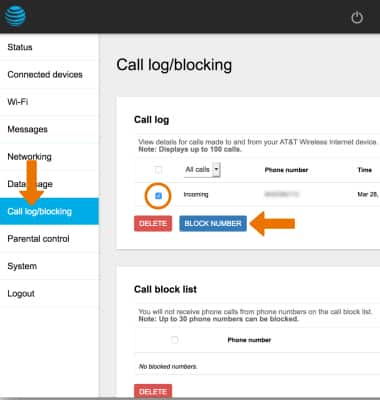
2. BLOCK PHONE NUMBER: Click Call log/blocking then click the checkbox next to the desired phone number you wish to block. Click BLOCK NUMBER.
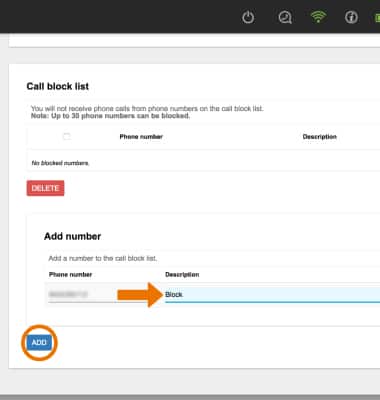
3. Enter a description for the phone number, if desired, then click ADD.
Note: You will be prompted to click OK to confirm.
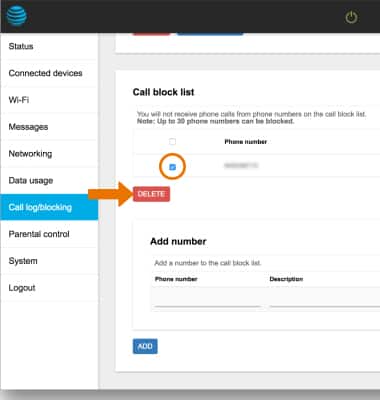
4. UNBLOCK PHONE NUMBER: Click the checkbox next to the desired phone number you want to unblock, then click DELETE.
Note: You will be prompted to click OK to confirm.