Block or Unblock Messages
Block messages from your device.
In this tutorial, you will learn how to:
• Block messages
• Unblock messages
• Block unknown numbers
Block messages
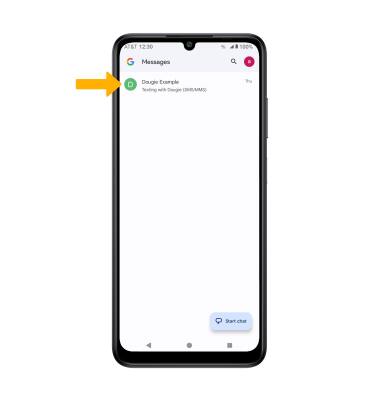
- From the home screen, select the
 Messages app.
 - Select and hold the desired message thread.
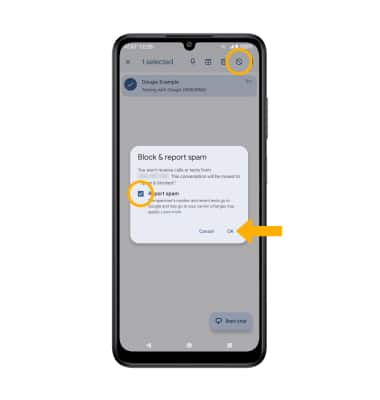
3. Select the  Block icon. Select the Report spam checkbox to have the number reported to Google, then select OK to confirm.
Unblock messages
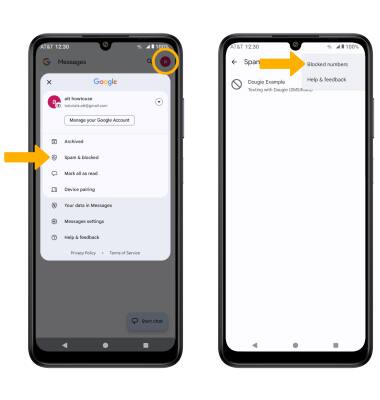
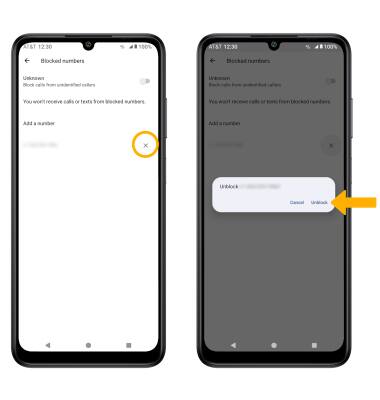
1. To remove a number from the Blocked numbers list, from the Messages app, select the  Account icon,then select Spam & blocked. Select the
  Menu icon, then select Blocked numbers.
3. Select the X symbol next to the desired contact or number, then select Unblock.
Block unknown numbers
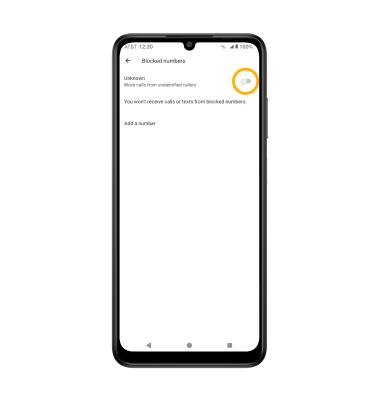
From the Blocked numbers screen, select the Unknown switch.
Note: Alternatively, from the home screen, select the

Phone app > Menu icon > Settings > Blocked numbers > Unknown switch.