Mobile Hotspot
In this tutorial, you will learn how to:
• Turn mobile hotspot on/off
• View mobile hotspot network name & connected devices
• Configure hotspot settings
When Mobile Hotspot is enabled, the  Mobile hotspot icon will be displayed in the Notification bar.
Turn mobile hotspot on/off
- Swipe down from the Notification bar with two fingers, then select the
 Settings icon.
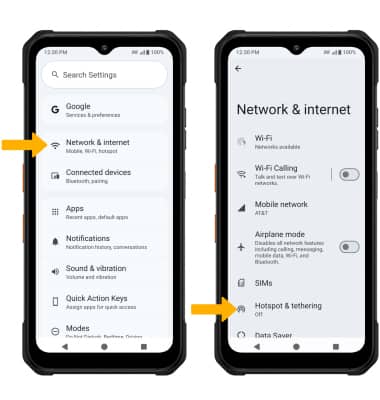
 - Select Network & internet, then select Hotspot & tethering.
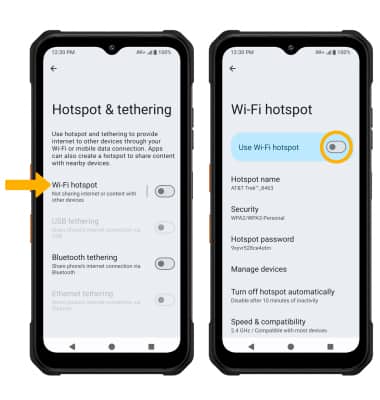
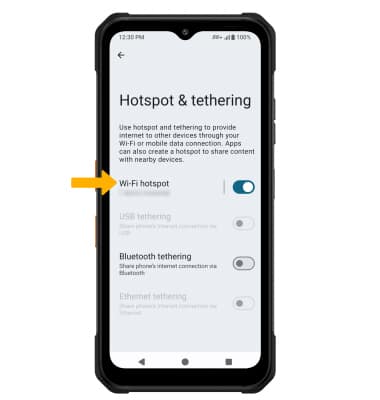
3. Select Wi-Fi hotspot, then select the Use Wi-Fi hotspot switch.
View mobile hotspot network name & connected devices
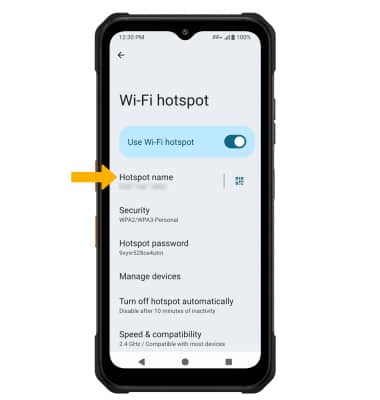
VIEW MOBILE HOTSPOT NETWORK NAME: The Wi-Fi hotspot Network name will be displayed on the Wi-Fi hotspot screen.
VIEW CONNECTED DEVICES: From the Hotspot & tethering screen, connected devices will be displayed under Wi-Fi hotspot.
Configure hotspot settings
1. From the Wi-Fi hotspot screen, select the desired network setting:
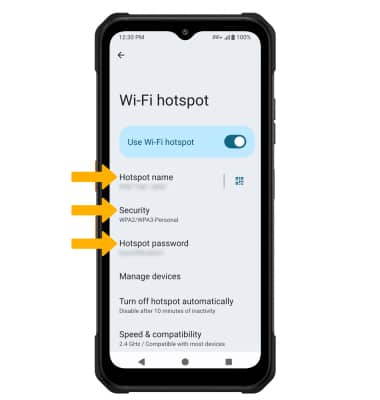
• HOTSPOT NAME: Change the N****ame of the Wi-Fi hotspot network.
• SECURITY: Change the Security type of the Wi-Fi hotspot network.
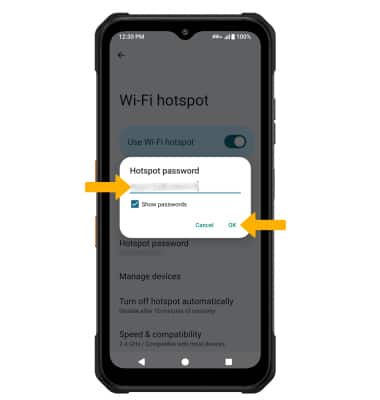
• HOTSPOT PASSWORD: View or change the Password of the Wi-Fi hotspot network.
2. Edit the desired information, then select OK when finished.