Keypad & Typing
In this tutorial, you will learn how to:
• Access keypad settings
• Access and use auto-complete suggestions
• Access text entry modes
Access keypad settings
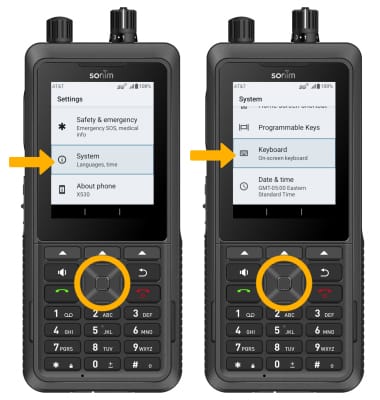
- From the home screen, press the Center Dynamic key to access the Menu. Press the navigation keys to highlight the
 Settings app, then press the Select button to select.
 - Use the navigation keys to highlight System, then press Select button. Press the navigation keys to highlight Keyboard, then press Select button.
3. Press the Select button to select On-screen keyboard, then press the Select button to select 12Key-Keyboard.
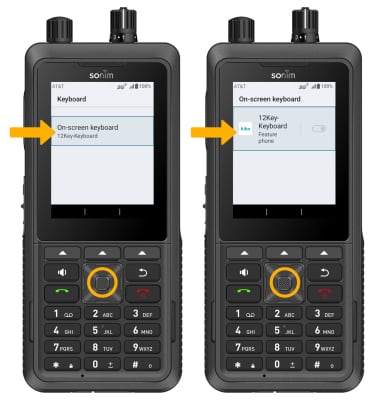
4. Press the up or down navigation keys to navigate to the desired text option, then press the Select button.
Access and use auto-complete suggestions
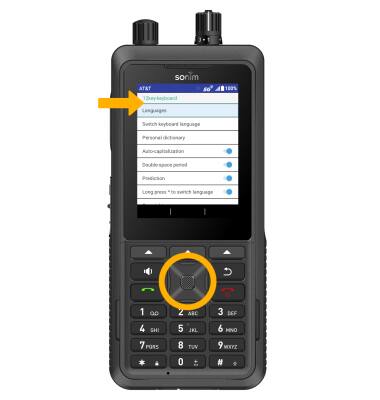
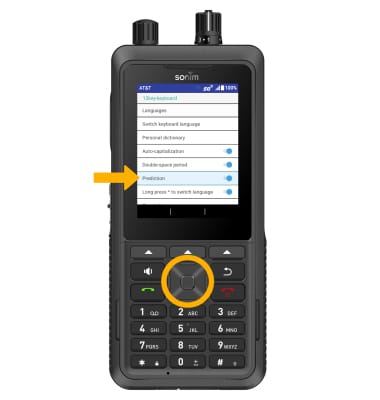
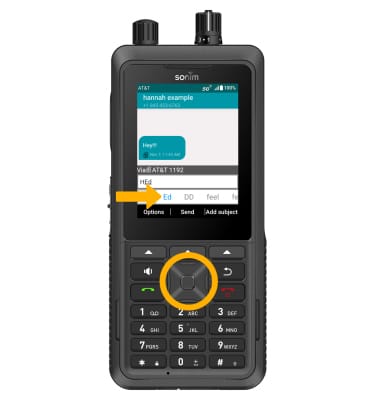
When typing a word, suggestions will appear below the typed text. To enable auto-complete suggestions, from the 12Key-Keyboard screen, press the navigation keys to highlight the Prediction switch. Press the Select button to enable.
To use auto-complete suggestion, press the navigation keys to highlight the desired word, then press the Select button to enter it into the text field.
Access text entry modes
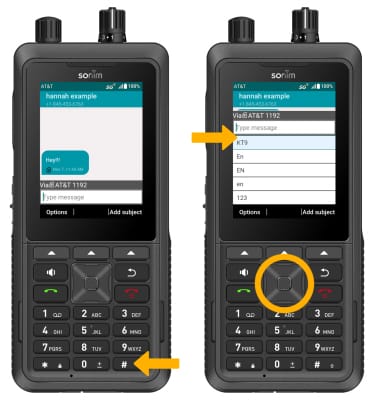
To access numbers, symbols, and predictive text, press the # key. Press the navigation keys to highlight the desired entry mode, then press the Select button.