Back up & Restore with Memory Card
Find out how to back up contacts, photos, and files with a memory card to increase device memory or transfer to another device.
Inserting a memory/microSD card into your device allows you to transfer and store contacts, music, pictures, and videos. MicroSD cards are sold separately. For information about your device's memory, visit the Available Storage tutorial. For those using the AT&T amiGO™ Jr. Phone, the parent must first provide access to Settings.
- Swipe up from the center of the home screen to access the Apps tray. Select the Samsung folder, then select the
 My Files app.
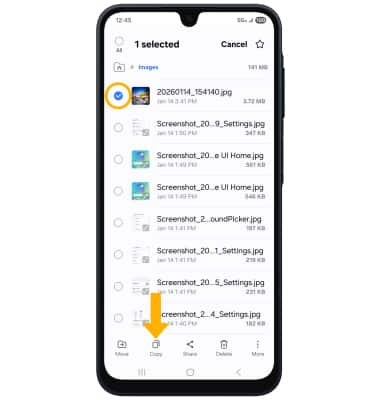
- Navigate to, then select and hold the desired file(s). Select Copy.
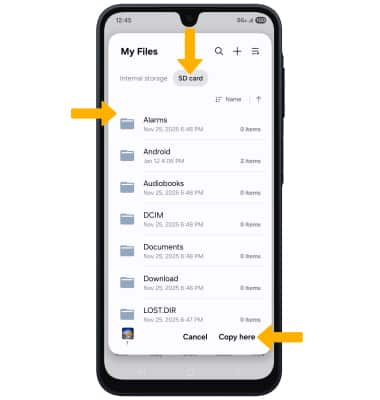
3. Select the SD card tab. Navigate to the desired folder, then select Copy here.