Signal & Cellular Data
For the best 5G experience, pair your 5G device with an eligible plan. Heads up: AT&T 5G may not be in your area. Learn more. To view locations using AT&T voice and data services, visit the AT&T Wireless Network coverage map. To learn more about the AT&T network, visit att.com/network.
In this article, you will learn how to:
• Check network connection strength
• Access cellular data
• Turn mobile data on or off
• Turn international data on or off
Check network connection strength
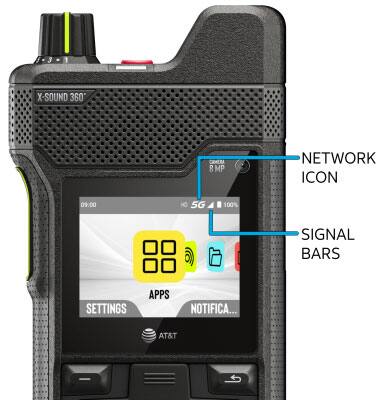
• CONNECTION TYPE: When connected to 5G, the 5G icon will be displayed in the Notification bar.
• CONNECTION STRENGTH: The Signal Bars display the connection strength. The more bars that are displayed, the better the connection.
Access cellular data
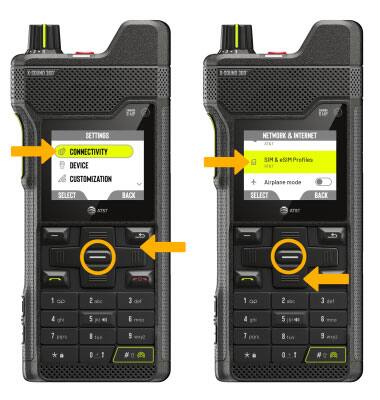
- From the home screen, to access cellular data, press the right navigation key to highlight the
 Settings app, then press the Select button to select.
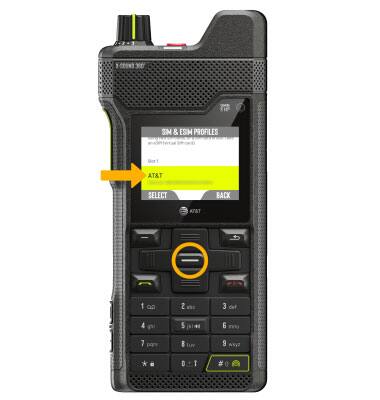
 - Press the navigation keys to navigate to then press S****elect button for Connectivity > Network & internet > SIM & eSIM Profiles. Press the down navigation key to highlight SIMs and press the Select button.
3. Press the Select button to select the desired SIM.
Turn mobile data on or off
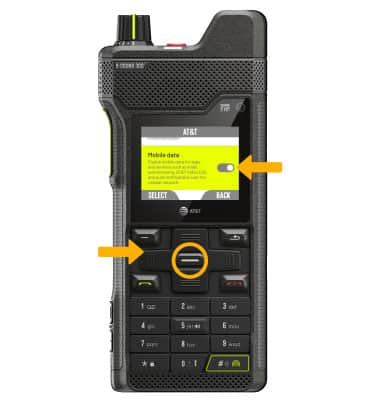
From the SIM screen, press the navigation keys to highlight the Mobile Data switch, then press the Select button to enable or disable.
Note: Mobile data is on by default. Turning off the mobile data will not allow any data to be transferred over the wireless network. Wi-Fi access, voice function, and standard text messaging are still allowed. You can also turn data on or off by device using your myAT&T account.
Turn international data on or off
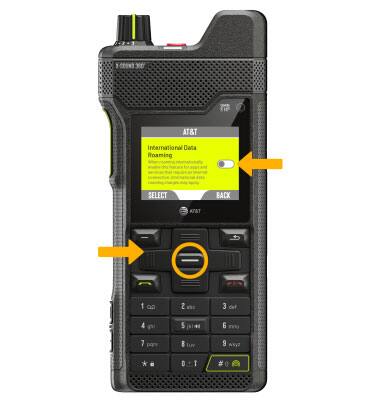
From the SIM screen, press the navigation keys to highlight the International Data Roaming switch, then press the Select button to enable or disable.
Note: Data roaming is off by default. Enabling Data roaming will allow the device to attach to foreign wireless network signals when available. International roaming charges will apply. This setting does not apply to voice access which requires additional provisioning for usage on international networks. To learn more, visit the AT&T International website.