Device Setup
Device Setup
Set up your device for the first time.
INSTRUCTIONS & INFO

The AT&T Cell Booster Pro must be used within the AT&T Cell Booster Pro coverage area. Verify coverage at att.com/cellboostereligibility. After setting up your device, make sure you complete the online activation process. Please visit Activate & Register for more information.
1. To set up the device, insert the ethernet cord into the yellow WAN port.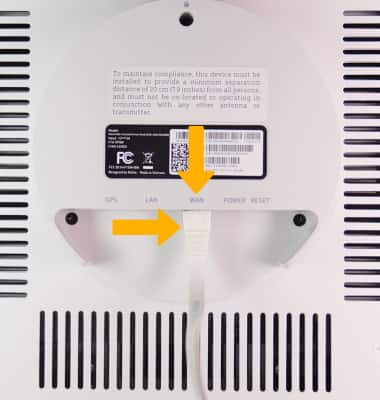
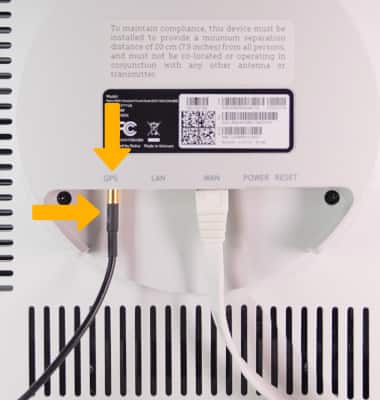
2. Install the GPS antenna by inserting the gold-side of the GPS cable into the GPS port until it clicks into place
3. Insert the Power cord into the Power cord port.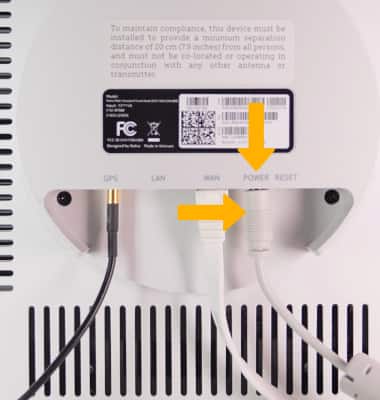
What's in the box?
The 4G LTE (SN4IBN) Smart Node package includes:
• SN4IBN Smart Node unit
• User guide
• Wall or ceiling mounting kit including screws and plastic anchors
• 3m Ethernet Cable
• 10m GPS antenna with its own RF cable
• User guide
• Wall or ceiling mounting kit including screws and plastic anchors
• 3m Ethernet Cable
• 10m GPS antenna with its own RF cable
• AC to 12 V DC power supply adapter
The 5G (SN5I77) Smart Node package includes:
• SN5I77 Smart Node unit
• User Guide
• 4G cover removal tool