Companion App: Profile Management
Companion App: Profile Management
Learn how to update your child's profile through the AT&T amiGO™ app.
INSTRUCTIONS & INFO

The AT&T amiGO™ app comes pre-installed on AT&T amiGO™ devices. To pair a smartphone with your AT&T amiGO™ device, you must first install the app on your smartphone. Visit the Download Apps & Games tutorial for instructions on how to download and the Getting Started tutorial for instructions on how to pair your smartphone with your tablet.
In this tutorial, you will learn how to:
• Update child's profile
To access the AT&T amiGO™ app, swipe up from the home screen to access the App tray, then select the  AT&T amiGO™ app.
Update child's profile
1. From the AT&T amiGO™ app on your smartphone, select the desired device.
Note: To access the My Devices screen, select the  Menu icon then select My Devices.
Menu icon then select My Devices.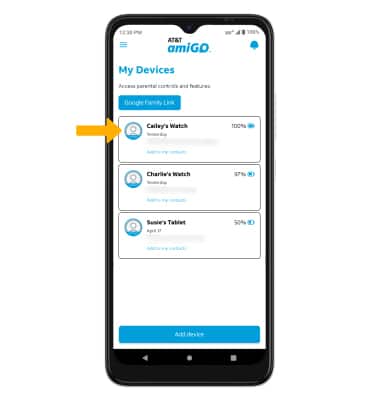
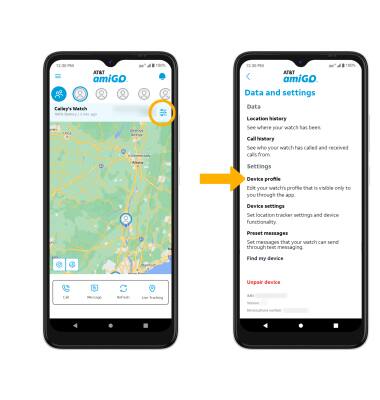
2. Select the Settings icon, then select Device profile.
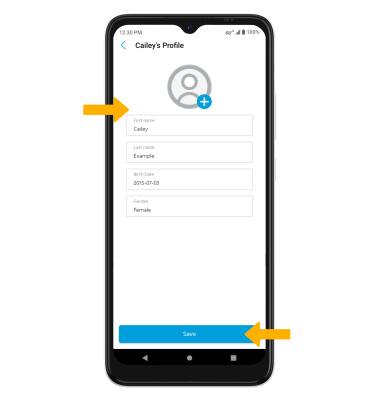
3. Edit profile information as desired, then select Save.