Insert or Remove SIM
Insert or Remove SIM
Get instructions about how to install or remove a SIM for your device.
INSTRUCTIONS & INFO

For information about using multiple SIMs, visit Use dual SIM phones.
In this tutorial, you will learn how to:
• Locate SIM tray
• Insert or remove SIM
• Insert or remove SIM
The  No SIM icon will be displayed in the Notification bar when there is no SIM card in the device.
Locate SIM tray
The SIM tray is located on the top left side of the device. To insert a SIM, insert a SIM tool into the small hole to eject the SIM tray.
Ensure you're inserting the tool straight into the pinhole and not at an angle. Inserting at an angle can prevent the SIM tray from ejecting properly.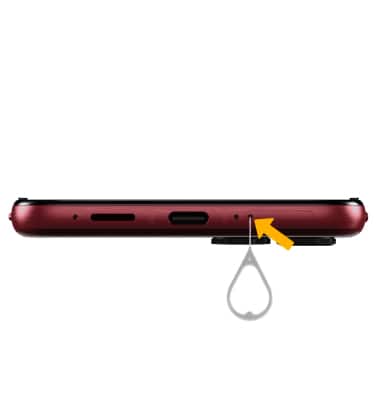
Insert or remove SIM
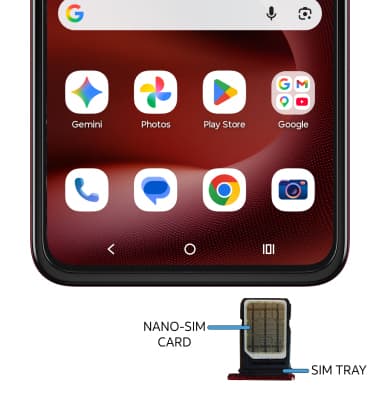
Insert or remove the Nano-SIM card into the SIM tray with the gold contacts facing down and the notched edge on the bottom right. Gently press the SIM card in until it clicks into place.
Note: Do not touch the gold contacts on your SIM card as it could damage the card.
Storage
Internal Memory: Up to 128GB