Wi-Fi
Turn Wi-Fi on or off, connect to a Wi-Fi network, and remove a Wi-Fi network.
In this tutorial, you will learn how to:
• Turn Wi-Fi on or off
• Connect to a Wi-Fi network
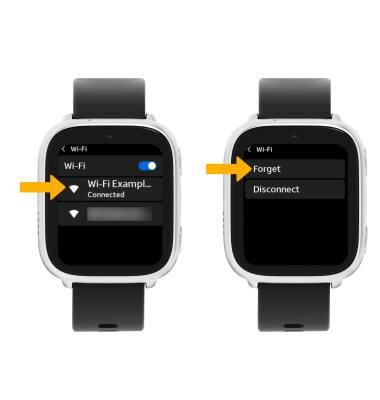
• Forget a Wi-Fi network
When connected to a Wi-Fi network, the  Wi-Fi connected icon will be displayed in the notification bar.
Note: Data transmitted over a Wi-Fi network does not count toward your AT&T data plan and will not be billed. When using the AT&T network, data rates apply.
Quickly turn Wi-Fi on or off
Swipe down from the upper right corner of the screen to access Quick Settings, then select the Wi-Fi icon.
Turn Wi-Fi on or off
1. From the Watch screen, swipe left four times then select the  Settings app.
2. Select Wi-Fi, then select the Wi-Fi switch.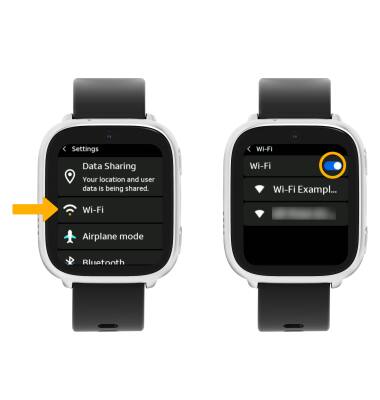
Connect to a Wi-Fi network
From the Wi-Fi screen, select the desired network name. If connecting to a secure network, enter the Password then select the Arrow icon.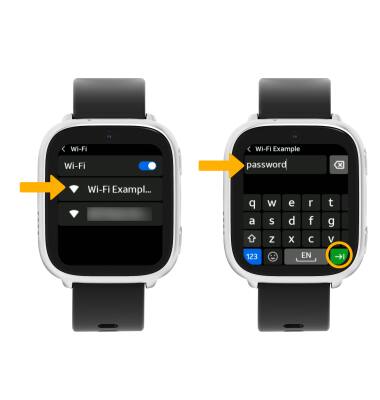
Forget a Wi-Fi network
Select the desired network name, then select Forget.