Camera & Video Settings
Manage camera and video settings including storage location, flash, picture size, timer, and more.
In this tutorial, you will learn how to:
• Access camera settings
• Change the picture size
• Turn the flash on or off
• Set a timer
• Set an audio response
• IR Night Vision
Access camera settings
From the Camera app, select the center down arrow, then edit settings as desired.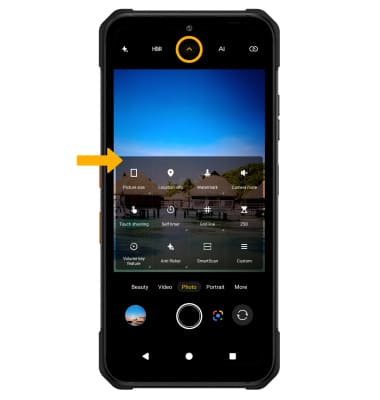
Change the picture size
From the Camera settings menu, select Picture size. Select the desired option.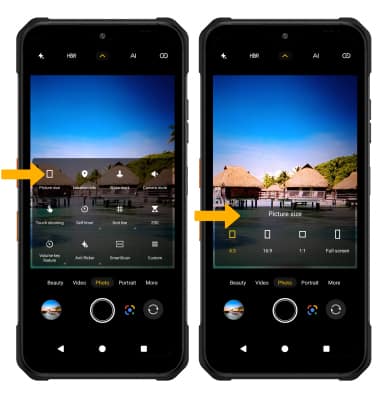
Turn the flash on or off
From the Camera screen, select the Flash icon then select the desired option.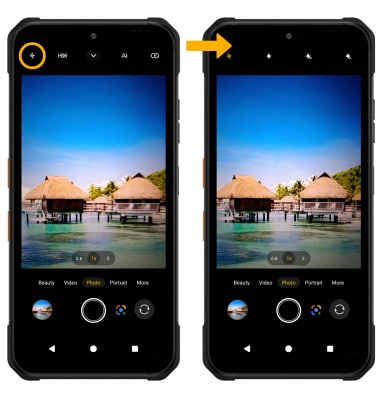
Set a timer
From the Camera settings menu, select Self timer. Select the desired option.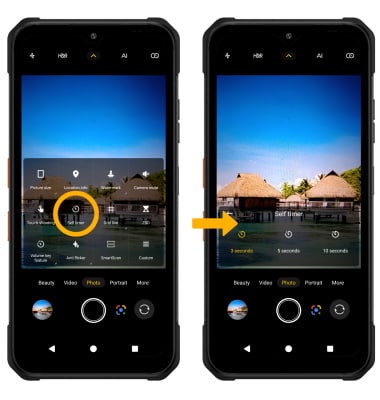
Set an audio response
From the Camera settings menu, select Custom > Camera Sound > desired sound to capture images. 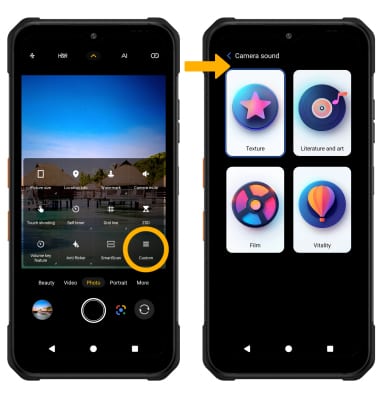
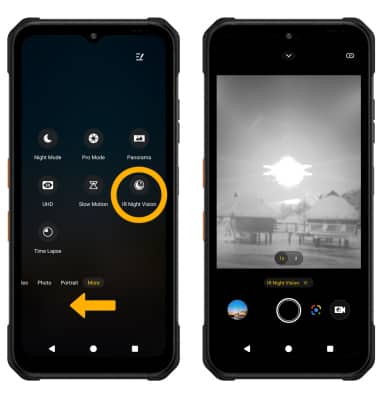
IR Night Vision
To use IR Night Vision, swipe left from the Camera screen, and select IR Night Vision.