Skip Navigation
Personal
Business
Find a store
Ver en español
Menu
Deals
Wireless
Internet
Accessories
Prepaid
Search
Support
Account
Start of main content
Wireless Support
/
Device Support
/
Change alerts
Share
Which device do you want help with?
Change device
Change alerts
This tutorial shows how to change alerts on your device.
INSTRUCTIONS & INFO
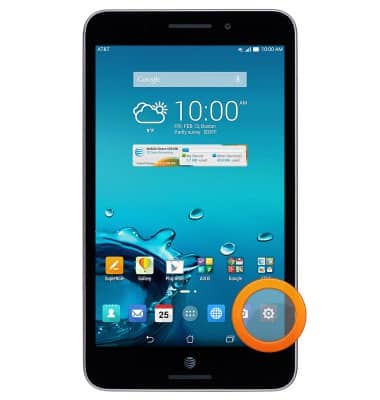
From the home screen, tap the
Settings icon
.
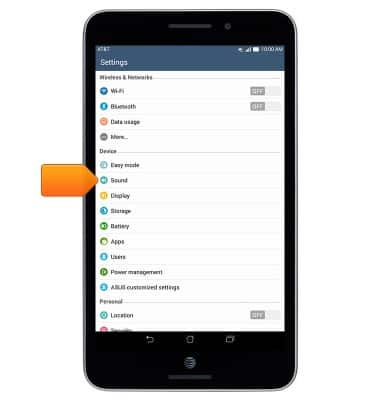
Tap
Sound
.
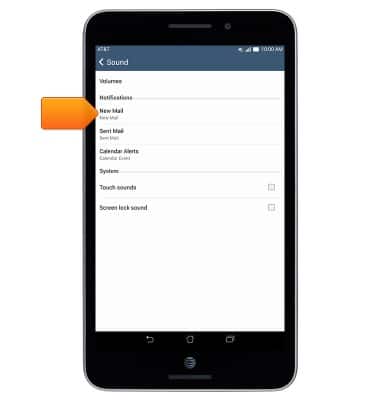
Tap the desired option under
Notifications
.
Note:
This tutorial selects 'New Mail.'
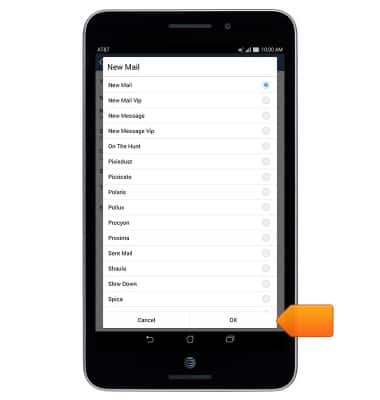
Select the desired notification tone, then tap
OK
.
Did you get the help you needed?
Yes
No
Additional support
Upgrade device
Check your upgrade eligibility
Wireless support
Get help with your wireless device, plan, and more.