Send & Receive Email
 In order to send and receive email, you must have already set up an email account.
When a new email is received, the  Email icon will display in the Notification bar. When a new Gmail message is received, the
  Gmail icon will display in the Notification bar.
Access email inbox
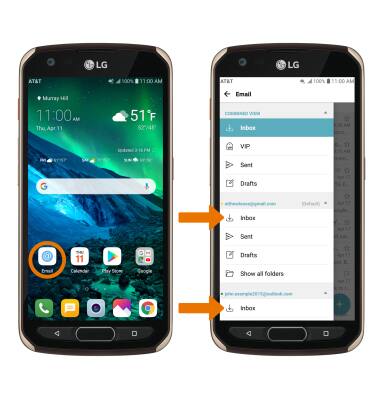
From the Home screen, select the Email app. If you have multiple email accounts on the device, select the  Menu icon > desired email account inbox.
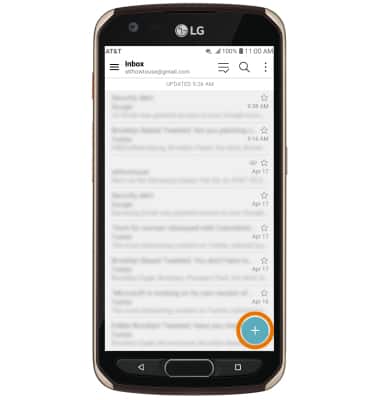
Compose an email
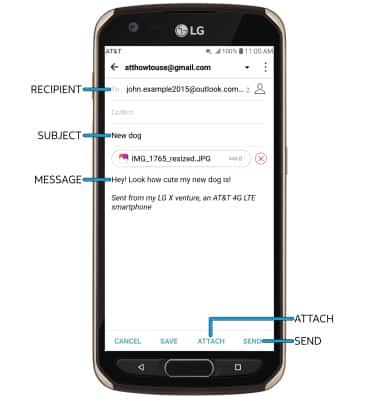
2. Enter the recipient(s) email address, then enter the desired subject and message. Select ATTACH to add an attachment. When finished, select SEND.
Refresh the inbox/view an email
Swipe down from the center of the screen. Select the desired email.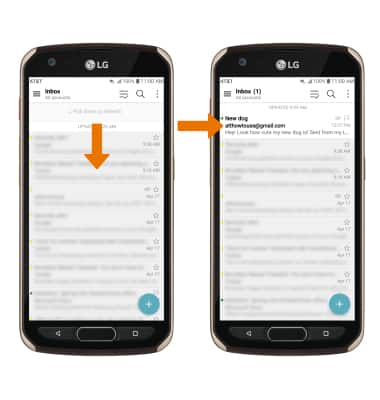
Email options
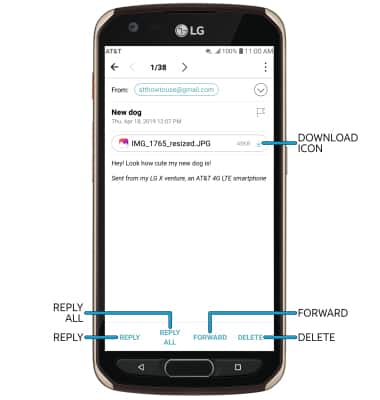
Select REPLY, REPLY ALL, or FORWARD to respond to an email. Select the Download icon to download an attachment. Select DELETE to delete an email.
Note: By default attachments will be saved to the Download folder. To view saved attachments, from the home screen, select the Gallery app > Albums tab > Download.