Visual Intelligence
Visual Intelligence
Bixby Vision gives you a deeper understanding of what you're looking at through your camera by identifying landmarks, translating languages, or showing you where to buy an item.
INSTRUCTIONS & INFO

To access and use Bixby, you must have and be logged into a Samsung account.
In this tutorial, you will learn how to:
• Access Visual Intelligence
• Use Visual Intelligence
• Access Visual Intelligence settings
Access Visual Intelligence
1. From the home screen, select the  Camera app.
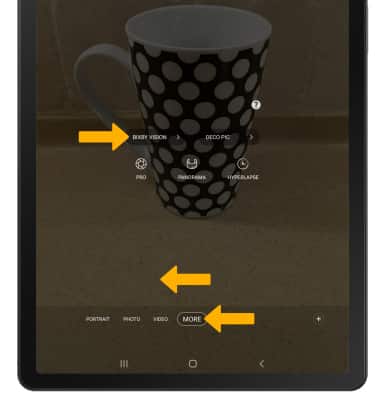
2. Swipe left to MORE then select BIXBY VISION.
Camera app.2. Swipe left to MORE then select BIXBY VISION.
Use Visual Intelligence
Point the device's camera at an object or location. Bixby Vision will automatically identify the object or location. Select Show more results, then navigate to and select the desired search result.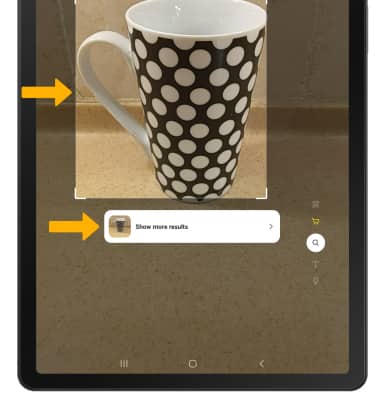
Access Visual Intelligence settings
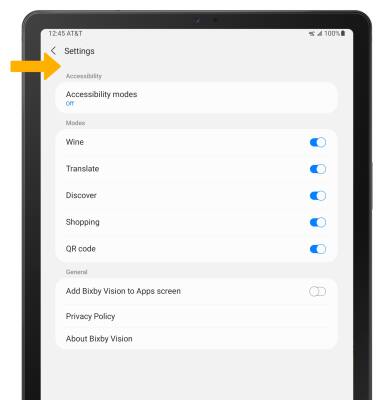
1. From the Vision screen, select the  Menu icon then select Settings.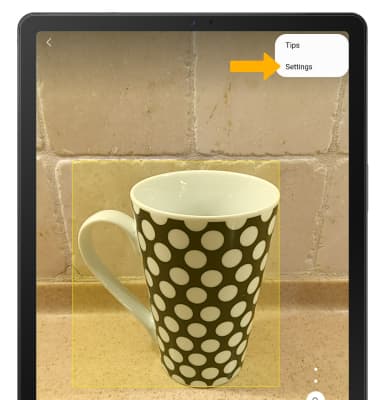
2. Edit settings as desired.