Device Setup
Set up your device for the first time or after a factory reset.

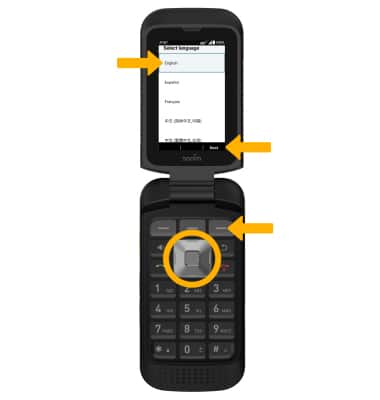
1. When turning the device on for the first time, or after a factory reset, you will be walked through a series of prompts to set up your device. Press the navigation keys to highlight the desired language, then press the Right Dynamic key to select Next.
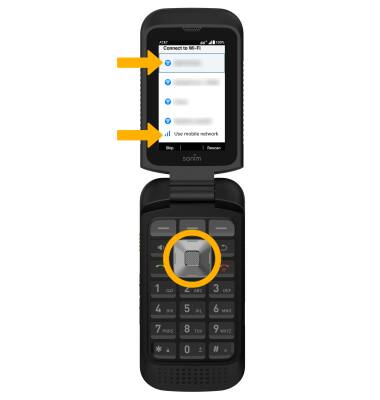
2. If you would like to connect to a Wi-Fi network, use the navigation keys to highlight the desired network name. Press the Select button, then follow the on-screen prompts. To continue on your mobile network, press the navigation keys to highlight Use mobile network for setup and press the Select button.
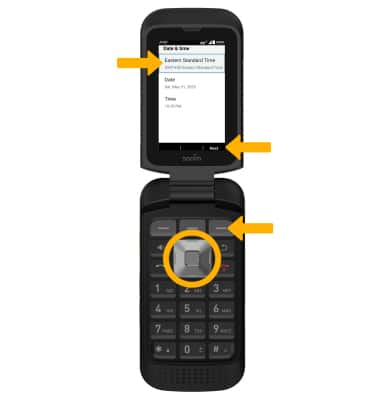
3. Use the navigation keys to highlight the desired date and time settings, then edit as desired. When finished, press the Right Dynamic key to select Next.
4. When set up is complete, you will prompted with a quick tutorial on how to access Quick Settings, Missed Events, assigned applications, or functions. Press any key to proceed through the prompts.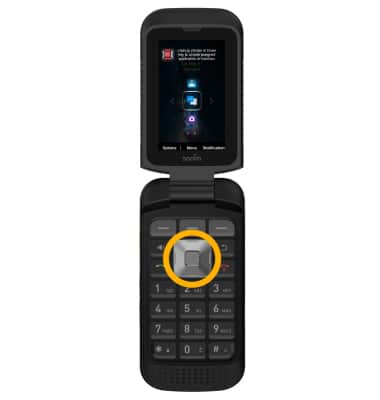
What's in the box?
• Battery
• Screwdriver
• Battery cover
• Quick start guide