Skip Navigation
Personal
Business
Find a store
Ver en español
Menu
Deals
Wireless
Internet
Accessories
Prepaid
Search
Support
Account
Start of main content
Wireless Support
/
Device Support
/
Connect Mac to Wi-Fi
Share
Which device do you want help with?
Change device
Connect Mac to Wi-Fi
Learn how to connect your device to the hotspot using Mac OS X.
INSTRUCTIONS & INFO
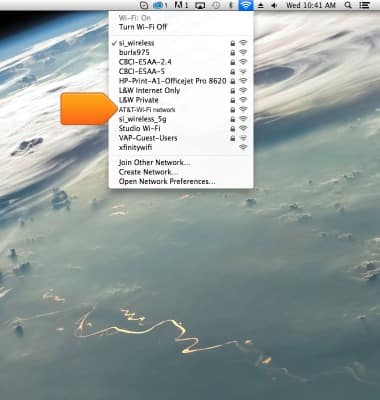
From the Mac OSX desktop, click the
Wi-Fi icon
.
Click the
AT&T-Wi-Fi network
.
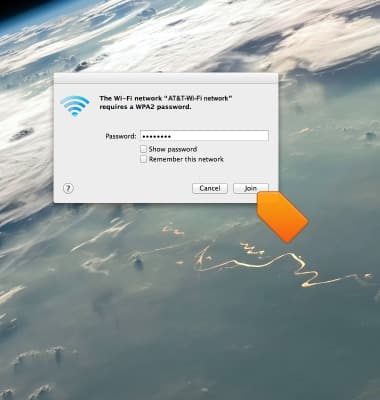
Enter the required password, then click
Join
.
Did you get the help you needed?
Yes
No
Additional support
Upgrade device
Check your upgrade eligibility
Wireless support
Get help with your wireless device, plan, and more.