The images and steps in this tutorial reflect the latest software version (Windows 11 Pro). Stay current by regularly checking for software updates, which often include important security patches and performance enhancements. Before downloading updates, ensure you’re connected to a reliable Wi-Fi or cellular network for a smooth experience.
• View software version
• Check for updates
• Check for updates
View software version
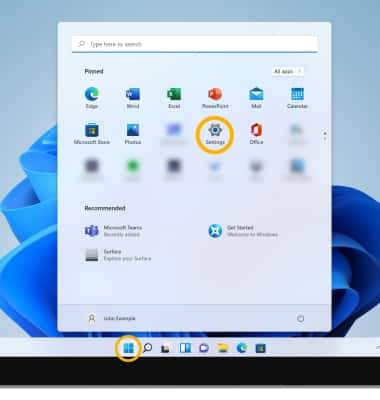
1. From the Home screen, select the Start icon, then select Settings.
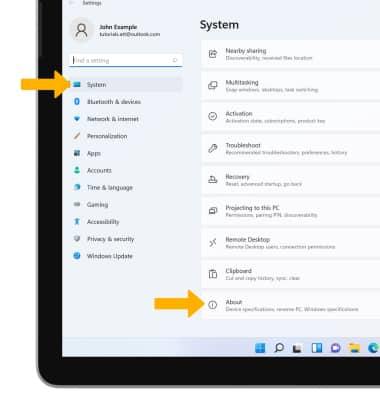
2. Select the System tab, then scroll to and select About.
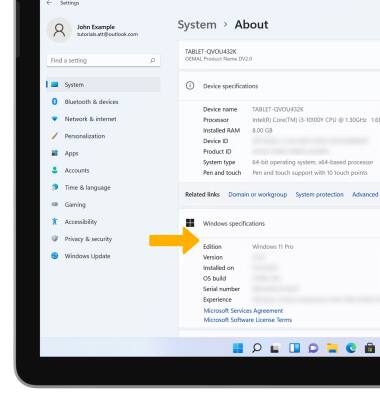
3. The Windows specifications will be displayed.
Check for updates
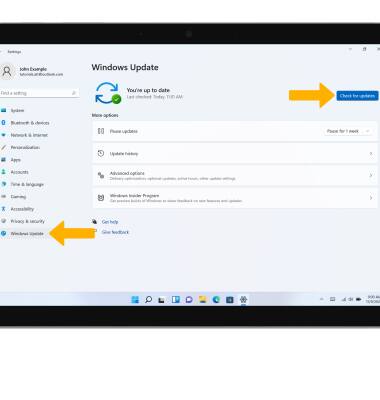
From the Settings screen, select the Windows Update tab, then select Check for updates.
Note: If an update is available, follow the on-screen instructions to perform the update.