
Overview | Orientation | Tasks

 Previous
|
Next
Previous
|
Next 
Task: Search Contacts
Steps
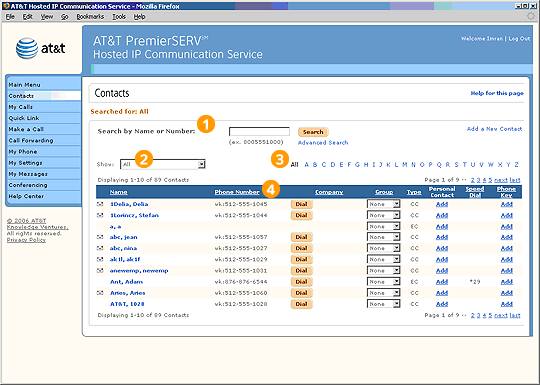
There are three ways to search for specific Contacts in HIPCS:

In the Search field, enter a last name or phone number. When you select Search, a list of all Contacts that match your search criteria will be displayed in the Contacts list below. Note: Advanced Search allows you to use multiple criteria at once to conduct a search.

From the pull-down menu, choose a type of Contact to be displayed, such as Personal, Company, or External Contacts.

Select a letter of the alphabet in the Browse bar. A list of all Contacts whose last names begin with your selected letter will be displayed below.

Select an underlined column header to sort the entries by that column. Selecting the header again will reverse the order.
Related Pages
Previous
|
Next