
Overview | Orientation | Tasks

 Previous
|
Next
Previous
|
Next 
External Contacts
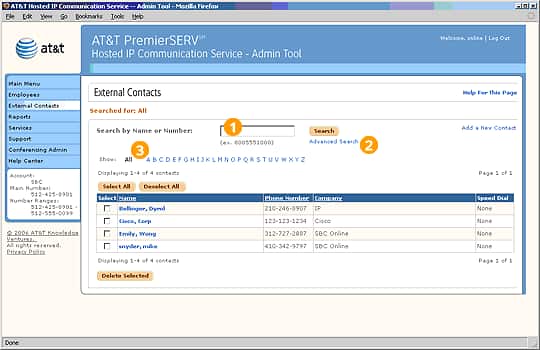
The External Contacts page lets you search for and view information on External Contacts.
 There are three different types of Contacts in HIPCS:
External Contacts are outside contacts like clients and vendors.
Company Contacts are Employees in your company.
Personal Contacts are people in Employees' individual contact lists.
As an Office Administrator, you have sole responsibility for entering and maintaining information about External Contacts. Employees cannot edit this information themselves.
Select an External Contact name to view and edit information about the Contact.
To add a new External Contact, select "Add a New Contact".
Select an underlined column header to sort the entries by that column. Selecting the header again will reverse the order.
Highlights

In the Search field, you can enter a last name or phone number. When you select Search, a list of all External Contacts that match your search criteria will be displayed in the External Contacts list below.

Advanced Search lets you use multiple criteria at once when searching.

Selecting a letter of the alphabet in the Browse bar will display all External Contacts whose last names begin with your selected letter.
Related Pages
Previous
|
Next