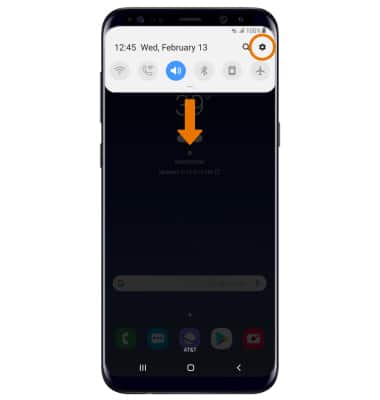
- ACCESS ALWAYS ON DISPLAY: Swipe down from the Notification bar, then select the Settings icon.
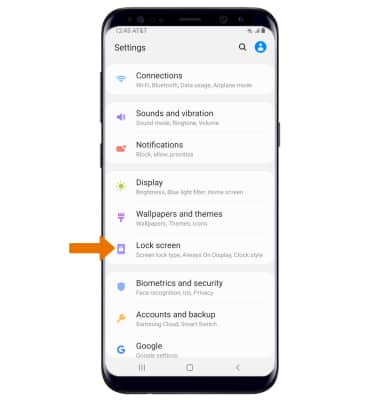
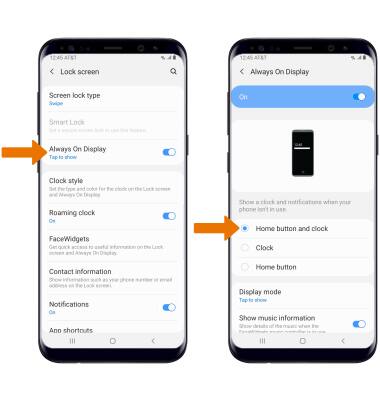
- Select Lock screen.
- TURN ON/OFF ALWAYS ON DISPLAY: Select the Always On Display switch.
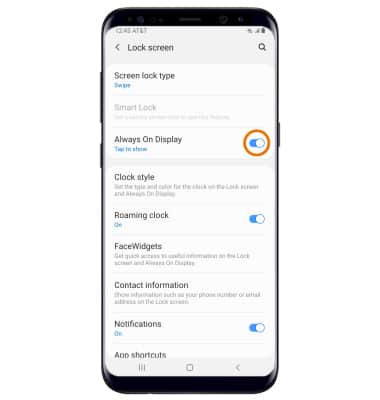
- ACCESS ALWAYS ON DISPLAY SETTINGS: Select Always On Display. Edit the settings as desired.
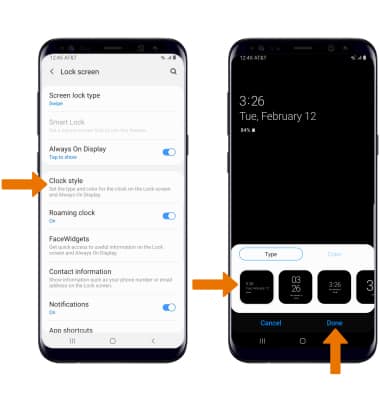
- EDIT ALWAYS ON DISPLAY APPEARANCE: From the Lock screen screen, select Clock style > Always On Display > edit the Appearance as desired > select Done.
Always On Display
Samsung Galaxy S8 / S8+ (G955U/G950U)
Always On Display
Always On Display allows you to view the clock, battery and missed phone call/message notifications when the screen is turned off. The Always On Display screen uses less power and also utilizes the proximity sensor to turn off completely when in a purse or pocket. The user can change what appears on the Always On Display screen.
INSTRUCTIONS & INFO