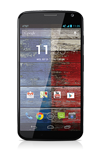
- The Signal Bars display the connection strength. The more bars that are displayed, the better the connection.
Note: To view the locations AT&T voice and data service can be used, see the AT&T Network coverage map Link: www.att.com/coverage.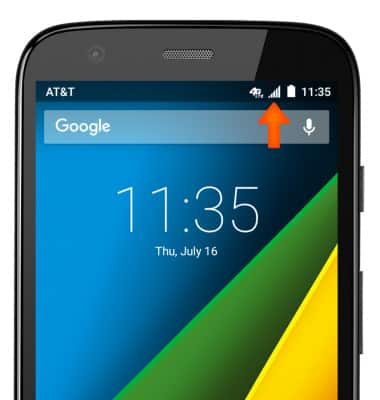
- When connected to 4G LTE, the 4G LTE icon will be displayed in the Notification bar.
Note: To learn more about the AT&T network, visit http://www.att.com/network.
- To turn cellular data on or off, swipe down from the top of the screen and tap the Settings icon.
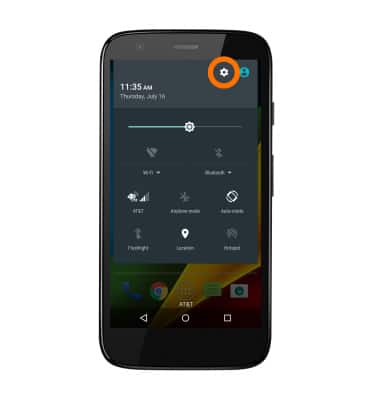
- Scroll to and tap Data usage.

- To toggle mobile data on/off, tap Cellular data.
Note: Mobile data is on by default. Turning off the mobile data will not allow any data to be transferred over the wireless network. Wi-Fi access, voice function, and standard text messaging are still allowed. You can also turn data on/off using your myAT&T account. Learn more about disabling or activating AT&T Mobile Share member’s data usage by device.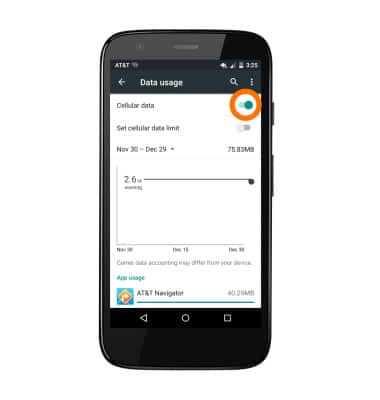
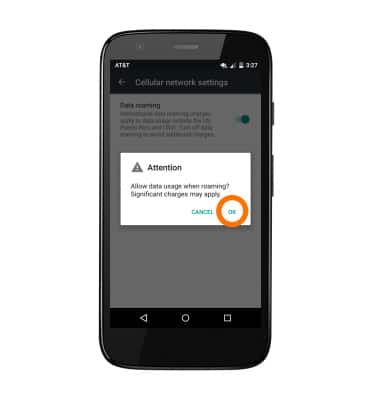
- To toggle data roaming on/off, from the Cellular networks menu, tap Data Roaming.
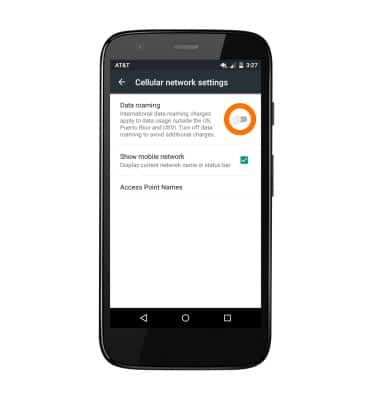
- Tap Data roaming to toggle data roaming on/off, and then Tap OK.
Signal & cellular data
Motorola Moto g (XT1045)
Signal & cellular data
View cellular network signal, turn international roaming, and your mobile data connection on or off.
INSTRUCTIONS & INFO