- To access the phone app, tap the Phone icon on the home screen.
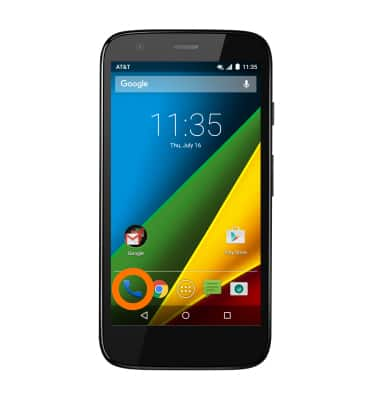
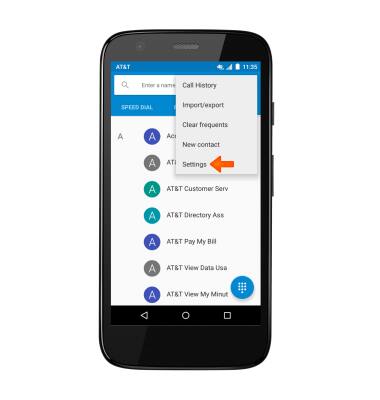
- To enable call forwarding, tap the Menu icon.

- Tap Settings.
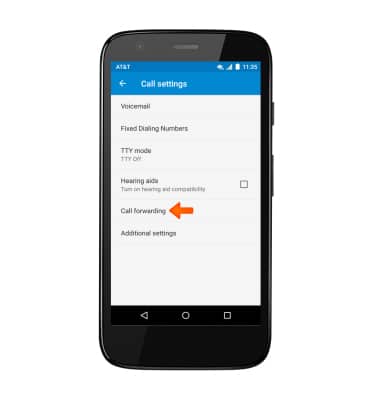
- Tap Calls.

- Tap Call forwarding.
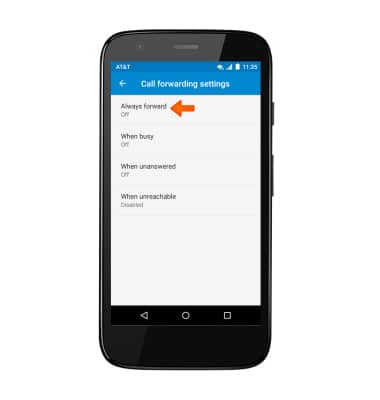
- Tap Always forward.
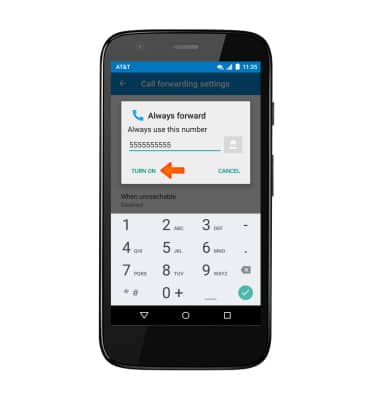
- Enter Desired forwarding number and tap TURN ON.
- When call forwarding is turned on, the Call forwarding icon will be displayed in the Notification bar.

- To turn call forwarding off, tap Always forward, and then tap TURN OFF.
Note: To change the call forwarding number, edit the number, then tap Update.
Call forwarding
Motorola Moto g (XT1045)
Call forwarding
Manage call forwarding from your device.
INSTRUCTIONS & INFO