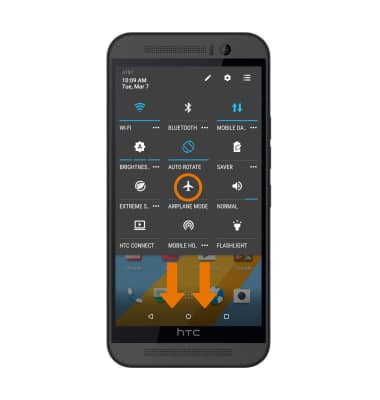
- Swipe down from the Notification bar with two fingers, then select the Airplane mode icon. When turning Airplane mode on, you will be prompted to confirm. Select OK.
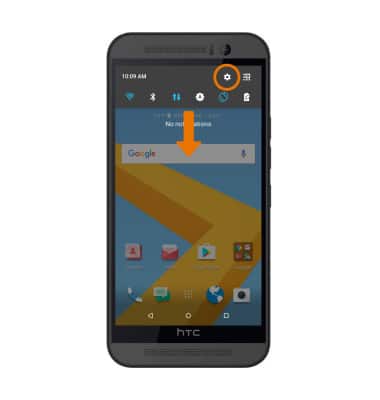
- To access Airplane mode from Settings, swipe down from the Notification bar, then select the Settings icon.
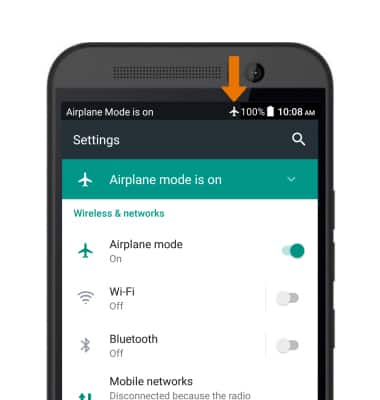
- Select the Airplance mode switch on or off.
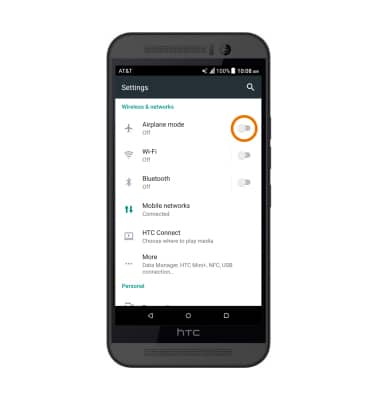
- While Airplane mode is enabled, the Airplane mode icon will be displayed in the Notification bar.
Airplane Mode
HTC One M9 (0PJA110)
Airplane Mode
Turn Airplane mode on and off.
INSTRUCTIONS & INFO