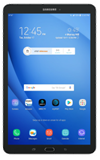
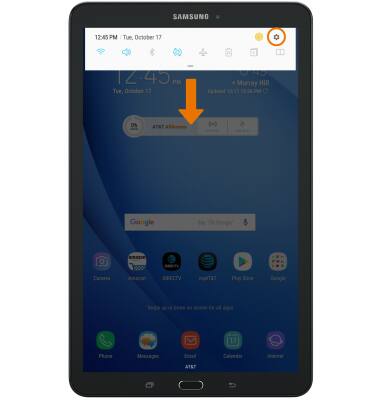
- ACCESS NOTIFICATION SETTINGS: Swipe down from the Notification bar, then select the Settings icon.
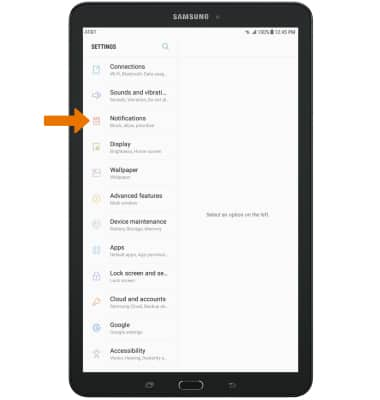
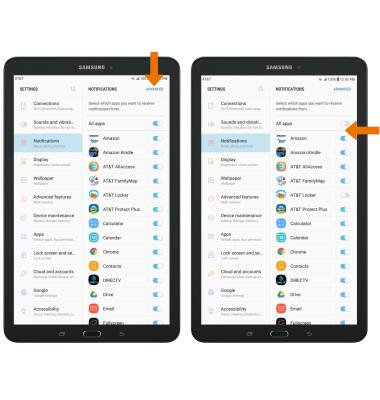
- Select Notifications.
- TURN ON/OFF ALL NOTIFICATIONS: Select the All apps switch.
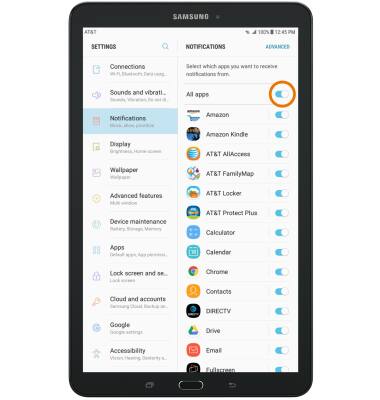
- TURN ON/OFF NOTIFICATION ON A PER APP BASIS: Select the switch beside the desired app.

- ACCESS ADVANCED NOTIFICATION SETTINGS: From the Notifications screen, select ADVANCED then select the desired app and adjust as desired.
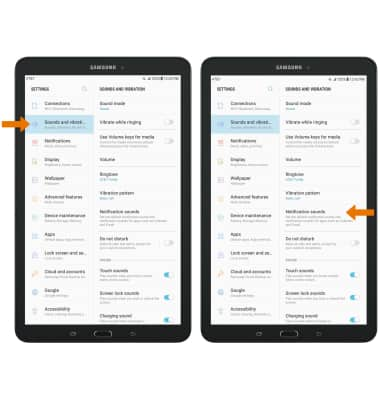
- ADJUST NOTIFICATION SOUNDS: From the Settings screen, select Sounds and vibration then select Notification sounds.
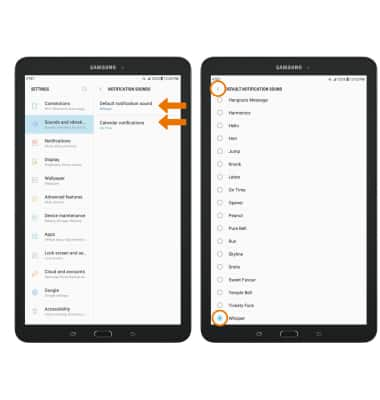
- Select the desired notification type. Select the desired notification sound, then select the Back icon.
Notifications
Samsung Galaxy Tab E 8.0 (T377A)
Notifications
Learn how to access and adjust notification settings, and turn notifications on or off.
INSTRUCTIONS & INFO