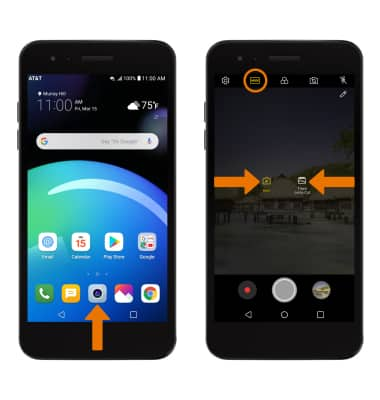
- ACCESS CAMERA MODES: From the home screen, select the Camera app then select the MODE icon to access the desired Camera mode.
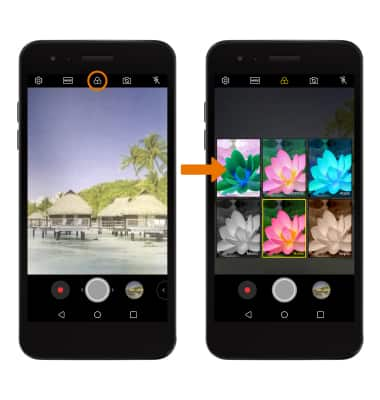
- ACCESS CAMERA FILTERS: From the Camera app, select Filters icon. Select the desired filter.
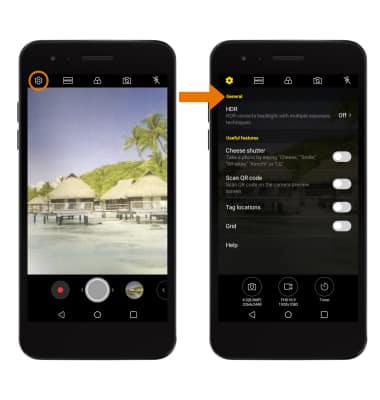
- CUSTOMIZE PHOTO/VIDEO SETTINGS: From the Camera app, select the Settings icon. Editing settings as desired.
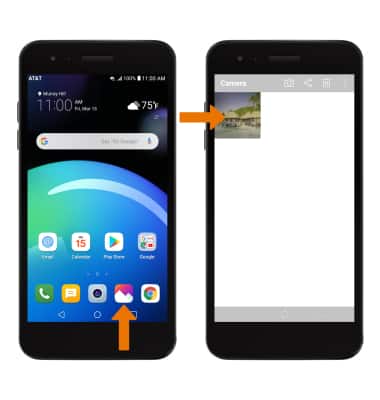
- CROP A PHOTO: From the home screen, select the Gallery app then select the desired photo.
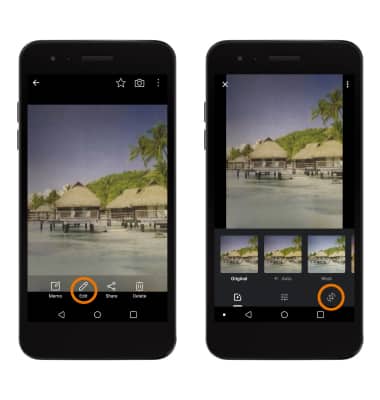
- Select the Edit icon, then select the Crop icon.
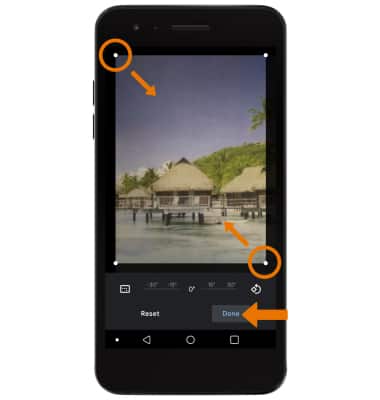
- Select and drag the crop corners to crop as desired, then select Done.
- MAKE A GIF: From the home screen, select the Gallery app > desired album > Menu icon > Create GIF > desired images > NEXT > adjust settings as desired > select SAVE.
Note: GIFs can be accessed from the GIFs folder in the Gallery app.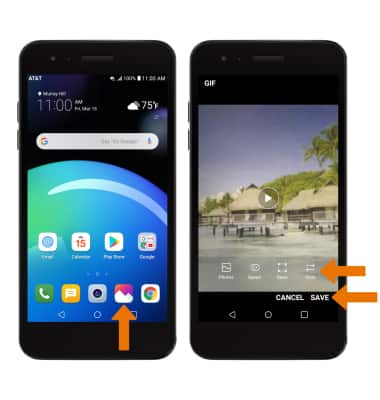
Advanced Photo & Video Features
LG Phoenix 4 (LM-X210)
Advanced Photo & Video Features
Learn how to access and use Camera modes, effects, customization, and crop a photo.
INSTRUCTIONS & INFO