Access messaging settings
1. From the home screen, press the right button to access the Messages app.

2. Press the right menu button to select Options. Press the down button to highlight Settings, then press the OK button to select.
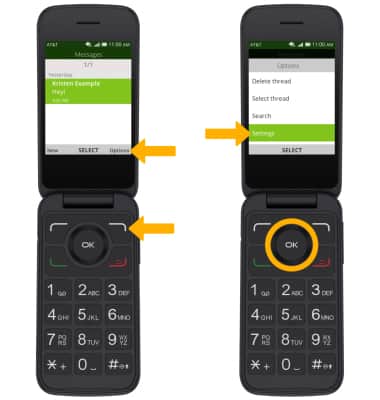
2. Press the right menu button to select Options. Press the down button to highlight Settings, then press the OK button to select.
Messaging settings options
Select the desired option to access the desired settings.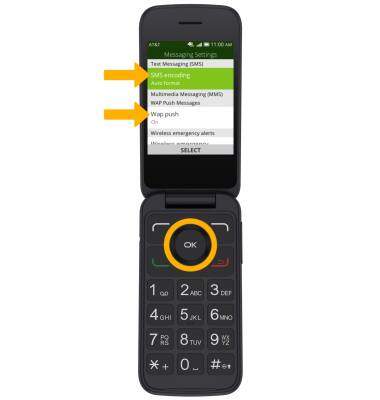
• ACCESS SMS SETTINGS: Press the down button to highlight SMS encoding, then press the OK button to select.
• ACCESS MMS SETTINGS: Press the down button to highlight Wap push, then press the OK button to select.
Enable/Disable Emergency Alerts
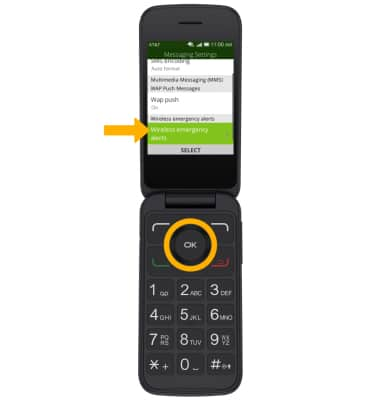
1. From the Messaging Settings screen, press the down button to highlight Wireless emergency alerts. Press the OK button to select.
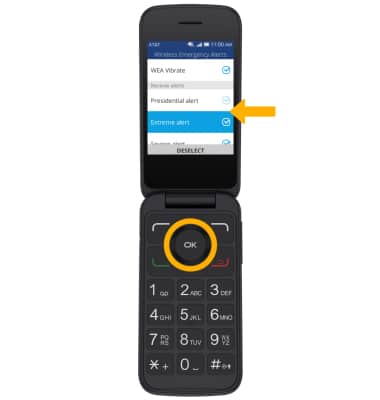
2. Press the down button to highlight the desired alert, then press the OK button to enable or disable.
2. Press the down button to highlight the desired alert, then press the OK button to enable or disable.