Wi-Fi Calling
Wi-Fi Calling
Use your Wi-Fi connection to talk and text when cellular coverage is limited or unavailable.
INSTRUCTIONS & INFO

Wi-Fi Calling is turned on as part of the activation process. To use Wi-Fi Calling, you'll need a Wi-Fi Internet connection and a postpaid AT&T wireless account provisioned with HD Voice. Certain restrictions, requirements or limitations may apply. Visit About Wi-Fi Calling or att.com/wificalling for more details.
In this tutorial, you will learn how to:
• Check Wi-Fi calling status
• Make a Wi-Fi call
• Quickly turn on/off Wi-Fi calling
When your phone is connected to Wi-Fi, Wi-Fi Calling is on, and a cellular connection is unavailable or poor, you'll see AT&T Wi-Fi Calling in the Extended Quick Settings to indicate that calls will be carried over Wi-Fi.
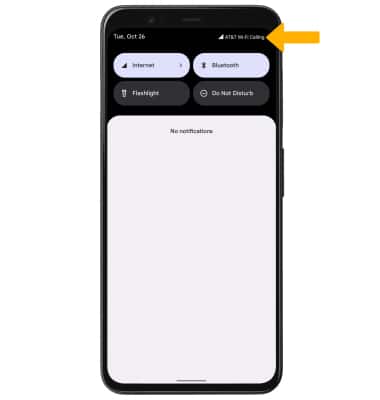
Check Wi-Fi calling status
1. From the home screen, select the  Phone app.
2. Select the  Menu icon, then select Settings. Select Calls.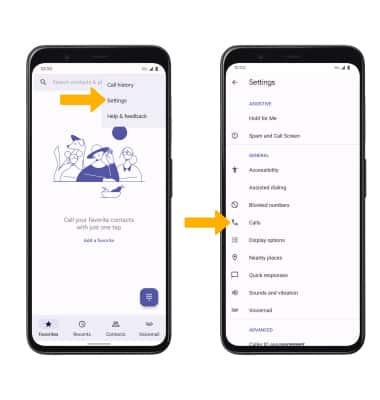
3. Select Wi-Fi calling.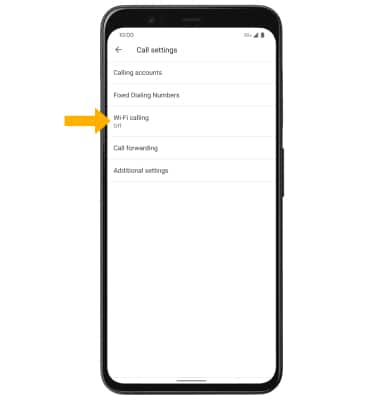
4. Select the Use Wi-Fi calling switch to enable. Enter your emergency address, then select Verify address.
Note: You will need to review the End User License Agreement and select Continue before entering your emergency address.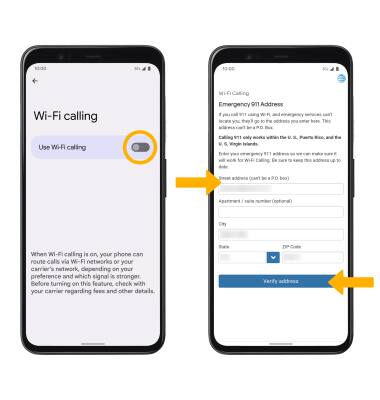
Make A Wi-Fi call
Making a call is the same whether on cellular or Wi-Fi. From the home screen, select the Phone app >  Dial Pad icon > dial the desired number > select the Call icon.