
Overview | Orientation | Tasks

 Previous
|
Next
Previous
|
Next 
Office Administrators
The Office Administrators page displays information about all of your company's Office Administrators.
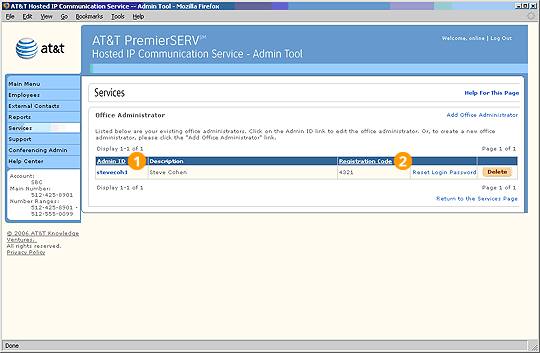
 When the HIPCS system was installed, one Office Administrator account was assigned. Once active, your company has the option of creating other Office Administrator accounts. This must be done through the Office Administrator account. Each additional Office Administrator has the same set of privileges as the original Office Administrator account.
Select an Admin ID to view and edit information about the Office Administrator.
Select an underlined column header to sort the entries by that column. Selecting the header again will reverse the order.
Select Add Office Administrator to add a new Office Administrator.
Tip: If you are delegating administrative responsibilities over non-overlapping subsets of Employees (such as individual departments or locations), consider creating Group Administrators instead of Office Administrators. Group Administrators are limited to managing their respective Administrative Groups.
Highlights

This is the Administrator identification that the new Office Administrator will use to login the Admin Tool. It is different than a User ID, which grants access to his or her Employee HIPCS portal.

The Office Administrator must enter his or her Registration Code to complete various Admin Tool tasks (creating Group Administrators, assigning extensions to specific phones, etc.).
Related Pages
Previous
|
Next