
Overview | Orientation | Tasks

 Previous
|
Next
Previous
|
Next 
Services
The Services page gives you access to pages where you can view and edit your company's Groups, Templates, and Administrative Users.
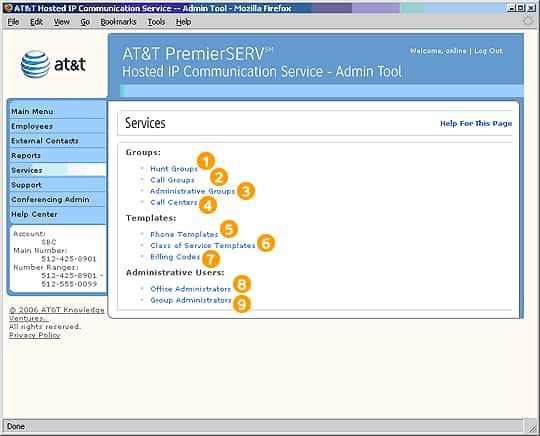
Select any of these links to go to the cooresponding Admin Tool screen.
Highlights

Hunt Groups direct incoming calls from station to station in sequence until someone answers or voice mail picks up.

Call Groups are groups of Employees who can share calling features.

Administrative Groups are groups of Employees who are managed by a designated Group Administrator.

A Call Center is a special telephone number where incoming calls are queued (put in line) to be answered by representatives in the order the calls are received.

Phone Templates let you define the types of telephones used by your company and assign certain calling features to the programmable keys on the telephones.

Class of Service Templates are preset collections of feature services and dialing restrictions that can be assigned to Employees.

Billing Codes are used to track and categorize outgoing calls that are made by Employees.

When your company originally purchased HIPCS from AT&T, you received one Office Administrator account. The original Office Administrator then has the option of creating other Office Administrator accounts. Each additional Office Administrator has the same complete set of privileges as the original Office Administrator account.

Group Administrators are assigned by Office Administrators to have control over the calling features and services of a specific subset of Employees, called an Administrative Group.
Related Pages
- Hunt Groups
- Task: Add a New Hunt Group
- Call Groups
- Task: Add a New Call Group
- Administrative Groups
- Task: Add a New Administrative Group
- Call Centers
- Task: Add a New Call Center
- Phone Templates
- Task: Add a New Phone Template
- Class of Service Templates
- Add and Edit Class of Service Templates
- Task: Add a New Class of Service Template
- Billing Codes
- Task: Add a New Billing Code
- Office Administrators
- Group Administrators
- Task: Add a New Office or Group Administrator
Previous
|
Next