
Overview | Orientation | Tasks

 Previous
|
Next
Previous
|
Next 
Task: Add a New Office or Group Administrator
Steps

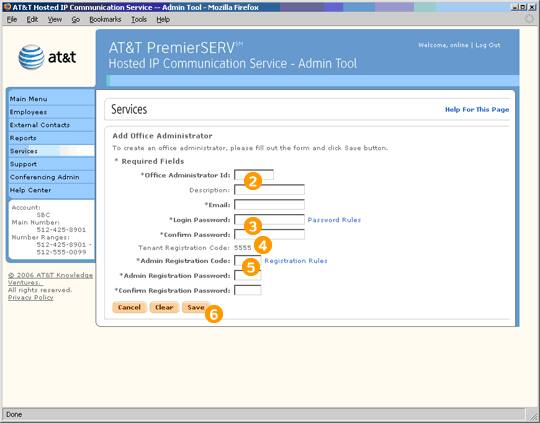
Select "Add a New Office Administrator" from the Office Administrators page or "Add a New Group Administrator" from the Group Administrators page.

Enter a name, description, and primary work email address for the new Administrator.

Assign the Administrator a password to use when logging in to the Admin Tool.

Review your company's Tenant Registration Code, which will be the same for all Administrators.

Assign the Administrator an Admin Registration Code and Admin Registration Password.

Select Save to create the new Office or Group Administrator.
Related Pages
Previous
|
Next