Get started with AT&T Phone
Learn how to set up and use your new digital home phone service.
Requirements for self-setup
You can set up your own home phone service if you:
- Have new or existing AT&T Fiber® or AT&T Internet
- Don't have a monitored home alarm system connected to your phone
- Don't have a wired Medical Alert device
Good to know: You don't need working phone jacks in your home to get AT&T digital home phone service.
Before activation
Prior to your activation, make sure you have the following:
- Phone installation kit: You'll receive your kit a day or two before your service activation date. It will include instructions and equipment needed for set up (you have to provide a touchtone phone).
- Account info: You'll need your AT&T ID, password, and account number.
- Passcode: You'll need the four-digit passcode you created when you spoke to an AT&T rep. This passcode is separate from the password used to sign in to AT&T.
- All-Fi Hub® or Wi-Fi® gateway location: You’ll connect your phone line to your gateway. If you already have AT&T Internet or AT&T Fiber, locate your gateway.
Set up and activation
Make sure you activate your phone service within seven days of your order date. Keep in mind, it can take up to 30 minutes to complete. Make sure you have your ID, password, account number, and passcode handy. You’ll also have to accept the Terms of Service and create a member ID at att.net/attphone so you can manage your features.
Get connected
Connect your phone to your hub or gateway’s Phone port using a standard phone cord.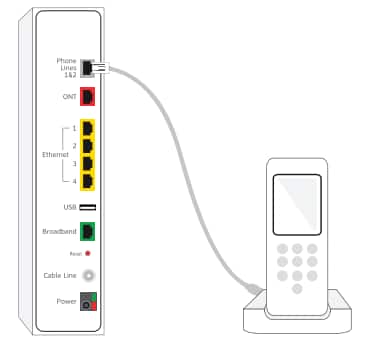
All set? Learn how to manage your phone and voicemail features at att.com/attphonefeatures.