Install AT&T internet – Pace 5031
You’re viewing instructions for
Internet equipment
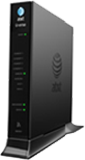
Pace
5031NV
KM1205118-slctrgrp_pac5031nv
Install internet
Set up, install, and activate AT&T Internet service
Before installation, check to be sure you have all information and materials:
- Service activation date – You can only connect to the Internet after 2:00 p.m. on the date specified on your confirmation letter or packing slip.
- Other service providers – If you have a security system, health alarm, or water meter monitor, you’ll need special assistance. You should contact AT&T to schedule an appointment or your monitoring service provider for instructions.
- Account information – All customers need your AT&T Internet telephone/account number and your passcode that was sent by mail, email, or given to you by an AT&T representative. Existing customers need your AT&T email address (Member ID) and password.
- Installation kit – This includes your gateway, filters, and necessary cables to get connected.
- Wi-Fi information – This includes your Wi-Fi network name and password found on the side of your Wi-Fi gateway.
Connect your filters and cables
- Connect the green data cable from your wall jack to the DSL/Broadband port on the gateway.
- Connect the yellow Ethernet cable from the Ethernet port on the gateway to the Ethernet port on your PC.
- Plug one end of your phone cable into the gateway's Phone Lines 1 & 2 port and the other end into a standard phone or cordless base station.
- Connect the black power adapter to the power port on the gateway.
- Plug the power cord into an electrical outlet. Note: If you purchased a Battery Backup Unit (BBU), connect the BBU to the gateway’s power port, plug it into a standard outlet, and turn the switch to ON.

Your gateway will power up. Wait for the Power, Broadband, and Service lights to turn solid green and for the Ethernet light to blink green. Do not unplug the power adapter or data cable while the modem powers up. This can damage the gateway.
Register and activate your account
When registering, enter the following information:
- AT&T Internet telephone number/account number found on your confirmation letter or packing slip.
- The 4-digit passcode mailed, emailed, or provided to you by an AT&T representative.
- AT&T Member ID and password.
- Security questions and answers (new users only).
The online registration process should start automatically. If It doesn’t, follow these steps:
- Open a Chrome, Firefox, Internet Explorer, or other Internet browser.
- Enter att.net/uverse in the address field.
- Select Enter.
- Continue your registration using the 4-digit passcode created when you placed your order. This was mailed to you separately for your reference.
- Complete the activation and registration by following the remaining on screen instructions.
Digital Phone customers need to call 877.377.0016 from the phone connected to the gateway to activate voice service. Follow the voice instructions to complete the activation, and upon successful activation, you will hear the following: Your telephone number XXX.XXX.XXXX has been successfully activated.
Connect to Wi-Fi
In just a few steps, connect to your new Wi-Fi network:
- Open your computer or device’s Wireless Network settings and refresh the network list.
- Select your Wi-Fi network name, found on the side of your gateway, from the list.
- Enter your 10-digit Wi-Fi password, the 10-digit key on the side of your gateway, to connect to your network.
Once connected, the Wireless light on your gateway will turn solid green.
Get your network information
Wi-Fi gateway
On the side of your Pace gateway there is a sticker with the original Wi-Fi settings and information.
- The Wi-Fi name is ATT followed by the last 7 digits of the gateway serial number (SN), or the name printed by SSID.
- The Wi-Fi password is the 12-digit number labeled Wireless Network Key. (Mac OSX users may need to enter a $ character at the beginning of the Wi-Fi password.)
Gateway settings screen
You can also get your Wi-Fi information from a computer or device connected to your Wi-Fi network. This is useful if you, or someone else, have changed your Wi-Fi network name or password.
- Open a Chrome, Firefox, Internet Explorer, or other browser window.
- Enter http://192.168.1.254 in the address bar.
- Locate the Gateway Status section.
- The Wi-Fi network name is the Network ID (SSID).
- The Wi-Fi password is the Network Key.
Wi-Fi network name and password change
Your Wi-Fi gateway comes with a default Wi-Fi network name and password. Change your network information to make it easier to remember (but don't use personal info like your name or address) and to protect your network from unwanted users.
- Open a Chrome, Firefox, Internet Explorer, or other browser window.
- Enter http://192.168.1.254 in the address bar.
- In the Key Things to do Using Your Gateway section, select Wireless.
- Change the desired information:
- Wi-Fi name: In the Network section, enter a new network name in the Network Name (SSID) field.
- Wi-Fi password: In the Security section, select WPA-WPSK (TKIP) WPA2 from the authentication drop-down, then in the Key field enter a custom password.
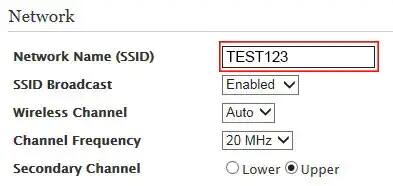
- Select Save.
- If required, enter the Device Access Code located on the side of your gateway.
- Select Submit.
Once you have successfully changed your Wi-Fi network name and password, you’ll need to reconnect all your Wi-Fi devices using the new network information.