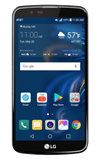
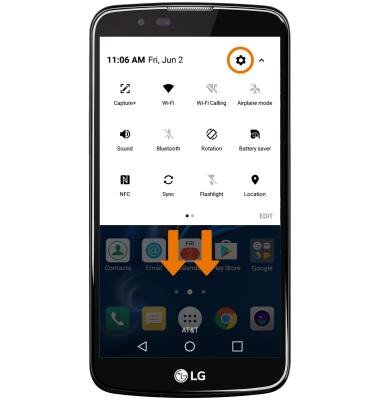
- ACCESSIBILITY FEATURES: Swipe down with two fingers from the Notification bar, then select the Settings icon.
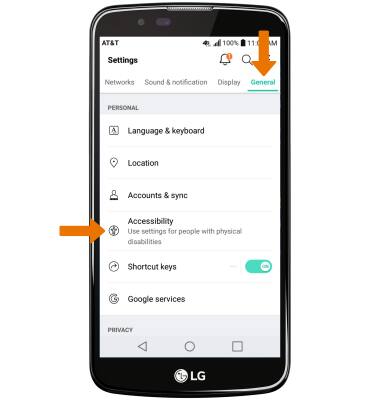
- From the General tab, select Accessibility.
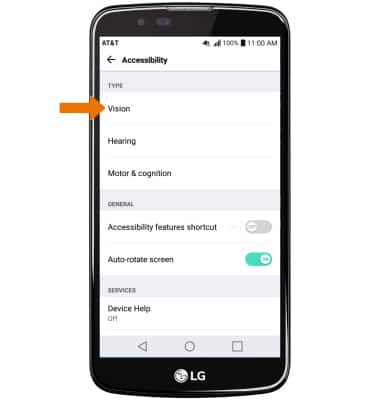
- VISION ACCESSIBILITY: Select Vision.
- ENABLE/DISABLE TALKBACK: TalkBack provides spoken feedback for all interactions with the phone. Select the TalkBack switch to enable or disable.
Note: When turning on TalkBack you will be prompted to TURN ON to confirm. To quickly turn off TalkBack, double-tap the TalkBack switch then double-tap TURN OFF. Alternately, press and hold the Power/Lock button until the device vibrates then with two fingers select and hold the screen until the device beeps.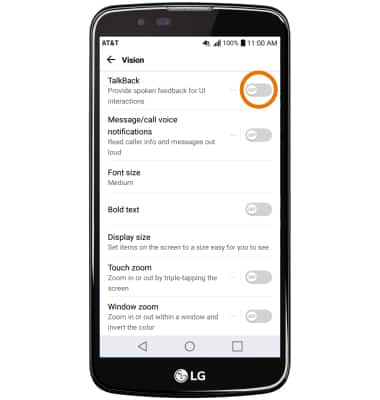
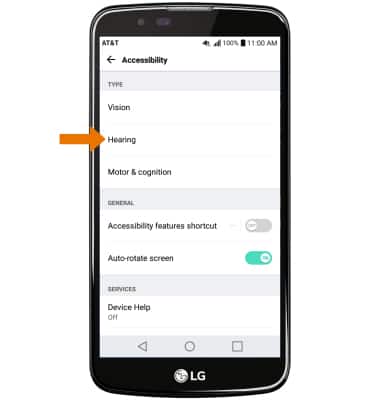
- HEARING ACCESSIBILITY: From the Accessibility menu, select Hearing.
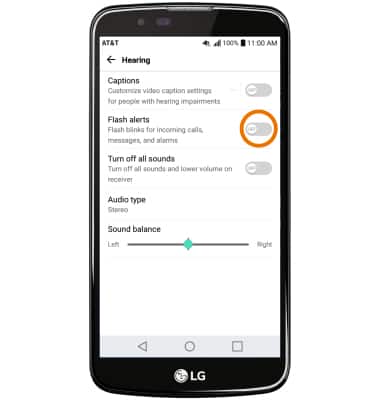
- ENABLE/DISABLE FLASH ALERTS: Flash alerts enables a flash for all calling, message, or alert notifications. Select the Flash alerts switch to enable or disable.
Accessibility
LG K10 (K425)
Accessibility
Accessibility features improve the usability of your device for users with impaired vision or hearing, cognitive difficulty, or reduced dexterity.
INSTRUCTIONS & INFO

For more information about accessibility features and TTY compatibility, see AT&T Accessibility.