- TURN ON/OFF BLUETOOTH: Swipe down from the Notification bar, then select the Bluetooth icon.
Note: To enable Bluetooth via settings, swipe down from the Notification bar, then select the Settings icon > Connections > select the Bluetooth switch on. To optimize battery life, turn Bluetooth off when not in use.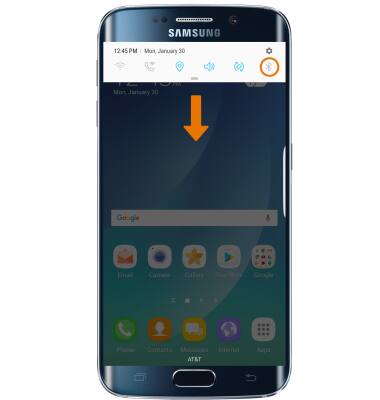
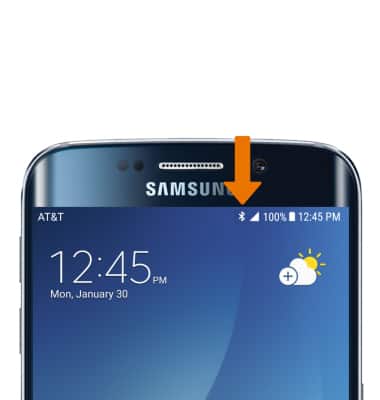
- While Bluetooth is enabled, the Bluetooth icon will be displayed in the Notification bar.
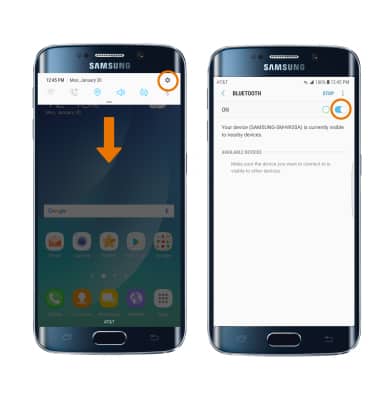
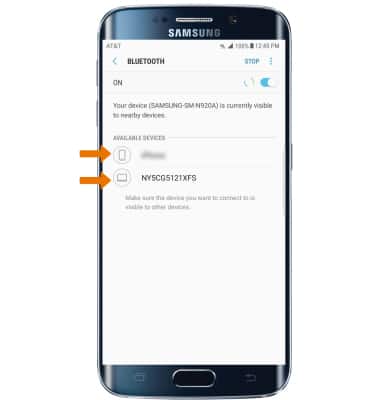
- SCAN FOR DEVICES: Swipe down from the Notification bar, then select the Settings icon. Select Connections > change Bluetooth switch on. Bluetooth will automatically scan for devices.
- Select the desired device to pair with it, then select OK when prompted to request a pairing.
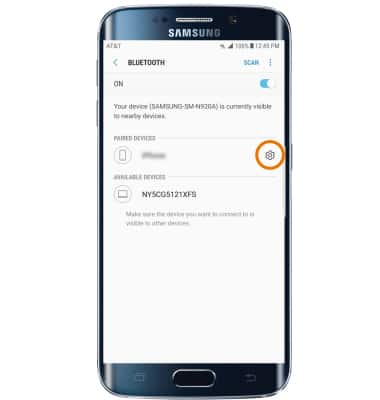
- ADJUST SETTINGS OR UNPAIR: Select the Settings icon next to the desired paired device.
- Adjust settings as desired or select Unpair to unpair the device.
Note: If having trouble pairing/unpairing your device with your vehicle, please refer to your vehicle's user manual for additional information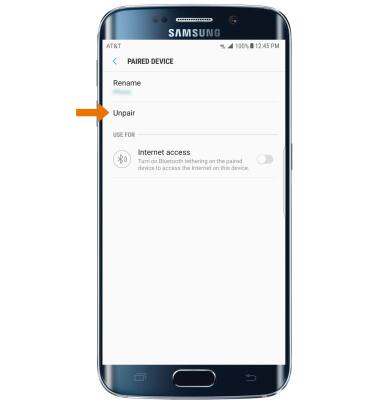
Bluetooth
Samsung Galaxy S6 edge+ (G928A)
Bluetooth
Turn Bluetooth on or off, scan and connect to other Bluetooth devices, and unpair a connected device.
INSTRUCTIONS & INFO