
In this tutorial, you will learn how to:
• Access blocked numbers
• Block and unblock numbers
• Block unknown numbers
• Use AT&T Call Protect
Access blocked numbers
From the Dial tab in the Phone app, select the  Menu icon > Call settings > Call blocking & Decline with message > Blocked numbers.
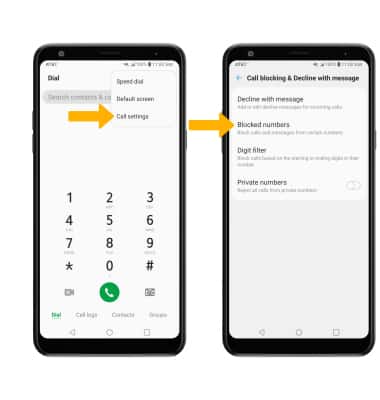
Menu icon > Call settings > Call blocking & Decline with message > Blocked numbers.Block and unblock numbers
BLOCK NUMBERS: From the Blocked numbers screen, select the  Add icon then select the desired option:
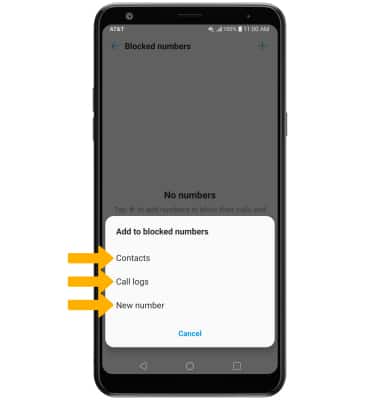
Add icon then select the desired option:• CONTACTS: Select Contacts > navigate to and select the desired contact > select DONE.
• CALL LOGS: Select Call logs > desired number > DONE.
• NEW NUMBER: Select New number > enter phone number > select BLOCK.
UNBLOCK PHONE NUMBER: Select the  Delete icon, then select the number or contact that you wish to unblock. Select Remove.
Note: Select REMOVE again to confirm.
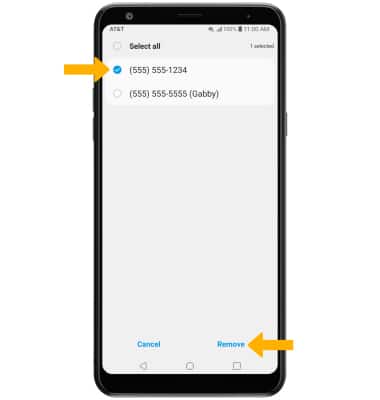
Delete icon, then select the number or contact that you wish to unblock. Select Remove.Note: Select REMOVE again to confirm.
Block unknown numbers
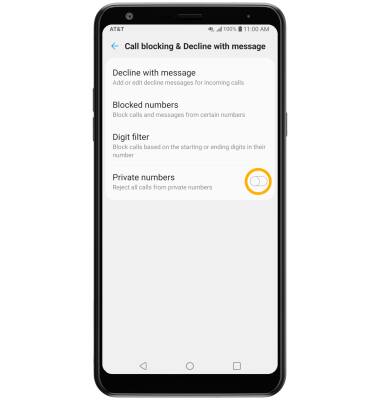
From the Call blocking & Decline with message screen, select the Private numbers switch.