
Overview | Orientation | Tasks

 Previous
|
Next
Previous
|
Next 
Call Forwarding
On this page, you can decide how you would like your incoming calls to be handled and forwarded.
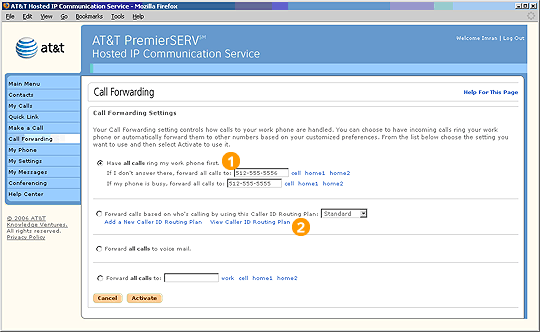
 Call Forwarding gives you the ability to manage your calls in a wide variety of business situations, whether you are at your desk, out to lunch, or traveling.
Select "Have all calls ring to my work phone first" when you are going to be working at your desk the majority of the time.
Select "Forward all calls to voice mail" in situations when you do not want to be disturbed by incoming calls, such as important meetings.
Select "Forward all calls to …" if there is another number you wish your calls to be sent to.
Highlights

To account for times when you are away from your desk briefly, you can enter an alternate number where you can be reached, such as a cell phone number.

Caller ID Routing Plans are rules you specify to direct incoming calls differently depending on where you are and who is calling. Essentially, a Caller ID Routing Plan is a situation-specific form of Call Forwarding that gets more specific than any of the other Call Forwarding options on this page.
Related Pages
Previous
|
Next