
Overview | Orientation | Tasks

 Previous
|
Next
Previous
|
Next 
Task: Add a New Caller ID Routing Plan
Steps

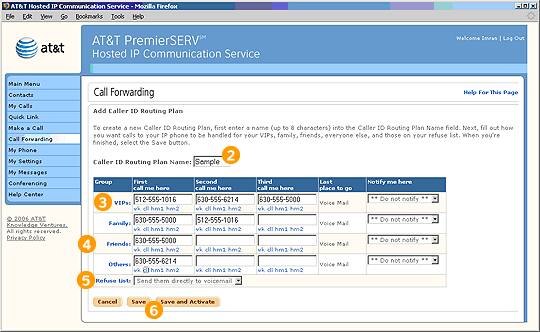
Select "Add a New Caller ID Routing Plan" from the Call Forwarding page.

Enter a name for the Caller ID Routing Plan.

For the "VIP" Group, enter phone numbers for the first, second and third forwarding attempts. Then select a final notification location.

Do the same for the "Family," "Friends," and "All Others" Groups.

For your "Refuse List," select an option from the pull-down menu.

Select Save to confirm your changes or Save and Activate to make it the active plan.
Related Pages
Previous
|
Next