
Overview | Orientation | Tasks

 Previous
|
Next
Previous
|
Next 
Caller ID Routing Plans
The Caller ID Routing Plans page displays the names of all default Caller ID Routing Plans and the ones you create.
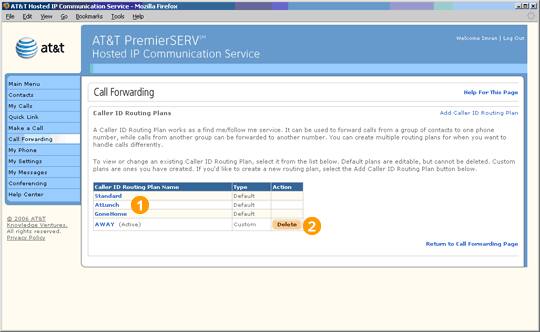
 Caller ID Routing Plans are rules you specify to direct incoming calls differently depending on where you are and who is calling. Essentially, a Caller ID Routing Plan is a situation-specific form of Call Forwarding.
For example, if you are working at your desk on a project that is due soon, you can:
- Direct calls from VIPs such as your boss to ring directly at your desk.
- Forward calls from family and friends to your cell phone.
- Give unwanted callers on your Refuse List a constant busy signal.
- Send all other calls directly to your voicemail.
The three default Call Treatments are Standard, AtLunch, and GoneHome.
Select a Caller ID Routing Plan to view and edit information about it.
Select Add Caller ID Routing Plan to create a new Caller ID Routing Plan.
Highlights

Standard, AtLunch, and GoneHome are default Caller ID Routing Plans. You can customize information and preferences for these three Caller ID Routing Plans, but you cannot delete them.

Caller ID Routing Plans that you create for yourself will appear below the default Caller ID Routing Plans. If you wish, you can delete Caller ID Routing Plans that you create.
Related Pages
Previous
|
Next